
README file from
GithubCephi
A warm literary Obsidian theme for notes and networks.
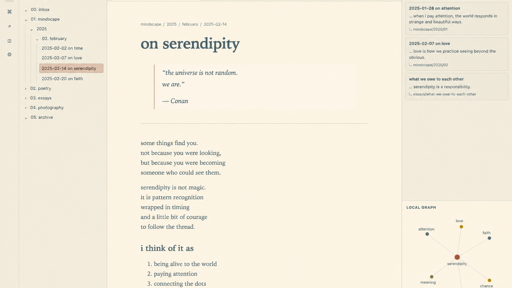
Cephi places a calm writing surface inside a compact research interface. Notes use a literary serif stack; navigation, metadata, backlinks, and controls use a restrained system sans. Light mode pairs pale Solarized ivory with blue-gray ink, while dark mode uses Nous-inspired warm near-black and ivory. Terracotta still marks focus and selection.
Preview
Highlights
- Pale Solarized-inspired light mode and warm Nous-inspired near-black dark mode.
- Comfortable 740px reading measure in editing and reading views.
- EB Garamond-first local font stack with no remote downloads.
- Compact file tree, low-radius tabs, tactile controls, and quiet metadata.
- Bordered Linked Mentions, Backlinks, and search matches for faster scanning.
- Native Global Graph and Local Graph styling with a deep olive canvas, understated nodes, thin edges, and a terracotta focused node.
- Optional Style Settings controls for note font, interface font, code font, reading width, body size, and line height.
Local installation
Create a folder named Cephi inside your vault's themes directory and place theme.css and manifest.json inside it:
YourVault/.obsidian/themes/Cephi/
├── manifest.json
└── theme.css
Then open Obsidian → Settings → Appearance → Themes and choose Cephi.
For development on macOS, a symlink keeps Obsidian pointed at this clone without copying files:
ln -s "/Users/kimchee/Documents/ChatGPT/cephi" \
  "YourVault/.obsidian/themes/Cephi"
After changing theme.css, switch to another theme and back to Cephi, or reload Obsidian, to refresh the CSS.
Reproducing the reference layout
Open Linked Mentions in the right sidebar. Then run Local Graph: Open graph view from the command palette and drag its tab beneath Linked Mentions in the right sidebar. Cephi styles both panes, but intentionally does not modify or ship vault-specific workspace.json state.
Style Settings
Cephi works without plugins. If the community Style Settings plugin is installed, Cephi exposes typography and reading-measure controls under the Cephi section.
Design and attribution
The supplied serendipity interface reference guides overall composition, except for its graph. Nous informs literary identity and dark mode; Novel informs page framing; Solarized informs light-mode color and application hierarchy; and Obsidian + Everforest informs graph restraint. Cephi's CSS is original and does not directly adapt source code from those themes. See THIRD_PARTY_NOTICES.md.
License
MIT © 2026 Sara Kim.