
README file from
GithubTrailmark
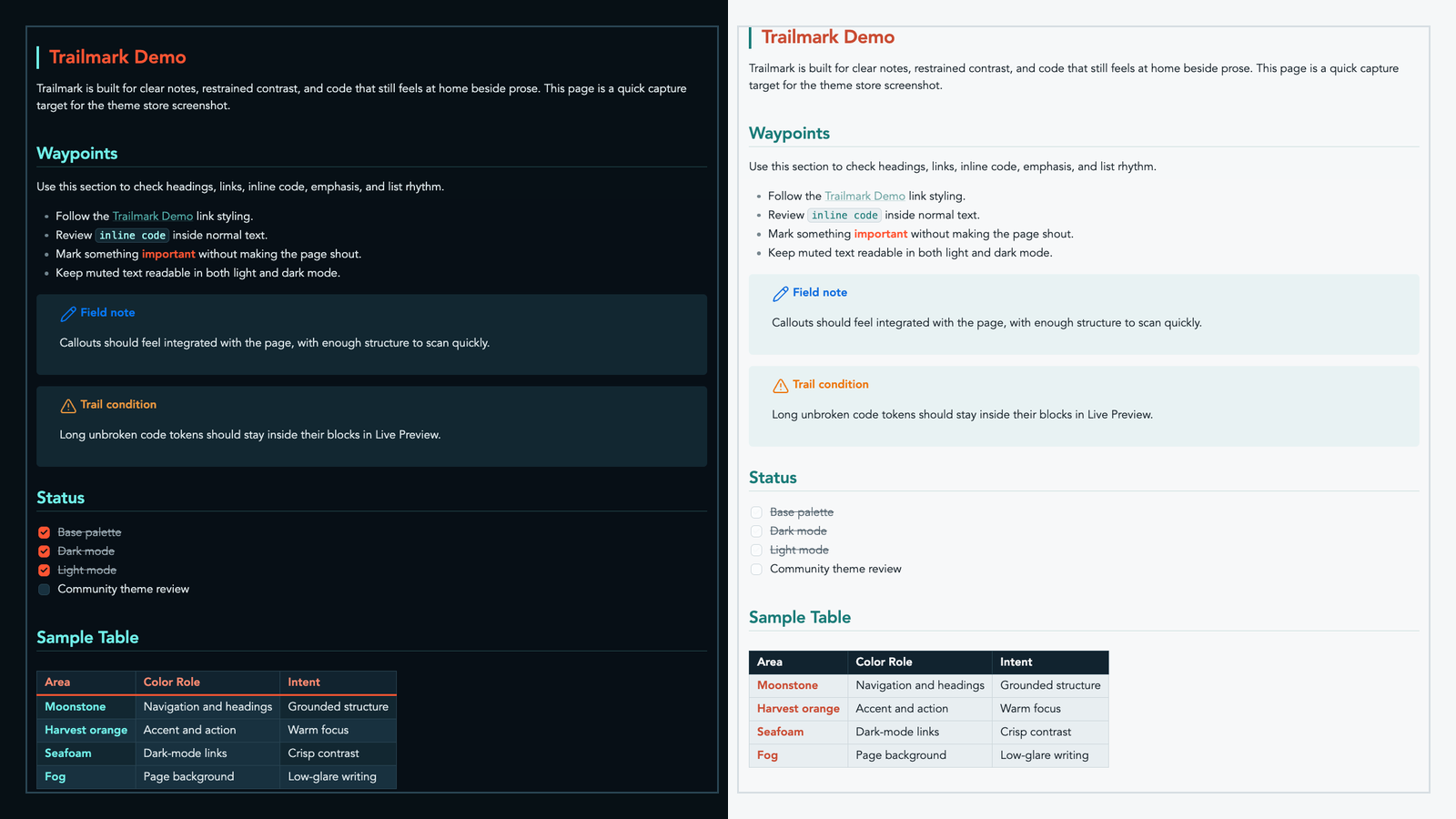
Trailmark is an Obsidian theme built for focused notes, technical writing, and field-ready documentation. It uses a restrained outdoor-industrial palette: deep moonstone, warm harvest orange, crisp seafoam, soft fog, and clean cloud surfaces.
Repository: https://github.com/joshua-walls/trailmark-theme
Design
Trailmark is meant to feel grounded and practical rather than decorative. It favors clear hierarchy, readable contrast, and small moments of color that help you scan a page without turning your vault into a dashboard.
- Moonstone gives the theme its structure: navigation, table headers, and strong page framing.
- Harvest orange is used for emphasis, action, and high-signal accents.
- Seafoam keeps dark-mode links and secondary highlights crisp.
- Fog and cloud keep light mode calm and low-glare.
- Dark surfaces are layered so notes, callouts, code, and metadata stay visually distinct.
Features
- Dark and light modes tuned as first-class experiences.
- Trailhead-style H1 underline and subtler inline title marker.
- Winding-trail identity layer with route gradients, waypoint dots, path gutters, dashed folder trails, and trail-edge active states.
- Color-rotated folder depth, property rows, and folder rails.
- Forge Health status styling when Forge exposes stable
data-statushooks. - Callout hierarchy with quiet fills, strong rails, status-colored icons, and nested-callout restraint.
- Dataview state language for empty, warning, and error states.
- Search result waypoint ticks, hover preview polish, and command palette trail-edge selection.
- Graph colors tuned for quiet links, seafoam nodes, harvest tags, warm unresolved nodes, and muted attachments.
Reading Experience
Headings are intentionally expressive: H1 carries the warm Trailmark accent, while H2 and supporting headings use cooler tones to keep long notes organized. Links, tags, highlights, checkboxes, and inline code each get their own treatment so dense notes remain easy to parse.
Trailmark is tuned for both Live Preview and Reading View, including long code tokens that should wrap inside code blocks instead of escaping the editor.
Callouts
Callouts are designed to feel integrated with the page. They use quiet filled surfaces, strong icon/title color, and generous spacing so they stand out without shouting.
The goal is to make notes, warnings, and field observations visible at a glance while keeping the surrounding document calm.
Code and Tables
Code blocks use a framed surface with a colored left rail, giving snippets enough presence without overwhelming prose. Inline code is compact and readable, with enough contrast to work inside normal paragraphs.
Tables use a strong header row, clear cell borders, and restrained alternating surfaces. They are meant to support quick comparison in operational notes, documentation, inventories, and reviews.
Tasks and Metadata
Task checkboxes use Trailmark accent colors so completed work is obvious without becoming noisy. Metadata and properties are styled as quiet panels that stay readable in both dark and light mode, with a restrained accent rhythm for property rows.
Forge Support
Trailmark includes optional styling for Forge Health surfaces. Status colors are applied only when Forge exposes stable hooks such as data-status on dashboard sections, section headers, pills, or similar elements.
Expected status mapping:
- good, healthy, clear, valid, indexed -> seafoam
- warning, needs attention -> harvest orange
- critical, error, fail, failed -> warm red
- muted, no note, exempt -> muted slate
CSS cannot infer Forge state from text alone or style a note pane based on a status that only exists in a separate Forge dashboard pane.
Install manually
- Download the latest release zip.
- Unzip it into your vault's
.obsidian/themes/folder. - In Obsidian, open Settings, then Appearance, then Themes.
- Select
Trailmark.
The installed folder should contain:
Trailmark/
  manifest.json
  theme.css