
README file from
GithubObsidian Query Language
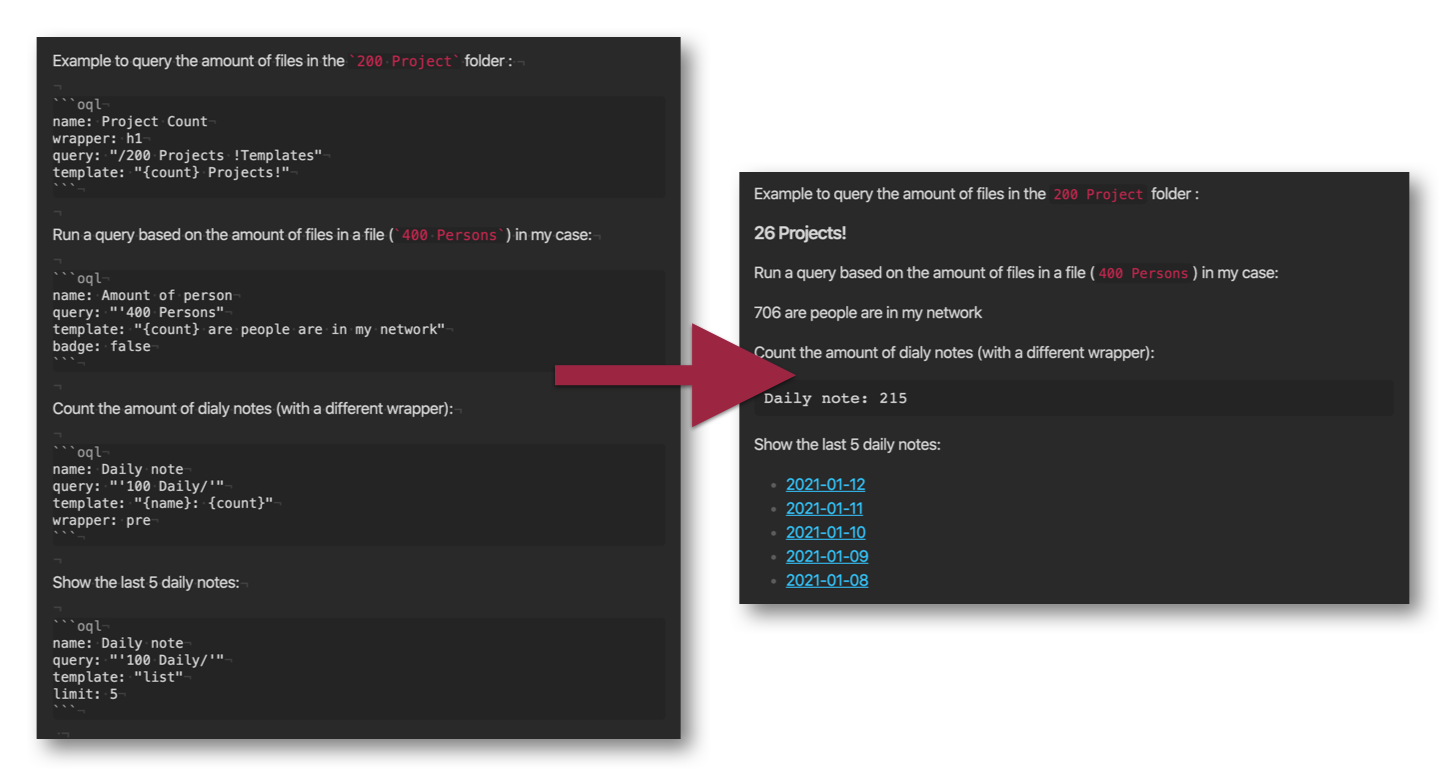
This is a plugin for Obsidian (https://obsidian.md) that allows you to query your notes and gather information about your vault inside a note itself. You write queries and configure them with a code block and the renderer will output the results in the markdown preview:
Changelog
-
2.1.1
- Bugfix for frontmatter parsing (thanks chipchipschips)
-
2.1.0
- Better Liveview support
-
2.0.0
- Breaking change:
templatekey is now 'string|table|list'. Formatting is now done with theformatkey, as per examples. - Removed
this.cachedDatafrom index building, now reading the file instead. - Moved the renderers to subfiles, allowing for easier refactoring (moving to Svelte in the future?).
- Other plugins can use search functionality (first initial try, more detail later).
- The index is now kept up to date with just the changes instead of rebuilding the entire index.
- Breaking change:
-
1.5.0 You can now sort by random (shuffle). Minor improvement to indexing when modifying or renaming files.
-
1.4.0 Tags are now supported in the fields view. Fields also work in the list view.
-
1.3.0 You can now sort on create/modified or any other fields in the table/list view.
Installation
Clone this repository in the .obsidian/plugins folder, run yarn && yarn build or npm install && npm run build and enable it in the settings of Obsidian.
Working with the plugin & examples
You can query your vault with a oql code block, for example:
```oql
name: Daily notes
query: "'100 Daily/'"
template: "string"
format: "{name}: {count}"
```
This little block in a note renders to a template, counting the notes in the 100 Daily folder and returns an output that renders as: Daily notes: 100 when you have 100 daily notes. This is just a basic way of querying your vault.
These are all fields available in the config, please note that certain fields only work with specific templates (like limit with list/table view):
```oql
name: Daily notes               # The name of the query (can be used in the format as {name})
query: "'100 Daily/"            # The actual query to use with Fuse.js (note the single ' for exact matching)
template: "string"              # or use "table" or "list" for a different output
format: "{name}: {count}"       # The format for the output
badge: true                     # Show the OQL badge on the right
debug: true                     # Show the debug window
wrapper: "div"                  # Wrapper (in case you want to render a title like `h1`)
limit: 10                       # When using list or table view, limit the result to N
sort: "title"                   # or "-title" for descending sort, others: "modified", "created" & "random"
fields: ['title', 'created']    # Fields to show in the table view
includeCurrentNote: false       # By default we exclude the note in which you are writing the OQL
```
Available placeholders format
{name} : The name of the OQL query block
{count} : The result count
{title} : The title of a result
{path} : The path of a result
{tags} : The tags of a result
{index} : The index of a result
{created} : The created date of a result
{modified} : The modified date of a result
More examples:
Please note that the query syntax is different in Fuse (that this plugin uses) from the current query model or search in Obsidian. Until Obsidian opens up the API for the search it's this way for now. You can use debug: true in the code-block to see the results returned by the query.
Render a query to a string:
```oql
name: "Daily notes"
query: "'100 Daily/"
template: "string"
format: "{name}: {count}"
```
Show debug window that lists the results, and wrap the results in a heading:
```oql
name: "Daily notes"
query: "'100 Daily/"
template: "string"
format: "{name}: {count}"
debug: true
wrapper: h1
```
Render a list of 10 random notes in folder1/.
```oql
name: Folder 1
query: "'folder1/"
template: "list" # Renders to a list with notes linked
sort: 'random' # Render the list in random order
limit: 10 # Limit it to the first 10
```
Render a list with a custom format of 10 last created notes in folder1/.
```oql
name: Folder 1
query: "'folder1/"
template: "list" # Renders to a list with notes linked
format: "{created}: {title}"
sort: 'created'
limit: 10 # Limit it to the first 10
```
Show the 5 oldest projects (sort -created) with their modified at date in a table:
```oql
name: Oldest projects
query: "'200 Projects/"
template: "table"
sort: '-created'
limit: 5
badge: false
fields: ['title', 'modified']
```
Count the amount of notes that contain a certain tag:
```oql
name: 'How many notes use #utrecht'
query: "'#utrecht"
template: "string"
format: "{name}: {count}"
badge: false
```
Check out the extended search docs from Fuse to figure out how to query your own vault. The syntax doesn't match the current query syntax of Obsidian search. Please be aware!
Complex queries
Fuse also supports more complex queries, so instead of using a string as a query, you can also create a query object. While this is less syntax forgiving, it can be way more specific. This is an example:
```oql
name: 'How many notes are in the notes folder'
query:
    path: "'notes"
template: "string"
format: "{name}: {count}
```
Search for content of notes
The previous examples focused on metadata searches. Of course, OQL may also be used to search the actual content of the notes in Obsidian.
The following examples should get you started (thanks to https://github.com/ewandel:
Example 1:
```oql
name: 'boolean OR search'
query: apple | pear
template: "string"
format: "{name}: {count}"
badge: true
debug: true
complete notation (longer, but more flexible):
```
Example 2:
```oql
name: 'OR combination list of results'
query: { $or: [{ "content": "'apple" }, { "content": "'pear" }] }
template: "list"
badge: true
debug: true
```
Example 3:
Only search in note "my garden" and check if it contains "apple" AND "pear". Note the = in front of "my garden" to force an exact match. Using "'" will only requires that the text contains that specific word. For example: a link to [[apple]] or an "apple-tree" will also be found.
```oql
name: 'Search in single file with AND'
query: { $and: [{ "title": ="my garden" }, {$and: [{ "content": "'apple" }, {"content": "'pear" }]}]}
template: "string"
badge: false
debug: true
includeMatches: false
format: "{count}"
```
Example 4:
```oql
name: 'check if note "my new garden" contains "fruit" AND ("tree" OR "bush")'
query: { $and: [{ "title": ="my new garden" }, { "content": "'fruit"}, {$or: [{ "content": "'tree" }, {"content": "'bush" }]}]}
template: "string"
badge: false
debug: true
includeMatches: false
format: "{count}"
```
How does this plugin work?
It builds a parallel index using Fuse that you can query for data!
Can I use the OQL plugin with my own plugin?
Yes! Right now that functionality is open for a bit.
To use it: Check if the user has the obsidian-query-language plugin installed. The following should return the plugin in the console: this.app.plugins.plugins['obsidian-query-language']. You can then use the search function, where the query is a string or object following the Fuse interface:
if ('obsidian-query-language' in this.app.plugins.plugins) {
    let query = "'testing" // all notes matching exactly the word 'testing'.
    let searchResults = await this.app.plugins.plugins['obsidian-query-language'].search(query)
    // Do something with the searchResults
}
The plugin throws an error if the SearchIndex isn't available. You might run into this if your plugin is loaded before the OQL plugin. So it's nice to catch that error and show the user a message 🖖. Otherwise it returns a promise which might contain the results!
Todo / Features
- Sorting the ouput?
- Add a tag field to the table output.
- Allow more complex logical query operators.
- Upgrade to a format string for all outputs.
- Expose a
.search(query)function on the plugin for other developers to use. - Add a template
graph? - Allow queries on frontmatter specific fields?
- Created/Modified timestamps are available, can we query those as well?
- Multiple queries? (Idea by Liam)
- Configure Fuse settings in a settings tab of the plugin? (sensitivity for fuzzy matching for example)
- Convert to search API of Obsidian once it's available.