Obsidian Attendance

by Tiim
5
4
3
2
1
Score: 31/100

Description

Category: Note Enhancements

The Obsidian Attendance plugin allows users to track attendance for events directly within their notes. By using customizable code blocks, users can specify parameters such as the event date, title, and a query to identify possible attendees based on tags, folders, or links. The plugin supports saving attendance states, including options for marking individuals as present, absent, or excused. It offers flexibility in combining and organizing attendee queries, making it suitable for use cases like class attendance or meeting participation.

Reviews

No reviews yet.

Stats

13
stars
4,188
downloads
0
forks
1,376
days
1,409
days
1,409
days
1
total PRs
0
open PRs
0
closed PRs
1
merged PRs
6
total issues
6
open issues
0
closed issues
0
commits

README file from

Github

Obsidian Attendance

This plugin for Obsidian.md helps you to keep attendance inside of your notes.

If you like this plugin, consider buying me a coffee.

"Buy Me A Coffee"

⚠ This plugin is still in early stages of development, expect some bugs and make sure to backup your vault regularly!

How to use this plugin

Create a code block with the attendance type:

```attendance
date: 2022-03-26
title: History Class
query: #person
```

The date, title and query fields are all required.
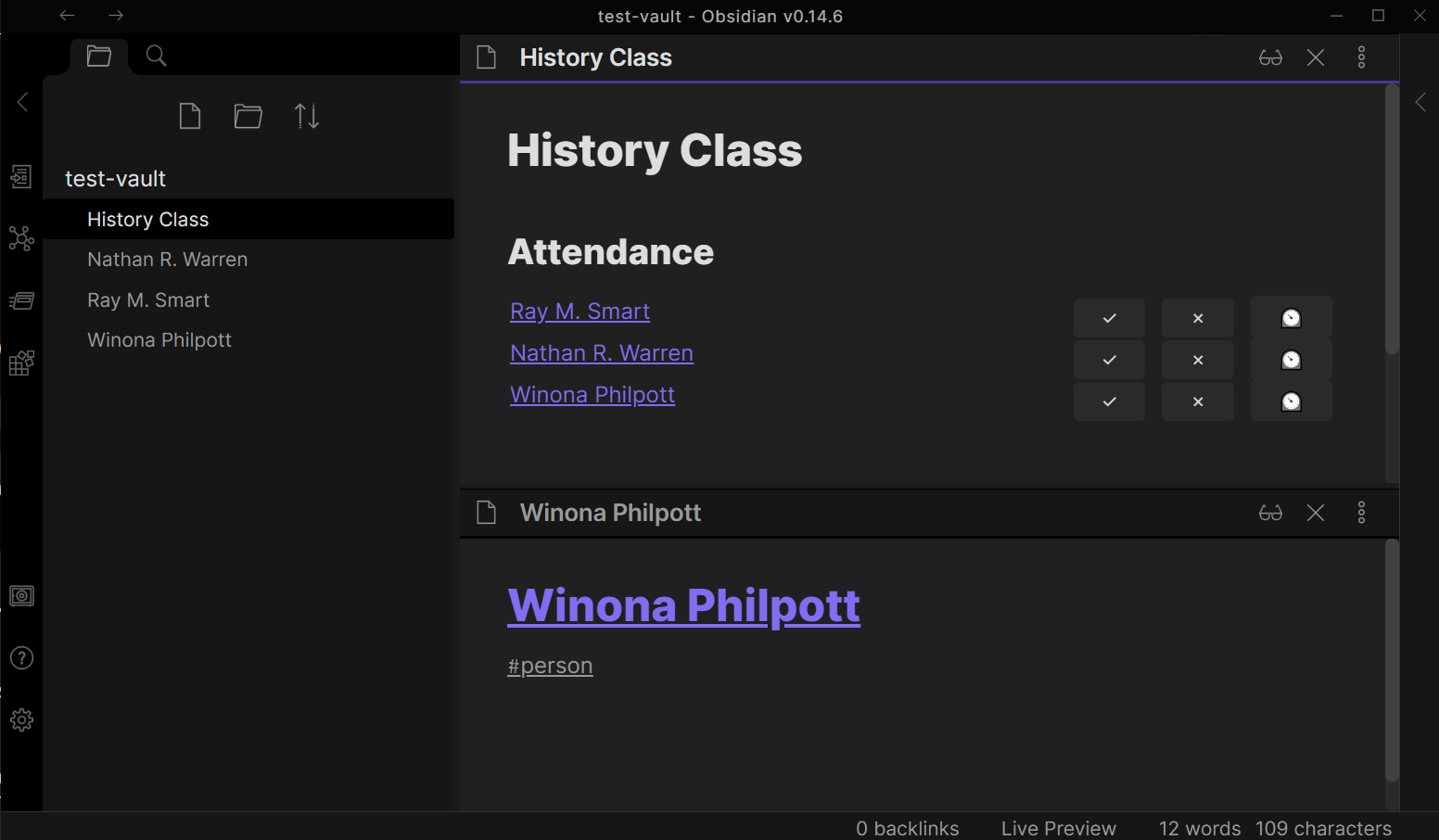
Attendance List

⚠ If you create multiple attendance lists in the same note, make absolutely sure they have either different "date" ore "title" attributes. Otherwise when you want to update the second attendance list, the plugin will overwrite the first list.

The date field

currently unused

The date field lets you specify the date of the event you want to take attendance for. This field is currently unused, but will be used in the future for exporting attendance lists.

The title field

currently unused

The title field lets you specify the title of the event. This field is currently unused but will be used in the future to allow exporting only certain events. This could for example be set to a specific class name if you are taking attendance for a class.

The query field

The query field lets you specify what notes are considered possible attendees of the event. The list will include all notes that match the query field.

The following query fields are currently supported:

Tags

Example:

query: #person/class-a

This query will match all notes with the #person/class-a tag.

Folders

Example:

query: "people"

This query will match all notes in the people folder.

Example:

query: [[PersonMOC]]

This query will match all notes that are linked from the [[PersonMOC]] note or that link to it.

Combining queries (and, or)

Example:

query: #class-a and [[Students]]

This will only match notes that have the tag #class-a and either link to the [[Students]] note or are linked from it.

Parentheses

When combining more than two queries it is recommended to use parentheses to keep the query readable. If none are explicitly set, the plugin will automatically put the parentheses as follows:

query: (#tag-a and (#tag-b and (#tag-c or #tag-d)))

Saving the attendance state

When you click on one of the three buttons ("present", "absent", "excused"), the codeblock behind the list will be modified to save the attendance state that you selected. The following shows an example of a codeblock with one present and one excused attendee:

```attendance
date: 2022-03-26
title: History Class
query: #person
* [[Ray M. Smart.md]], "present", ""
* [[Winona Philpott.md]], "excused", ""
```
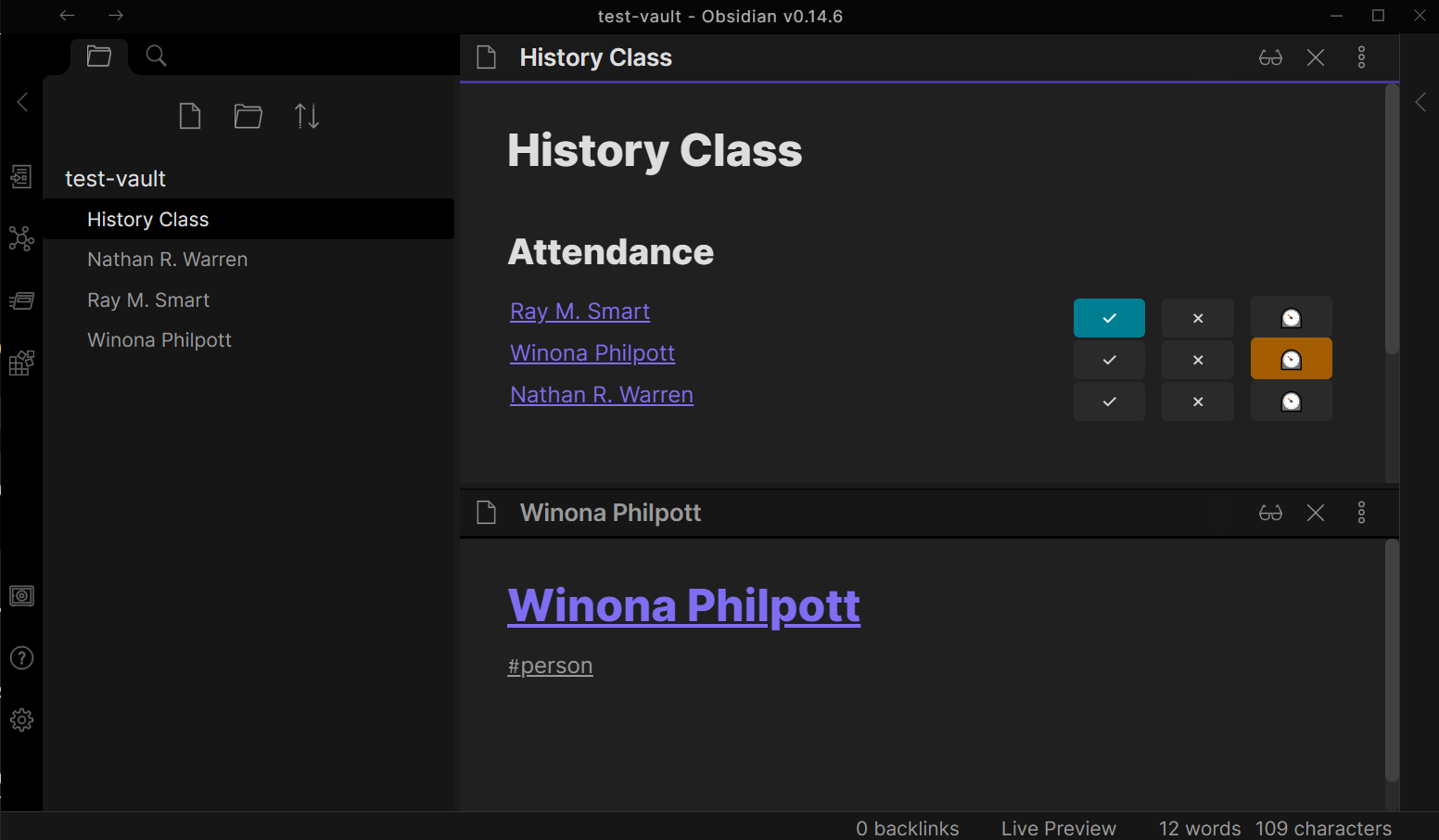
Attendance List with one attendee present and one excused

Manually installing the plugin

  • Download the main.js, styles.css and manifest.json files from the latest release.
  • Create the folder MyVault/.obsidian/plugins/obsidian-attendance and put the downloaded files in there.
  • Enable the plugin in the community plugins page in the settings.

Contributing

You are more than welcome to contribute to this plugin! You can contribute by:

  • Filing issues for bugs you encountered
  • Adding to the documentation
  • Adding a feature request
  • Making a pull request to the code

How to work on the code

  • Clone this repo into the folder MyTestVault/.obsidian/obsidian-attendance
  • npm i to install dependencies
  • npm run dev to start compilation in watch mode.

To conveniently reload the plugin every time you make a change, use the hot-reload plugin.

Improve code quality with eslint

Run npm run lint to see all the errors and npm run lint -- --fix to fix all errors that are automatically fixable.

Releasing new releases

  • Update minimum obsidian version in manifest.json.
  • Run npm run build && npm run test
  • Run npm version [patch, minor, major] to update the version.
  • Run git push && git push --tags
  • Run gh release create $(cat manifest.json | jq ".version" -r) --generate-notes to create the github release
  • Run gh release upload $(cat manifest.json | jq ".version" -r) manifest.json styles.css main.js

Adding your plugin to the community plugin list

API Documentation

See https://github.com/obsidianmd/obsidian-api

Code from other plugins

This plugin is inspired and uses code from the following plugins:

  • Obsidian Dataview

Similar Plugins

info
• Similar plugins are suggested based on the common tags between the plugins.
Frontmatter Tag Sugest
4 years ago by Jonathan Miller
Autocompletes tags in Obsidian YAML frontmatter. No more deleting #!
AutoMOC
4 years ago by Diego Alcantara
FuzzyTag
3 years ago by Adrian
Base Tag Renderer
3 years ago by Darren Kuro
A lightweight obsidian plugin to render the basename of tags in preview mode.
Canvas Filter
3 years ago by Ivan Koshelev
Obsidian Canvas plugin that let's you show only pages / arrows with specific tags / colors / connections.
Reading comments
3 years ago by BumbrT
Reading comments, for consuming books or large articles in markdown with https://obsidian.md/.
Testing Vault
3 years ago by Michael Pedersen
Auto Classifier
3 years ago by Hyeonseo Nam
Auto classification plugin for Obsidian using ChatGPT.
EmoTagsTitler
3 years ago by Cyfine
Colored Tags
3 years ago by Pavel Frankov
Colorizes tags in different colors.
Multi Tag
3 years ago by fez-github
Obsidian plugin that allows the user to add a tag to all files in a folder. Not in active development. Now working on Multi-Properties, which covers most of this plugin's functionality.
Nested tags graph
3 years ago by drpilman
A small plugin for Obsidian that links nested tags in graph view
Tag Page
3 years ago by Matthew Sumpter
An Obsidian plugin to create and manage dedicated Markdown pages for tags, with features to automatically populate and refresh content based on user-defined settings.
Tags Overview
3 years ago by Christian Wannerstedt
Obsidian plugin which adds an extended tags panel where tagged files can be overviewed, filtered and accessed in an easy way.
Tag Breakdown Generator
3 years ago by Hananoshika Yomaru
Break down nested tags into multiple parent tags
Quick Tagger
2 years ago by Gorkycreator
Quick tagger for Obsidian.md
Colored Tags Wrangler
2 years ago by AndreasSasDev
Obsidian Plugin : Assign colors to tags. Has integrations with other plugins, like Kanban.
Tag Buddy
2 years ago by David Fasullo
Unlock powerful tag editing features in Reading Mode. Add, remove and edit tags across your vault. Use tag inboxes to level up any workflow with a powerful idea assembly line.
Smart Title
2 years ago by magooup
obsidian-plugin-smart-title
Tag Formatter
2 years ago by snsvrno
Configurable Obsidian plugin that hides parent tags.
Tag Links
2 years ago by Zacchary Dempsey-Plante
A plugin for Obsidian that allows tags to be opened as links using a hotkey.
Advanced Сanvas Filter
2 years ago by CHex0K
Folder by tags distributor
2 years ago by RevoTale
Automatically group Obsidian notes into folder by tags specified in note.
Index Notes
2 years ago by Alejandro Daniel Noel
Plugin that automatically generates index blocks based on tags
Tags Routes
2 years ago by Ken
This is a plugin for obsidian, to visualize files and tags as nodes in 3D graph.
Note 2 Tag Generator
2 years ago by Augustin
Note Reviewer
2 years ago by Travis Linkey
An obsidian plugin to help review notes that have been taken
Tag Wrangler
5 years ago by PJ Eby
Rename, merge, toggle, and search tags from the Obsidian tag pane
Collapse All
5 years ago by Nathonius
Liquid Templates
5 years ago by Diomede Tripicchio
Define your templates with LiquidJS tags support
HTML Tags Autocomplete
5 years ago by bicarlsen
Autocomplete HTML formatting tags.
Metadata Auto Classifier
2 years ago by Beomsu Koh
AI-powered Obsidian plugin that automatically classifies and generates metadata (tags, frontmatter) for your notes.
Insta TOC
a year ago by Nick C.
Generate, update, and maintain a table of contents for your notes while typing in real time.
Current File Tags
a year ago by Trung Tran
Tag Tactician
a year ago by Scott Tomaszewski
Media Companion
a year ago by Nick de Bruin
Tagvis
a year ago by Mason Bryant
Generate Timeline
a year ago by Shanshuimei
An obsidian plugin to generate timelines from tags, folders, files or metadata automatically. 根据标签,文件夹,文件或者属性自动生成时间轴的插件。
Private Mode
a year ago by markusmo3
Yearly Glance
a year ago by Moy & RavenHogWarts
An obsidian plugin to build "year at a glance" view.
Related Notes by Tag
9 months ago by Chris Howard
displays notes that share tags with your currently active note
Auto Close Tags
9 months ago by k0src
Obsidian MD plugin to auto-close HTML tags.
SafeLearn Formatter
8 months ago by UnterrainerInformatik
A community plugin for Obsidian, that offers visual aids for the SafeLearn-specific tags.
QuickLink
8 months ago by Jamba Hailar
On obsidian, use @ to quickly link files
Tag Group Manager
5 months ago by Stargazer-cc
Tag Group Manager is a plugin designed for Obsidian that helps manage tag groups and quickly insert tags.
Tag Timer
4 months ago by quantavil
The Tag Timer is a versatile plugin for Obsidian that allows you to seamlessly track the time you spend on specific tasks or sections within your notes.