Idle Monitor

by alberto98fx
5
4
3
2
1
Score: 32/100

Description

The Idle Monitor plugin tracks user activity in Obsidian and provides real-time notifications when the user becomes idle. It detects inactivity based on typing and optional mouse movement, displaying the idle time in the status bar. Users can customize the idle time threshold, check intervals, and notification formats, including 12-hour or 24-hour time settings. The plugin also offers visual customization options such as text color adjustments and a glowing rainbow gradient effect.

Reviews

No reviews yet.

Stats

1
stars
282
downloads
0
forks
466
days
467
days
467
days
2
total PRs
0
open PRs
0
closed PRs
2
merged PRs
1
total issues
1
open issues
0
closed issues
9
commits

Latest Version

a year ago

Changelog

Automated release for version 1.0.5

README file from

Github

Idle Monitor Plugin for Obsidian

Idle Monitor is an Obsidian plugin that tracks user activity and provides real-time feedback when you stop typing or moving your mouse. It includes customizable options to display idle time, adjust settings for activity monitoring, and showcase a beautiful rainbow gradient for the status text.

Screenshots
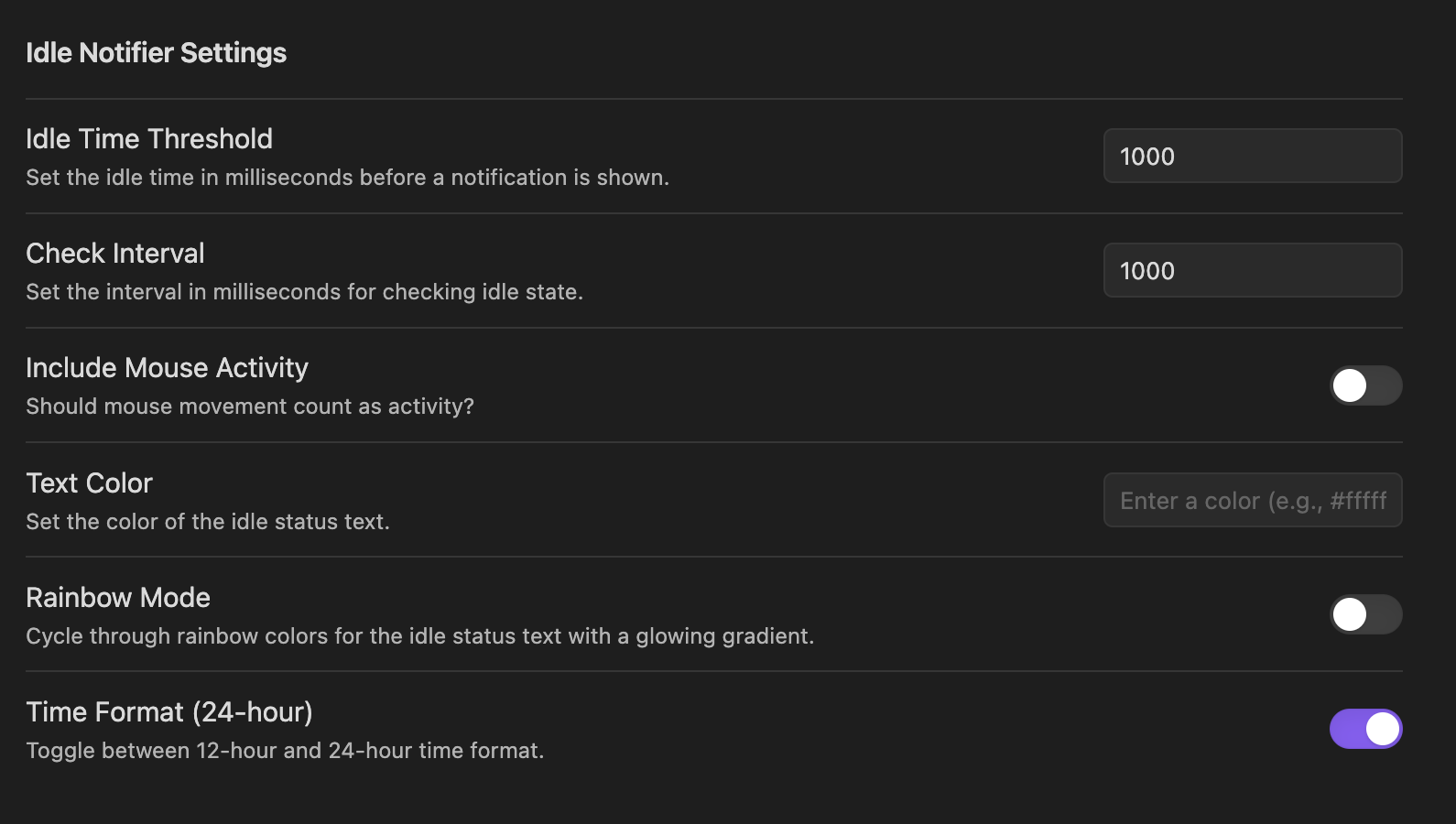
Features

  • Idle Time Tracking: Notifies you how long you've been idle.
  • Customizable Notifications:
    • Adjust the idle time threshold.
    • Option to include or exclude mouse movement as activity.
    • Select between 12-hour and 24-hour time formats for notifications.
  • Visual Customization:
    • Customize the color of the status text.
    • Enable a glowing rainbow gradient effect for idle status.
  • Status Bar Display: View the idle status directly in the Obsidian status bar.
  • Tooltip for Last Activity: Hover over the status bar to see the exact time you stopped typing.

Usage

Setting Up the Plugin

  1. Open Settings in Obsidian.
  2. Navigate to the Plugin Options under Idle Monitor.
  3. Configure the following settings:
    • Idle Time Threshold: Set how long the user can be idle before being notified.
    • Check Interval: Define how often the plugin checks for idle activity.
    • Include Mouse Activity: Toggle whether mouse movement counts as activity.
    • Text Color: Customize the text color for the status bar display.
    • Rainbow Mode: Enable a glowing rainbow gradient effect.
    • Time Format (24-hour): Switch between 12-hour and 24-hour formats for hover tooltips.

Viewing Idle Information

  • The plugin updates the status bar to show how long you’ve been idle.
  • Hover over the status bar text to see the exact time you stopped typing, formatted according to your selected time format.

Contributing

Contributions are welcome! Feel free to submit issues or pull requests.

Similar Plugins

info
• Similar plugins are suggested based on the common tags between the plugins.
Get Info
4 years ago by Chetachi
A small menu that is tucked inside your status bar and shows helpful information for your chosen file 📄.
TimeStamper
4 years ago by Martin Eder
A plugin for Obsidian to quickly insert customized date- and time-stamps to the currently active note
Plugin Update Tracker
4 years ago by Steven Swartz
Know when installed obsidian plugins have updates and evaluate the risk of upgrading
Status Bar Quote
4 years ago by Jinu
Obsidian plugin - You can pin your favorite quote.
Inbox
3 years ago by Zachatoo
Show in app notification on startup if there is data to process in the "inbox" note/folder.
Last Modified Timestamp in Status Bar
3 years ago by Yustynn
Notes dater
3 years ago by Paul Treanor
Adds created_on and updated_on dates of the active note to status bar
Birthday-Tracker
3 years ago by Marius Wörfel
Obsidian plugin to keep track of all birthdays of your family and friends.
Waka time box
3 years ago by complexzeng
Timetracker
3 years ago by Nils Dammenhayn
Obsidian plugin that adds a stopwatch whose value can be pasted into the editor
Timer
3 years ago by Marius Wörfel
Obsidian plugin, which allows you to measure time.
Status Bar Organizer
2 years ago by Kacper Darowski
Arrange and hide status bar elements.
Notification Controller
2 years ago by juan-miii
⏱️ Hide Startup Time Notice: An Obsidian plugin that automatically hides the startup time notice.
Datepicker
2 years ago by Mostafa Mohamed
Datepicker widget for Obsidian.
Battery Indicator
2 years ago by Kacper Darowski
Brings a battery indicator to Obsidian's status bar
Reading Time
6 years ago by avr
Show Current File Path
5 years ago by Ravi Mashru
Obsidian plugin to show the file path of the current file in the status bar
Pomodoro
5 years ago by Tokuhiro Matsuno
Grandfather
5 years ago by Danny Hernandez
A simple Obsidian plugin to display the time and date on the status bar
Status Bar Pomodoro Timer
5 years ago by kzhovn
A status bar pomodoro timer plugin for Obsidian.
Weekly Goal Tracker
2 years ago by George Gorman
Visual Crossing Weather
2 years ago by willasm
MemoChron
a year ago by Michalis Efstratiadis
Calendar integration and note creation with support for public iCalendar URLs.
SolidTime Integration
a year ago by proniclabs
Obsidian SolidTime Integration Plugin
CJK Count
a year ago by Louie Kurenai
Text Block Timer
a year ago by frankthwang
Remaining reading time
7 months ago by ununnamed
Shows the remaining reading time in status bar
Reading progress desktop
6 months ago by qian-shen
Obsidian 阅读进度条插件。
Minidoro
5 months ago by Shakti Sampad Swain
Minidoro is a minimalist Pomodoro timer that lives right in your Obsidian header. It's designed to be simple, unobtrusive, and fully customizable.
Status Bar Clock
4 months ago by Marty Ballard
Status Bar Clock for Obsidian
