Dangerzone Writing

by Alexis Rondeau
5
4
3
2
1
Score: 38/100

Description

The Dangerzone Writing plugin offers a high-pressure writing environment to stimulate creativity and focus. Users set a timer for a writing session, during which they must continuously type; pausing for longer than a set duration results in all written text being deleted. This approach is ideal for overcoming writer's block, drafting initial ideas, or warming up writing skills. The plugin includes customizable settings for session duration, deletion time, font size, and background color to create a tailored and immersive experience. Successful sessions are tracked, encouraging consistent use.

Reviews

No reviews yet.

Stats

82
stars
12,726
downloads
5
forks
1,984
days
1,313
days
1,313
days
1
total PRs
0
open PRs
0
closed PRs
1
merged PRs
10
total issues
8
open issues
2
closed issues
0
commits

Latest Version

4 years ago

Changelog

This version adapts the plugin to the new obsidian API while not changing the functionality.

README file from

Github

🔥 Dangerzone Writing 🔥 for Obsidian

“Elegant”

“Dangerous”

“Relaxing”

“Perverted”

“Your best friend”

"Your worst nightmare"

Hey all, I’ve been a paying customer of FlowState since 2016 and wanted something similar for Obsidian.

It’s really fun. And stressful. But mostly fun.

It's simple:

  1. You start a timer for X minutes.
  2. THEN, during those X minutes you MUST write continuously.
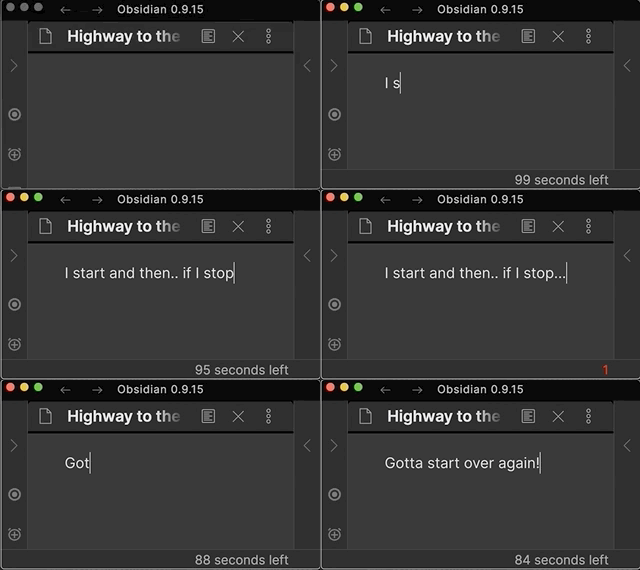
  3. The catch: If you PAUSE for longer than 5 seconds, everything you’ve written is DELETED.

Here's an example session:
When to use Dangerzone Writing

  • Use it to "warm" up your writing muscle
  • Use it to write that first draft however dirty and ragged
  • Use it to keep you laser-focused on writing

How to use the Dangerzone Writing plugin

  1. Open a note in Obsidian^
  2. Click the "Stopwatch" icon in the left bar to start the timer
  3. From now on, the count-down from 60 seconds to 0 starts
  4. Start writing!
  5. DO. NOT. STOP. WRITING for 60 seconds.
  6. If you DO stop writing for more than 5 seconds, everything you've written in this note so far is DELETED.

Again, let me be clear: If you stop for more than 5 seconds, your writing in this note will be deleted.

^ I usually create an empty one, but that's not necessary

How to start as a beginner

If you've never used this type of writing before, I highly recommend starting with the defaults and an empty note to get a feeling for it.

A few simple tips and tricks

  1. Fake it till you make it: It's totally fine to write a lot of "nothing" such as Well, I don't know what to write here. Nothing comes to mind. I'm sitting here. Writing... - I do this all the time. You'll eventually find a thought that is interesting, so don't worry.
  2. Don't Panic: Just because there's a countdown, doesn't mean you have to freak out. I know this sounds weird, but as long as you hit a key every second or so, this thing won't blow up. So, instead of switching to PANIC-MODE as soon as you start a session, just stay calm and start writing.
  3. Start small: Gradually increase session time as you get more comfortable with this type of challenge.
  4. Learn to touch-type: Learn to touch-type if you're not yet fully touch-typing and you're struggling with the mechanics to keep up. This is one of the most powerful hard-skills I've ever learned.

How to personalize your sessions and fuse time

To optimize your flow experience, you can configure your:

Writing Session Timing Settings

  • Countdown duration in seconds: Default is 60s, How many seconds you want your Dangerzone Writing session to last?
  • Seconds-to-deletion fuse: Default is 5s, How many seconds until your text is deleted?

Immersive Writing Settings

  • Session Font-Size: Increases editor font-size temporarily for a more immersive experience. Leave empty to keep default size
  • Session Background Color: Changes background color of editor temporarily for a more immersive experience. Find a good color at https://htmlcolorcodes.com. Leave empty to omit

Successful sessions tracking

You get a +1 🎉 for every Dangerzone Writing session you complete successfully. "Successfully" means that once the timer is up, there is at least some text there (indicating you didn't just give up and let the countdown finish).

Let me know how it goes!

Thank you

Thank you ryanjamurphy, roberthaisfield, macedotavares, afokapu, tristanbailey, lukeleppan, AutonomyGaps and hicsuntdragons for your feedback and support.

Disclaimer

This plugin is provided as-is with NO warranty that it'll work exactly as you expect. It's made to DELETE text in a note after X seconds of inactivity when you're start a session. Please do not hold me responsible if it does, in fact, DELETE your text. That's what it does. On the other hand there is always the possibility of a bug that makes this plugin behave unexpectedly.

Similar Plugins

info
• Similar plugins are suggested based on the common tags between the plugins.
Add links to current note
6 years ago by MrJackphil
This plugin adds a command which allows to add a link to the current note at the bottom of selected notes
Adjacency Matrix Maker
5 years ago by SkepticMystic
Creative an interactive adjacency matrix of your Obsidian vault
AI Tagger
2 years ago by Luca Grippa
Simplify tagging in Obsidian. Instantly analyze and tag your document with one click for efficient note organization.
Alias Management
2 years ago by WithMarcel
Identify duplicate notes based on similar aliases and filenames in Obsidian.
Another Sticky Headings
2 years ago by Zhou Hua
Antidote Grammar Checker Integration
3 years ago by Heziode
An Obsidian integration of Antidote, a powerful grammar checker
Augmented Canvas
2 years ago by Léopold Szabatura
Supercharge your Obsidian canvas experience with AI features.
Auto Definition Link
2 years ago by Nolan Carpenter
This is a plugin for Obsidian to automatically create links to blocks in your vault
BookFusion
2 years ago by BookFusion
BookFusion Obsidian Plugin
Canvas LMS Task Importer
2 years ago by jordaeday
Imports assignments from Canvas LMS as tasks in Obsidian
Canvas Mindmap Helper
2 years ago by Tim Smart
Clojure Plugin Host
a year ago by Vladimir "farcaller" Pouzanov
A Clojure plugin host, allowing the creation of simple Clojure-based plugins right inside Obsidian
Discord Rich Presence
5 years ago by Luke Leppan
Update your Discord Status to show your friends what you are working on in Obsidian. With Discord Rich Presence.
Discordian Theme
5 years ago by @radekkozak
Discordian plugin for tweaking Discordian theme
Ego Rock
2 years ago by Ashton Eby
An obsidian plugin that implements a basic taskwarrior UI for listing and modifying tasks.
Electron Window Tweaker
5 years ago by mgmeyers
Expiration-Date-Tracker
3 years ago by Marius Wörfel
Opsidian plugin to keep track of all expiration dates, for example, for your groceries.
Filtered Opener
2 years ago by Roman Kubiv
Sets of notes defined by filters to open notes.
Footlinks
5 years ago by Daha
Obsidian plugin that extracts urls from the main text to footer, offering a better reading/editing experience.
Gitlab Wiki Exporter
2 years ago by Josef Rabmer
Hash Pasted Image
2 years ago by Minh Vương
Auto rename pasted images added to the vault via hash algorithm SHA-512
Hide Sidebars on Window Resize
5 years ago by NomarCub, Michael Hanson
A simple Obsidian plugin to hide the sidebars when the window gets narrow.
Hoarder Sync
a year ago by Jordan Hofker
An Obsidian.md community plugin that allows syncing with https://karakeep.app/
Hugo codeblock highlight
2 years ago by aarol
Highlights lines in code blocks using Hugo's hl_lines syntax
Image to text OCR
2 years ago by Dario Baumberger
Convert a image in your note to text.
ImgBB Uploader
2 years ago by Jordan Handy
An image uploader to imgBB for Obsidian
Immich
2 years ago by Talal Abou Haiba
InlineCodeHighlight
3 years ago by Dimava
JavaScript Init
5 years ago by ryanpcmcquen
Run custom JavaScript in Obsidian.
Julian Date
5 years ago by thek3nger
Plugin for Obsidian to add the current Julian Date for astronomical observations
KeepSidian
2 years ago by lc0rp
Lineage
2 years ago by ycnmhd
Gingko-like interface in obsidian
Link indexer
5 years ago by Yuliya Bagriy
Markdown Furigana
5 years ago by Steven Kraft
Simple Markdown to Furigana Rendering Plugin for Obsidian
Markdown Media Card
2 years ago by Zhou Hua
Metadata Icon
2 years ago by Benature
change metadata entry icon
Mochi Cards Exporter
5 years ago by kalbetre
Mochi Cards Exporter Plugin for Obsidian
Movie Search
2 years ago by Gubchik123
Obsidian plugin to help you create movie notes.
Mxmind Mindmap
2 years ago by mxmind
mxmind for obsidian plugin
Nexus AI Chat Importer
2 years ago by Superkikim
Notes dater
3 years ago by Paul Treanor
Adds created_on and updated_on dates of the active note to status bar
oblogger
3 years ago by loftTech
tag explorer and frontmatter logger plugin for obsidian
Open cards in imdone.
5 years ago by saxmanjes
Open cards in imdone from obsidian
Orion Publish
2 years ago by Sean Collings
PARA Workflower
2 years ago by KevTheDevX
Helpful commands for starting and working in your vault with the PARA method.
PF2e Statblocks
2 years ago by Tyler Pixley
Allows Obsidian to render Pathfinder 2e statblocks cleanly, using only Markdown-based syntax.
Plugin Reloader
2 years ago by Benature
manual reload plugins
Prompt ChatGPT
2 years ago by Coduhuey
Quadro
2 years ago by Chris Grieser (aka pseudometa)
Obsidian Plugin for social-scientific Qualitative Data Analysis (QDA). An open alternative to MAXQDA and atlas.ti, using Markdown to store data and research codes.
Readwise Community
5 years ago by renehernandez
Sync Readwise highlights into your obsidian vault
Regex Pipeline
5 years ago by No3371
An Obsidian plugin that allows users to setup custom regex rules to automatically format notes.
Relay
2 years ago by System 3
Multiplayer Mode for Obsidian
S3 Image Uploader
3 years ago by jvsteiner
This project implements an image uploader, similar to others offered by the community, with one important difference: you can provide your own s3 based storage, instead of relying on a third party service, such as imgur.
Seafile
2 years ago by conql
Search on Internet
5 years ago by Emile
Add context menu items in Obsidian to search the internet.
Show Current File Path
5 years ago by Ravi Mashru
Obsidian plugin to show the file path of the current file in the status bar
simple-sketch
2 years ago by Yoh
an Obsidian plugin to create minimal sketches
Suggest Notes
2 years ago by Doggy-Footprint
Tencent COS for Imgur
a year ago by bobostudio
🔥 Obsidian 腾讯云 COS 图床插件
Text Wrapper
3 years ago by smx0
Plugin for Obsidian
Timeline
5 years ago by George Butco
Obisdian.md plugin for creating timelines
Title index
5 years ago by renmu123
markdown_index is an extension that can add serial numbers to your markdown title.
Tokenz
2 years ago by Ferenc Moricz
Use any kind of short codes in Obsidian! Comes with a map for smileys (:), ;), ...) and one for emojis (:smile:, :wink:, ...).
Track-a-Lot
2 years ago by Iulian Onofrei
This is a tracker plugin for Obsidian
Update Time
2 years ago by Sébastien Dubois
Obsidian plugin that updates front matter to include creation and last update times
Workbench
5 years ago by ryanjamurphy
A plugin to help you collect working materials.
Yesterday
2 years ago by Dominik Mayer
Obsidian plugin providing Yesterday journaling support
Youglish
5 years ago by Noureddine Haouari
Use YouTube to improve your pronunciation. YouGlish plugin gives you fast, unbiased answers about how words is spoken by real people and in context.