
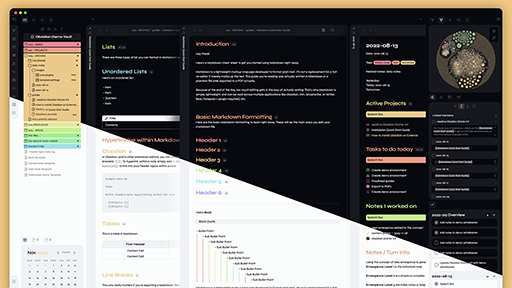
README file from
Github


Features
-
Light & Dark Theme
Enjoy the flexibility of choosing between light & dark themes to suit your preferences and reduce eye strain.
Dark Mode
Light Mode
-
Modern Card Style
Experience a sleek and contemporary card design that enhances visual appeal and improves user experience.
-
Enhanced Checkboxes
Say goodbye to plain checkboxes! Enjoy alternative checkbox designs that add a touch of personality and fun to your task management.
Vicious offers a diverse range of alternate checkbox types to cater to various task statuses and actions. Take a look at the available checkbox types below:
| Syntax | Description |
|---|---|
- [ ] |
Unchecked |
- [x] |
Checked |
- [-] |
Cancelled |
- [)] |
Good |
- [:] |
Pin |
- [(] |
Bad |
- [}] |
High |
- [=] |
Normal |
- [{] |
Low |
- [?] |
Question |
- [*] |
Star |
- [!] |
Important |
- [>] |
Forward |
- [<] |
Backward |
- [/] |
Pause |
- [+] |
Upward |
- [_] |
Downward |
- [%] |
Recurring |
- [&] |
Trash |
- [.] |
Lock |
- [@] |
At |
- [#] |
Hashtag |
- ['] |
Quote |
- [a] |
Archive |
- [A] |
Alarm |
- [b] |
Bookmark |
- [B] |
Birthday |
- [c] |
Comment |
- [C] |
Clip |
- [d] |
Diamond |
- [D] |
Document |
- [e] |
Envelope |
- [E] |
Eye |
- [f] |
Flame |
- [F] |
Financial |
- [g] |
Gaming |
- [G] |
GYM |
- [h] |
Home |
- [H] |
Heart |
- [i] |
info |
- [I] |
Idea |
- [m] |
Music |
- [M] |
Medical |
- [p] |
Person |
- [P] |
Plane |
- [s] |
Sport |
- [S] |
Search |
- [u] |
URL |
- [v] |
Video |
- [w] |
World |
- [W] |
Work |
- [z] |
Moon |
- [Z] |
Sun |
- [0] |
Text Highlight 0 |
- [1] |
Text Highlight 1 |
- [2] |
Text Highlight 2 |
- [3] |
Text Highlight 3 |
- [4] |
Text Highlight 4 |
- [5] |
Text Highlight 5 |
- [6] |
Text Highlight 6 |
- [7] |
Text Highlight 7 |
- [8] |
Text Highlight 8 |
- [9] |
Text Highlight 9 |
- [§] |
Text Highlight § |
-
Vibrant List Indents
Make your lists visually appealing and easily scannable by adding colorful indents that enhance readability and organization.
-
Vibrant Tags
Tags are visually striking and easily distinguishable, allowing you to quickly identify and locate important information.
-
Distinctive Callouts
Highlight important information or annotations with custom callouts that make them visually prominent and easier to notice.
| Syntax | Description |
|---|---|
> [!help] |
Help |
> [!faq] |
FAQ |
> [!question] |
Question |
> [!tip] |
Tip |
> [!hint] |
Hint |
> [!bug] |
Bug |
> [!error] |
Error |
> [!danger] |
Danger |
> [!attention] |
Attention |
> [!caution] |
Caution |
> [!warning] |
Warning |
> [!example] |
Example |
> [!failure] |
Failure |
> [!missing] |
Missing |
> [!fail] |
Fail |
> [!important] |
Important |
> [!info] |
Info |
> [!success] |
success |
> [!check] |
check |
> [!done] |
done |
> [!abstract] |
Abstract |
> [!tldr] |
TLDR |
> [!summary] |
Summary |
> [!todo] |
TODO |
> [!cite] |
Cite |
> [!quote] |
Quote |
Installation
Installing the Vicious Theme: Step-by-Step Guide
To install the Vicious theme for your desired application or tool, follow these general steps:
Obsidian Marketplace (Recommended)
- Go to the
Settings - Then navigate to
Appearances - Under the Themes section, click on the
Managebutton across from Themes - Search for
Vicious - Click on
Install and use
Manual
- Download this repo
- Then navigate
/.obsidian/themes - Create folder & call it
Vicious. - Copy the
theme.cssandmanifest.jsoninside the folder. - Open Obsidian and go to the
Settings - Then navigate to
Appearances - Under the Themes section, click on the dropdown menu next to Theme heading
- Select
Vicious
Contribute to Vicious theme
Contribute to the Vicious theme and make a difference! Your input is valuable in enhancing the Vicious theme for Obsidian. Whether you have ideas, suggestions, or want to help with bug fixes, your contributions are welcome.
Make your notes shine in the Vicious theme!