
README file from
Github
About
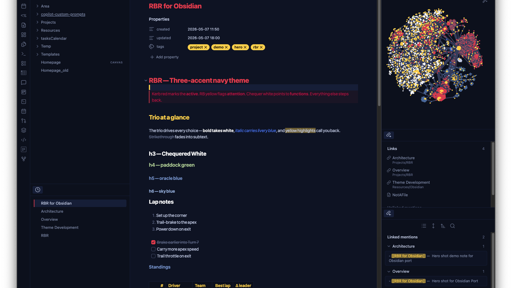
rbr.obsidian paints Obsidian with the RBR color scheme — a three-accent palette: kerb red for what's active, RB yellow for what needs attention, chequer white for functions / methods. A deep navy base keeps the trio readable. See the upstream STYLE-GUIDE.md for the full design rules.
[!NOTE] This scheme is a fan tribute. Not affiliated with or endorsed by Red Bull Racing, Oracle Red Bull Racing, or Red Bull GmbH.
Install
Manual install (current)
- Download
theme.cssandmanifest.jsonfrom this repo. - Drop them into your vault at:
<vault>/.obsidian/themes/RBR/ ├── manifest.json └── theme.css - In Obsidian: Settings → Appearance → Themes → pick RBR.
Tip: from the vault root,
mkdir -p .obsidian/themes/RBRand copy the two files in.
From source
git clone https://github.com/Amdhj22/rbr.obsidian.git
mkdir -p <your-vault>/.obsidian/themes/RBR
cp rbr.obsidian/{manifest.json,theme.css} <your-vault>/.obsidian/themes/RBR/
Reload Obsidian (Cmd+R / Ctrl+R) and pick RBR in Settings → Appearance → Themes.
From the Obsidian Community Themes
Coming soon. Once published, install via Settings → Appearance → Themes → Manage → search RBR.
What it paints
rbr.obsidian covers the surfaces Obsidian exposes via CSS variables and a few hand-styled selectors:
| Layer | What it covers |
|---|---|
| Workspace chrome | Sidebar, file explorer, tabs (active tab → kerb-red top bar), title bar, status bar, modals, popovers, scrollbars |
| Editor body | Cursor (RB yellow), active line, selection (surface2), matching brackets, indentation guides, inline title |
| Markdown rendering | Headings (h1 = kerb red, h2 = RB yellow, h3 = chequer white), links, blockquotes (red side bar), tables, hr, bold/italic |
| Code blocks & live preview | CodeMirror token mapping — keywords = red, strings = green, functions = white, types = yellow, numbers = grey, comments = subtext |
| Tags | RB-yellow pill ("look here") |
| Callouts | info/note → oracle blue, warning/todo → RB yellow, tip/success → paddock green, error/bug/fail → kerb bright, important → kerb red |
| Search & highlight | Search matches and ==highlights== tinted RB yellow |
| Graph view | Unresolved nodes → kerb bright, focused → kerb red, tag nodes → RB yellow, attachments → paddock green |
| Properties / metadata | Property keys in RB yellow, values in default text |
Highlights of the painting choices:
- Active tab top border = Kerb Red — only one tab is "the one"
- Cursor = RB Yellow — the always-attention pixel
- Active file in the file explorer gets a kerb-red accent bar on the left
- Inline title of the current note = Kerb Red
- Vault name in the title bar = RB Yellow
- Blockquote = kerb-red side border with a subtle red wash
==highlight=== RB-yellow background (matches the search-match style)
Companion ports
For a consistent look across the rest of your stack:
| Tool | Repo |
|---|---|
| Neovim | Amdhj22/rbr.nvim |
| VS Code | Amdhj22/rbr.vscode |
| tmux | Amdhj22/rbr.tmux |
| Ghostty / iTerm2 / Powerlevel10k / eza | Amdhj22/rbr |
Development
git clone https://github.com/Amdhj22/rbr.obsidian.git
cd rbr.obsidian

# Symlink into a test vault for live editing
ln -s "$PWD" "<your-test-vault>/.obsidian/themes/RBR"
Then in Obsidian: Settings → Appearance → Themes → RBR. Edits to theme.css show up after Cmd+R (Reload).
For deeper inspection, open Obsidian's developer tools with Cmd+Option+I (macOS) or Ctrl+Shift+I (Windows / Linux). The Styles pane lets you find the CSS variable behind any element before adding a rule here.
Submitting to the Community Themes gallery
Once the repo is public, follow Obsidian's submission flow:
- Tag a release matching
manifest.json'sversion(e.g.0.1.0). - Open a PR against
obsidianmd/obsidian-releasesadding RBR tocommunity-css-themes.json. - After review, RBR appears under Settings → Appearance → Themes → Manage.
License
MIT © Amdhj22