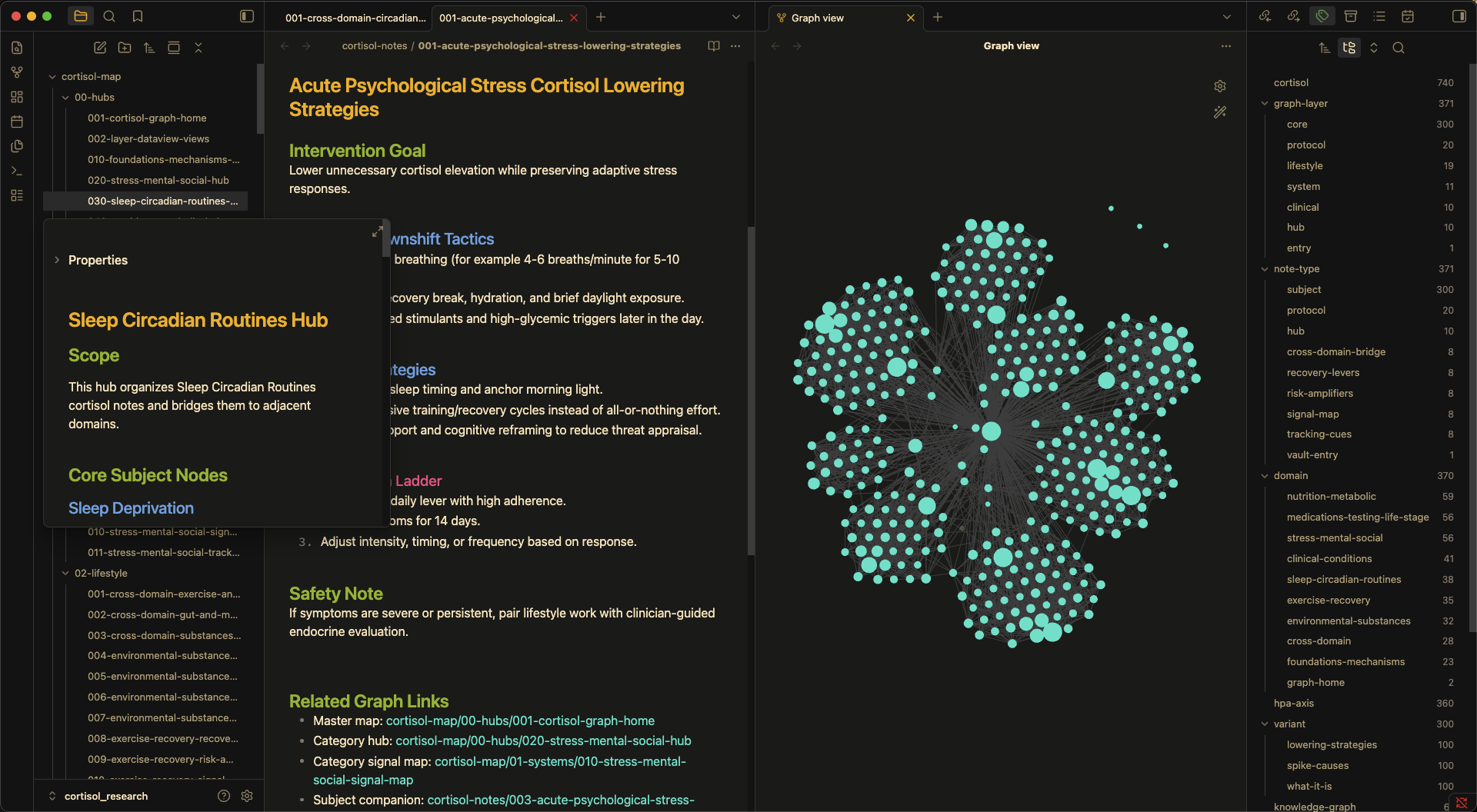
README file from
GithubRequirements
- Obsidian v1.1.9 or above
Installation
Manual
-
Clone the repo:
git clone [email protected]:soykindabored/srcery-obsidian.gitOr from the srcery-colors community managed repo:
git clone [email protected]:srcery-colors/srcery-obsidian.git -
Copy
manifest.jsonandtheme.cssinto your vault's theme directory:mkdir -p /path/to/vault/.obsidian/themes/Srcery cp manifest.json theme.css /path/to/vault/.obsidian/themes/Srcery/Or symlink the files if you want to stay up to date with
git pull:mkdir -p /path/to/vault/.obsidian/themes/Srcery ln -s /path/to/srcery-obsidian/{manifest.json,theme.css} /path/to/vault/.obsidian/themes/Srcery/Note that you have to create the
themes/directory in each vault's.obsidian/unless you've already installed a theme from the marketplace. -
In Obsidian, go to Settings → Appearance → Themes and select Srcery.
-
Obsidian Community Download
Srcery Palette
This is the canonical colors for Srcery, a syntax highlighting theme for various editors and GUIs.
Created using colors that logically adheres to the 16 color base palette of a terminal, while trying to retain its own identity. The colors are designed to be easy on the eyes, yet contrast well with the background for long sessions using an editor or terminal emulator.
Check out 🌐 srcery.sh and Github for more.
| IMG | NAME | INDEX | HEX | RGB | HSL |
|---|---|---|---|---|---|
 |
black | 0 | #121110 |
rgb(18, 17, 16) |
hsl(30, 6%, 7%) |
 |
red | 1 | #EF2F27 |
rgb(239, 47, 39) |
hsl(2, 86%, 55%) |
 |
green | 2 | #519F50 |
rgb(81, 159, 80) |
hsl(119, 33%, 47%) |
 |
yellow | 3 | #FBB829 |
rgb(251, 184, 41) |
hsl(41, 96%, 57%) |
 |
blue | 4 | #2C78BF |
rgb(44, 120, 191) |
hsl(209, 63%, 46%) |
 |
magenta | 5 | #E02C6D |
rgb(224, 44, 109) |
hsl(338, 74%, 53%) |
 |
cyan | 6 | #0AAEB3 |
rgb(10, 174, 179) |
hsl(182, 89%, 37%) |
 |
white | 7 | #C5B088 |
rgb(197, 176, 136) |
hsl(39, 34%, 65%) |
 |
bright_black | 8 | #917E6B |
rgb(145, 126, 107) |
hsl(30, 15%, 49%) |
 |
bright_red | 9 | #F75341 |
rgb(247, 83, 65) |
hsl(6, 92%, 61%) |
 |
bright_green | 10 | #98BC37 |
rgb(152, 188, 55) |
hsl(76, 55%, 48%) |
 |
bright_yellow | 11 | #FED06E |
rgb(254, 208, 110) |
hsl(41, 99%, 71%) |
 |
bright_blue | 12 | #68A8E4 |
rgb(104, 168, 228) |
hsl(209, 70%, 65%) |
 |
bright_magenta | 13 | #FF5C8F |
rgb(255, 92, 143) |
hsl(341, 100%, 68%) |
 |
bright_cyan | 14 | #2BE4D0 |
rgb(43, 228, 208) |
hsl(174, 77%, 53%) |
 |
bright_white | 15 | #FCE8C3 |
rgb(252, 232, 195) |
hsl(39, 90%, 88%) |
 |
dark_green | 22 | #294229 |
rgb(41, 66, 41) |
hsl(120, 23%, 21%) |
 |
dark_red | 88 | #4F2321 |
rgb(79, 35, 33) |
hsl(3, 41%, 22%) |
 |
dark_blue | 24 | #1E5181 |
rgb(30, 81, 129) |
hsl(209, 62%, 31%) |
 |
dim_green | n/a | #2E5C2E |
rgb(46, 92, 46) |
hsl(119, 33%, 27%) |
 |
orange | 202 | #FF5F00 |
rgb(255, 95, 0) |
hsl(22, 100%, 50%) |
 |
bright_orange | 208 | #FF8700 |
rgb(255, 135, 0) |
hsl(32, 100%, 50%) |
 |
teal | 30 | #008080 |
rgb(0, 128, 128) |
hsl(180, 100%, 25%) |
 |
gray1 | n/a | #1C1B19 |
rgb(28, 27, 25) |
hsl(40, 6%, 10%) |
 |
gray2 | n/a | #262522 |
rgb(38, 37, 34) |
hsl(45, 6%, 14%) |
 |
gray3 | n/a | #312F2C |
rgb(49, 47, 44) |
hsl(36, 5%, 18%) |
 |
gray4 | n/a | #3B3935 |
rgb(59, 57, 53) |
hsl(40, 5%, 22%) |
 |
gray5 | n/a | #45433E |
rgb(69, 67, 62) |
hsl(43, 5%, 26%) |
 |
gray6 | n/a | #504D47 |
rgb(80, 77, 71) |
hsl(40, 6%, 30%) |
Screenshots