
README file from
GithubVSCode Dark+ for Obsidian
A carefully crafted dark theme for Obsidian inspired by VSCode Dark Modern and TRAE IDE.
Designed for long reading and writing sessions with low-saturation, non-neon colors that are easy on the eyes.
Features
- VSCode Dark Modern color palette — faithful reproduction of the editor's signature dark tones
- 6 distinct heading colors — each heading level has its own muted color for easy scanning
- Styled callouts — all 10+ callout types with left-border color coding
- Custom checkboxes — clear visual distinction between pending and completed tasks
- Calendar plugin support — multi-color calendar with themed today, weekdays, and navigation
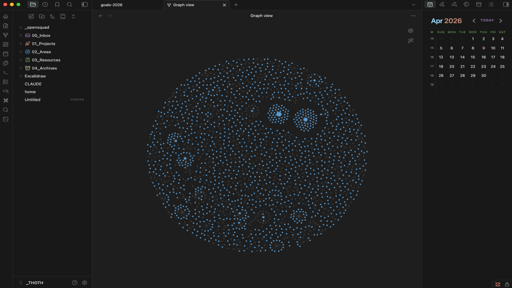
- Graph view colors — themed node colors for notes, tags, attachments, and unresolved links
- Canvas support — dark canvas background with 6 themed card colors
- Monospace editor font — Menlo / SF Mono for a code-editor feel
- Low saturation throughout — no neon, no eye strain
Color Palette
| Element | Color | Hex |
|---|---|---|
| Background | Dark charcoal | #1e1e1e |
| Sidebar | Darker charcoal | #181818 |
| H1 | Salmon | #ce9178 |
| H2 | Muted green | #6a9955 |
| H3 | Warm yellow | #dcdcaa |
| H4 | Light blue | #9cdcfe |
| H5 | Soft purple | #a07cc5 |
| H6 | Teal | #4ec9b0 |
| Links / Bold | VSCode blue | #569cd6 |
| Link hover | Purple accent | #a07cc5 |
| Inline code | Salmon | #ce9178 |
| Accent | VSCode blue | #569cd6 |
| Text | Light gray | #d4d4d4 |
| Muted text | Mid gray | #858585 |
Callouts
All standard Obsidian callout types are styled with a 3px left border and dark background:
| Callout | Color |
|---|---|
> [!note] |
Blue #569cd6 |
> [!tip] |
Teal #4ec9b0 |
> [!warning] |
Yellow #cca700 |
> [!error] |
Red #f48771 |
> [!info] |
Light blue #9cdcfe |
> [!success] |
Green #6a9955 |
> [!question] |
Purple #c586c0 |
> [!quote] |
Gray #858585 |
> [!example] |
Yellow #dcdcaa |
> [!abstract] |
Salmon #ce9178 |
Calendar Plugin
The theme includes custom styling for the Calendar community plugin:
- Month title — Light blue
#9cdcfe - Today — Salmon
#ce9178 - Weekday headers — Green
#6a9955 - TODAY button — Purple
#a07cc5 - Selected day — Green highlight
- Navigation arrows — Light blue on hover
Checkboxes
- Pending — Dark border, transparent background
- Completed — Blue fill with strikethrough text in gray
Supported Plugins
This theme includes specific styling for:
- Dataview / DataviewJS — Bordered blocks with dark background
- Calendar — Full color customization
- Editing Toolbar — Consistent dark styling
- Iconize — Works well with the theme's color palette
Installation
Manual
- Download
theme.cssandmanifest.jsonfrom this repository - Create a folder called
VSCode Dark+in your vault's.obsidian/themes/directory - Place both files inside the folder
- Open Obsidian Settings → Appearance → Theme → Select VSCode Dark+
Obsidian Community Themes
Coming soon.
Recommended Settings
- Settings → Editor → Readable line length: Off
- Settings → Appearance → Base font size: 13
- Settings → Appearance → Accent color:
#569cd6
Font Stack
The theme uses a monospace font stack optimized for macOS:
Menlo → SF Mono → Monaco → monospace
For the best experience, no additional fonts need to be installed.
Credits
- Color palette derived from VSCode Dark Modern and TRAE IDE
- Built for Obsidian v1.0+
License
MIT