
README file from
GithubObsidian's Wyrd
And amazing. So I'm making this theme weird, too.
Wyrd is a purple-hued, low-contrast, dual-mode theme for Obsidian.md.
It's also not like most other themes.
About Wyrd
A quick note: Wyrd is still very much a work-in-progress, as visible with the roadmap below. There are a number of sections that I haven't had a chance to change yet; the work so far represents the vast majority of what I use on a regular basis.
Wyrd is not minimal.
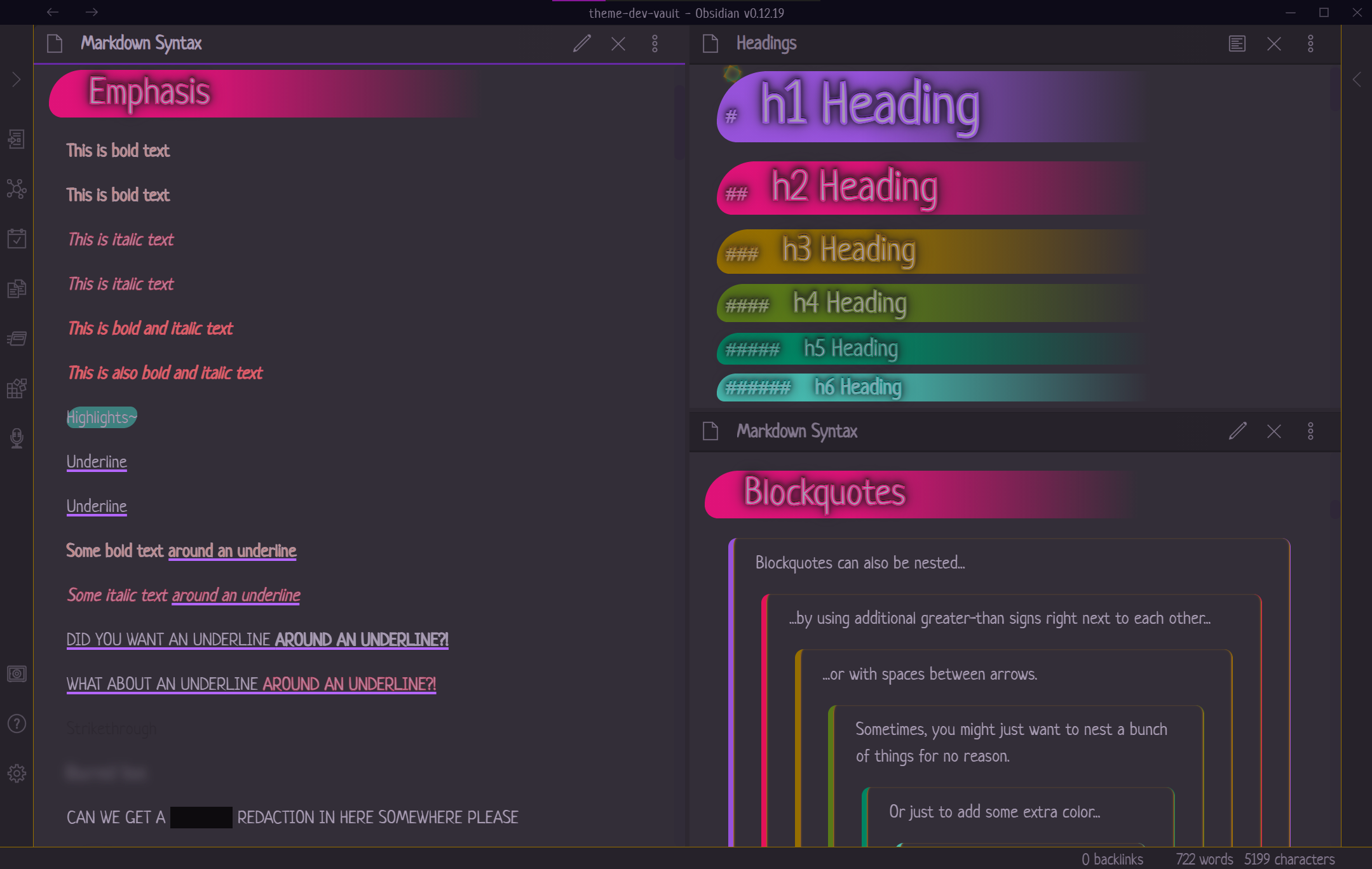
It's expressive, colorful, and animated.
I like to experiment with CSS to create something visually unique, so familiar styles have unusual touches...


... and unusual combinations of markdown can be used to create unique styles not otherwise available through markdown.

(What, you thought there was a reason that was censored ? Hah!)


Installing
Wyrd is available through the Obsidian Community Themes store! While in Obsidian, go to Settings > Appearance, find the Themes section, click the Manage button, and search for Wyrd!
If you would prefer a manual install, download obsidian.css and save it in your .obsidian/themes folder as Wyrd.css, then activate the theme within Obsidian's Theme Manager. (I'll set up releases soon!) 💜
Some Notes
Because I like to experiment with CSS, many features I add to this theme may not fully carry over into other environments due to differences in rendering. As such, I've been doing my best to ensure that the text will continue to render in unique ways, regardless of whether these features work.
It's also worth pointing out that some styles present here can provide some measure of privacy for text while Previewing or in Publish.
Please don't mistake these for real privacy measures: they're anything but. CSS does not have the ability to provide real privacy measures for sensitive data.
These features are purely intended for fun, and are marked below under Features.
Features
- Visual balance between light and dark modes!
- Custom font selection
@imported through Google Fonts! - All fonts scale with the current
--editor-font-size!- Including headings (!!)
--editor-font-sizeis also manually set via CSS to ensure that the code continues to work as expected in Obsidian Publish environents.
Wyrd's Custom Styles
Using specific combinations of markdown syntax, Wyrd converts them into additional styles beyond what's standard.
While many themes choose to use specific HTML tags that aren't commonly used anymore, I've opted for my own preference: Layering markdown syntax in specific ways.
Underline
Useage: _*Underline*_, *_Underline_*, __**Underline**__, or **__Underline__**
Yep, that's right—double up your preference of bold or italic to get yourself a nifty underline!
Note: Due to how the parser works, you must alternate the symbols for bold or italic to prevent it from being styled as bold.
Blur
Friendly Reminder: This is not a real privacy measure.
Useage: ~~==Blurred text==~~
Blurs text in both Edit and Preview modes, and reveals it on hover with a drop shadow instead.
The Edit mode effect is much more subdued to provide a visual indication that doesn't render the text illegible.
Pseudo-Redaction
Friendly Reminder: This is not a real privacy measure.
Useage: A bold-italic-bold-italic pattern around the text. Eg, ***___Redacted text___*** or ___***Redacted text***___
In Preview mode, the text is rendered transparent with a near-black background, and makes it non-selectable. Selecting text around redactions will not select the redacted text itself, and the redacted text is excluded from being copied to the clipboard.
There is presently no unique style for this in Edit mode. CodeMirror makes it challenging to style this specific combination without affecting the underlines and some other styles as well.
Want to use the theme for Publish?
- Copy the theme file to your vault's root and rename it
publish.css. - Search for
/* Ready for publishing?and delete everything that line and below. - Copy any needed snippets into the file.
- Be mindful of any rules that need to be at the top of the file! (This includes any
@imports!) - The rest should be good to put at the bottom of the file.
- Be mindful of any rules that need to be at the top of the file! (This includes any
- Save the file.
- Upload through Obsidian's
Publish changesmodal!
Note: Eventually, I plan to have an additional
publish.cssfile in this repository to cut out the second step for you.
Roadmap
Right now, the roadmap doesn't reflect any particular priority of items. Please don't take their current placement as reflective of their importance.
Note Content
- Live Preview (mostly)
- Text styling
- Basic
-
**Bold**styling -
_Italic_styling -
~~Strikethrough~~(ST) styling -
==Highlight==(HL) styling
-
- Repeating
-
_*Italic + Italic*_== underline -
**__Bold + Bold__**== underline
-
- Expressive
- Bold & Italic
**_Bold & Italic_**or__*Bold & Italic*__
- Blur
~~==Blur==~~- Slight blur in edit mode
- Heavier blur in preview mode
- Hover exposes blurred text
- Pseudo-redaction
***___Redacted text___***or___***Redacted text***___- Text is transparent and non-selectable, with a suitable background for light and dark versions of the theme.
- NOTE: This does not provide security!
- "Redacted" text is not removed from the DOM, which means it's still exposed to anyone smart enough use a browser's
Inspector.
- "Redacted" text is not removed from the DOM, which means it's still exposed to anyone smart enough use a browser's
- Bold + ...
-
**==Bold + HL==**== ? -
**~~Bold + ST~~**== ?
-
- Italic + ...
-
_==Italic + HL==_== ? -
_~~Italic + ST~~_== ?
-
- Highlight + ...
-
==_HL + Italic_==== ? -
==**HL + Bold**==== ? -
==~~HL + ST~~==== ?
-
- Strikethrough + ...
-
~~==ST + Italic==~~== ? -
~~==ST + Bold==~~== ?
-
- Bold & Italic
- Basic
- Lists
- Unordered
- Ordered
- [/] Task lists
- [/] Alternate styles for markers (partial—Live Preview only)
- Link styling
- Internal link
- Unresolved internal link
- External link
- Footnotes
- Tables
- Alternating rows
- Row/cell highlighting on hover
- Code
- Code blocks
- Inline code
- Syntax highlighting
- Embeds
- [/] Notes (partial—no default style yet)
- Images
- Cap size?
- PDFs
UI
- Sidebars
- Leaf containers
- Leaf resize bars
- Ribbon menu
- Titles
- App title bar
- Note title bars
- Panes
- Status bar
- Graph view
- Settings window
@media screenqueries (if needed)- Mobile support
Publish Support
- Page header (hidden)
- File explorer
Print Support
- Basic print support
Plugin Support
Core Plugins
- Tag Pane
- File Explorer
Community Plugins
- Style Settings
- ???
Known Issues
- Links in headings have no transition despite having one styled
- Live Preview headings aren't aligned with their backgrounds
- Code styles have not been changed to match the theme
- Plain embeds have not been restyled for Live Preview
- Active line indicator needs to be moved outside of the text