
README file from
GithubBiggs
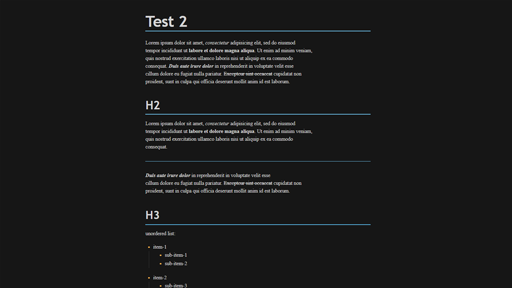
Biggs is a square-edged Obsidian theme with a ruled, typeset document feel. A serif text face, clean sans headings, and one recurring idea hold it together: a rule marks what matters. Headings stand on rules, and the active tab, active list item, blockquote, and callout are each marked by one.
Features
- Dark and light modes drawn separately. Dark is near-black ink with sidebars set below the page. Light is cool drafting paper with deeper inks chosen to hold up on it.
- Cyan for links and active states, amber for tags, inline code, list markers, and checkboxes, and neutral grays for everything else
- A six-level heading scale with muted, graduated color sweeping from cyan to amber, on heading text and on rules that fade out to the right
- Square geometry across controls, tabs, menus, and icons, with an option to soften it
- Typeset tables, coordinated syntax highlighting, and callouts, properties, canvas, and graph colors from the same palette
- A separately tuned phone layout with visible controls and a square navigation bar
Customization
With the Style Settings plugin you can change:
- Accent, highlight, and heading colors, separately for each mode
- The heading palette: cyan to amber, cyan to violet, or blue
- Which heading levels carry a rule, whether rules fade or run solid, and whether heading text stays neutral
- Body typeface, text size, line height, and line width
- Soft corners, the active line tint, and table width
The accent color in Obsidian's Appearance settings also works, as does the text font setting there. Without Style Settings, all defaults still apply.
Installation
Copy this folder into your vault's .obsidian/themes directory, then enable Biggs from Obsidian's appearance settings.
Fonts
Biggs bundles no fonts and uses the best match installed on each system:
- Text: Iowan Old Style, Palatino Linotype, Book Antiqua, Palatino, Noto Serif, or Georgia
- Headings: Avenir Next, Segoe UI Variable, Segoe UI, Roboto, Noto Sans, or Arial
- Code: Cascadia Code, Source Code Pro, SF Mono, Menlo, or Consolas
Development
Theme styles live in theme.css, organized into numbered sections listed at the top of the file. Colors for each mode are in the two palette sections. Shared tokens, including all corner radii, build on those. Prefer changing a token over adding a rule.
Values that Obsidian declares on .theme-dark and .theme-light must be overridden on those same selectors, because a rule on body loses to them.
The release metadata lives in manifest.json and versions.json.
Support
If you enjoy Biggs, you can buy me a coffee.