
README file from
GithubTsukuyomi
English · 简体中文
An unofficial Obsidian theme inspired by Tsukuyomi from Cosmic Princess Kaguya!. Version 1.1.0 brings ink-blue nights, turquoise lights, and Japanese city scenery to your workspace while keeping reading and writing surfaces calm.
Maintained by ArisaTaki as an individual fan project.
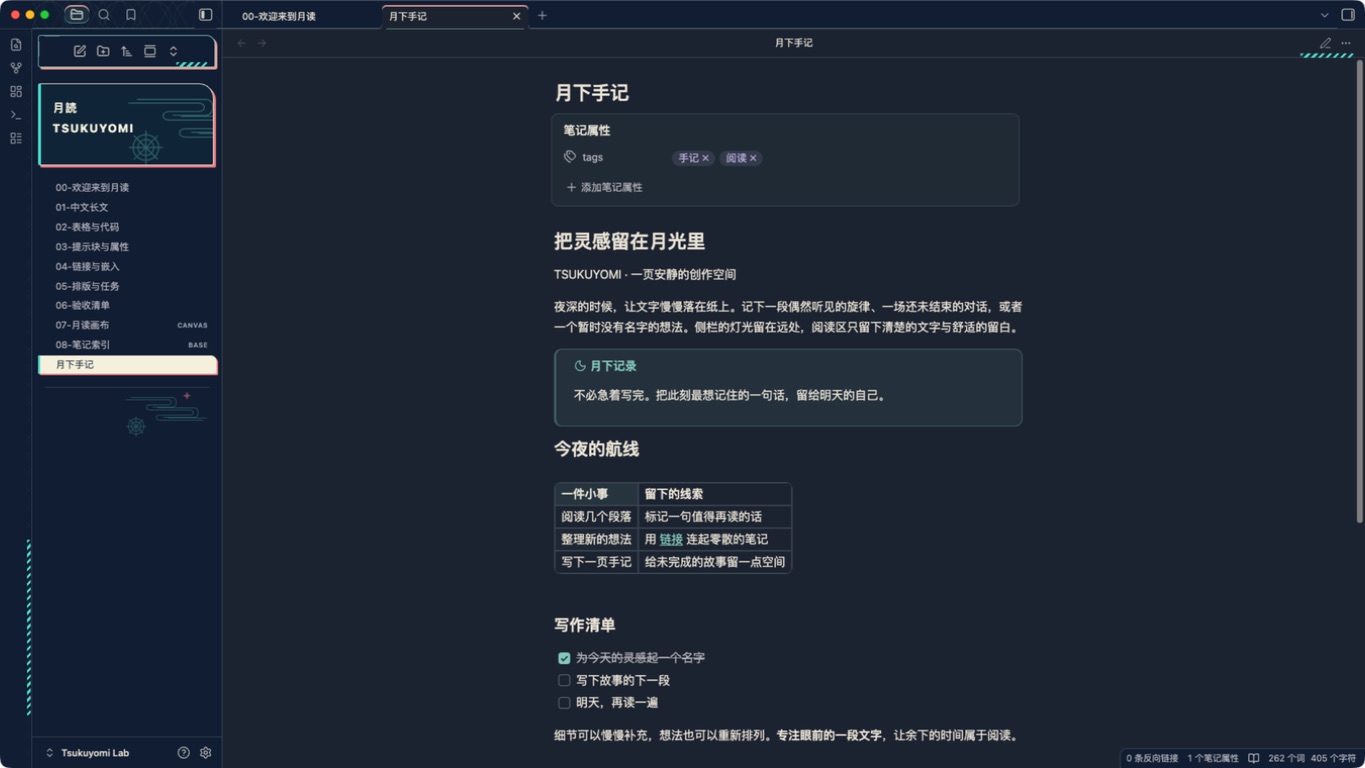
Features
- Dark and light modes follow Obsidian's appearance setting.
- Comfortable reading, including Chinese and mixed-language notes: opaque backgrounds, a default
40remline width and1.75line height, and your own fonts and font sizes. Supports Reading view, Live Preview, and Source mode. - A decorative empty view with a stationary city and torii, a separate action menu, four vector companions, and swimming skeletal fish. Artwork stays in empty views and workspace edges, away from note text and file names.
- Compact phone layouts retain the stage, action menu, and a smaller sidebar sign, leave space for native top and bottom controls, and remove the decorative frame from an empty file toolbar.
- Offline and self-contained: installation requires only
theme.cssandmanifest.json. SVG artwork is embedded, with no runtime JavaScript, network requests, dependencies, or required plugins.
Desktop empty-view previews: dark · light. Captured on September 16, 2026 during development; the desktop visual design is retained.


Installation
Requires Obsidian 1.13.7 or later. The official web listing is published, but as of September 16, 2026, 16:37 (UTC+8), Tsukuyomi is not yet in the directory list used by Obsidian 1.13.7. In-app search and Add to Obsidian depend on that list; use manual installation while synchronization is pending.
Once synchronization is confirmed, open Settings → Appearance → Themes → Manage and search for Tsukuyomi. See the publishing record for the synchronization window and follow-up status.
Manual installation:
- Download
Tsukuyomi-1.1.0.zipfrom the 1.1.0 release. - Extract the
Tsukuyomifolder into your vault's.obsidian/themes/directory. It should containmanifest.jsonandtheme.css. - In Obsidian, open Settings → Appearance and select Tsukuyomi.
Alternatively, download the individual manifest.json and theme.css attachments and place them in .obsidian/themes/Tsukuyomi/.
To update, replace both files and reselect the theme. To disable it, select Obsidian's default theme. Your note content is not modified.
Optional settings
The defaults work without plugins. Install the Style Settings community plugin to adjust these five options:
| Setting | Default | Purpose |
|---|---|---|
| Minimal mode | Off | Hide signs, decorative borders, and the empty-view scene |
| Reading width | 40rem |
Adjust the maximum text width |
| Interface density | Standard | Choose standard or compact spacing on desktop; mobile retains native touch spacing |
| Scene opacity | 0.70 |
Adjust empty-view decoration opacity from 0 to 1 |
| Static scene | Off | Use static fish and companions; stop decorative motion and interface transitions |
Animation plays only in an active empty pane when both the viewport and pane are at least 320 × 480, including the compact layout. System reduced-motion preferences, Static scene, and inactive panes use static artwork. Minimal mode, printing, or either area falling below that size hide the scene while retaining the native actions. Buildings and note content always remain still.
Saved Style Settings values survive upgrades. The old tk-enable-motion setting has been replaced by tk-disable-motion; enable Static scene if you prefer no motion.
Mermaid diagrams
Version 1.0.5 adds a scrollable diagram container: oversized diagrams can scroll horizontally without forcing their text to fit the note width. Mermaid's own inline sizing constraints, such as useMaxWidth, still apply. Flowcharts, sequence diagrams, and state diagrams use the theme's light and dark colors; class, ER, and other diagram types retain their native colors. Node positions and connection routing remain controlled by Mermaid. No JavaScript or plugin is added.
For notes with a custom Mermaid theme or themeVariables, add the following frontmatter to keep native diagram colors while retaining the scrollable container:
---
cssclasses:
  - tk-mermaid-original
---
Merge this entry with any existing cssclasses. It is a per-note option, separate from the five Style Settings options. Check the validation record for tested cases and limitations.
Interaction details
Menus preserve warning colors and disabled states, while ordinary keyboard-selected menu and suggestion items gain a turquoise inset outline. Compact density applies only on desktop. In Reading view, wide tables scroll within their container; Live Preview keeps Obsidian's native table component.
For an optional table reading guide, add this note property:
cssclasses: [tk-table-guide]
Merge it with any existing cssclasses. This enables a subtle row highlight on desktop hover or when a control within the row receives focus, plus tabular-width digits. It is off by default and adds no Style Settings option. See the UX references for the design rationale.
Compatibility
Native application checks were performed with Obsidian 1.13.7 on macOS, including a six-page PDF regression comparison for 1.0.3 with matching pagination and complete text. Windows, Linux, and mobile devices have not been tested. Chinese IME composition, the Style Settings panel, other printing scenarios, and long-term performance still have outstanding checks. Default-palette checks do not cover arbitrary custom colors or every third-party plugin.
The 1.0.4 phone-layout fix follows an iPhone 14 Pro screenshot report. Desktop-browser checks at 393 × 852, 375 × 667, 320 × 568, and 430 × 932 passed using the locally installed Obsidian 1.13.7 CSS and simulated DOM. These are not native iOS results; follow-up on the user's device is still required. Actual system reduced-motion switching, mobile editing, the keyboard, touch gestures, battery use, iPad, and Android remain untested.
See the validation record for actual checks, screenshots, and limitations.
Development
Requires Node.js 22.9.0 or later.
npm ci
npm test
npm run lint
npm run lab
npm run build generates the root theme.css and dist/Tsukuyomi/. npm run lab installs only into this project's lab/Tsukuyomi Lab/ vault. After changing fish or companion artwork, run node scripts/generate-fish.mjs or node scripts/generate-mascots.mjs, respectively, then run the checks. The build rejects outdated generated assets. Development dependencies are not included in the installed theme.
npm run lint uses Obsidian's official Stylelint configuration with documented project compatibility adjustments. See lint notes. Local checks do not constitute community-directory approval.
License and artwork
This individual fan project is distributed free of charge through a public GitHub repository on a noncommercial basis, without ads, paid downloads, or donation links. Original software code that the maintainer has rights to license is available under the MIT License. Third-party character designs, trademarks, and other underlying rights are excluded from that software license.
The project is not affiliated with Obsidian or the original work's rights holders. Companion artwork is fan art; official images, logos, music, and fonts are not bundled with the theme. See NOTICE for rights and distribution scope, and sources for references. Research HTML files in docs/ may load external reference images; they are not used by the installed theme.
Contributing · Changelog · Design notes · Publishing and review status