
README file from
GithubVSCode Light Modern for Obsidian
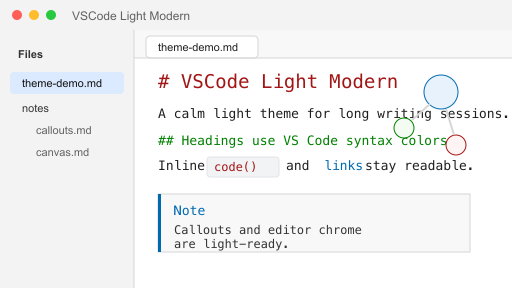
Light theme adaptation based on leozague/obsidian-vscode-dark-plus, tuned for macOS and Obsidian light mode.
Features
- VS Code Light Modern inspired palette with low-saturation syntax colors.
- macOS-first font stack: SF Pro for UI and SF Mono / Menlo for editor text.
- Light-mode adaptations for headings, links, inline code, callouts, checkboxes, graph view, canvas, Calendar and Dataview blocks.
- Keeps the original theme's compact editor feel: 13px text, monospace writing surface, tight tabs and neutral borders.
Installation on macOS
- Open your Obsidian vault in Finder.
- Create this folder if it does not exist:
.obsidian/themes/VSCode Light Modern/ - Copy
theme.cssandmanifest.jsoninto that folder. - In Obsidian, go to
Settings -> Appearance -> Themesand chooseVSCode Light Modern. - Make sure Obsidian is using light mode.
You can also install from Terminal after replacing /path/to/YourVault:
mkdir -p "/path/to/YourVault/.obsidian/themes/VSCode Light Modern"
cp theme.css manifest.json "/path/to/YourVault/.obsidian/themes/VSCode Light Modern/"
Recommended Settings
Settings -> Appearance -> Base font size:13Settings -> Editor -> Readable line length: offSettings -> Appearance -> Accent color:#006ab1
Credits
- Original theme: VSCode Dark+ for Obsidian by Leonardo Zague.
- Palette inspired by VS Code Light Modern / Light+ syntax colors.
License
MIT