
README file from
Github✍️ Handwriting (Kalam) Theme
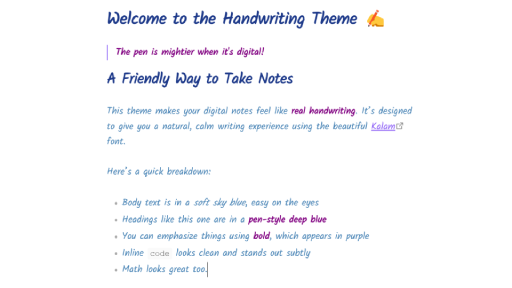
Bring the charm of handwritten notes to your Obsidian vault with this clean, expressive theme powered by the Kalam font.
Perfect for academic notes, creative journaling, and anyone who prefers a personal, human touch.
🎨 Features
- ✏️ Kalam handwriting font for a natural note-taking feel
- 💙 Sky blue body text for a soft and calm reading experience
- 🔵 Pen-blue headings (
#,##, etc.) - 💜 Purple bold text for elegant emphasis
- 💻 Works in both Preview and Live Preview modes
- ✅ Math and inline code styled to match the handwritten aesthetic
📦 Installation (Community Theme)
If you're browsing themes inside Obsidian:
- Go to Settings → Appearance → Themes
- Click "Browse" and search for:
Handwriting (Kalam) - Click Install and Use
🛠️ Manual Installation (Advanced)
If you'd like to install it manually:
- Download
theme.cssfrom this repository - Copy it to
.obsidian/themes/handwriting-theme/inside your vault - Make sure
manifest.jsonandscreenshot.pngare also in the same folder - In Obsidian:
Go to Settings → Appearance → Themes → Select: Handwriting (Kalam)
🧪 Optional: Use with CSS Class
Want to apply the handwriting style to select notes only? Enable this as a CSS Snippet and add the following to your note:
---
cssclass: handwriting
---