
README file from
GithubTomorrow Night Blue for Obsidian
A local Obsidian port of Visual Studio Code's bundled Tomorrow Night Blue theme.
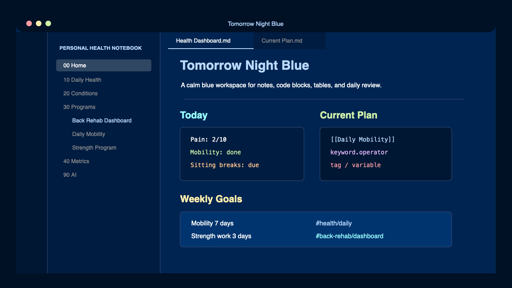
The palette is matched closely to VS Code's built-in theme:
- editor background:
#002451 - sidebar/widgets:
#001c40 - tabs/input/activity bar:
#001733 - title/status bar:
#001126 - active line:
#00346e - selection:
#003f8e - borders/whitespace:
#404f7d - syntax accents:
#ff9da4,#ffc58f,#ffeead,#d1f1a9,#99ffff,#bbdaff,#ebbbff
Install Manually
-
Download or clone this repository.
-
Copy the repository folder into your Obsidian vault's theme directory:
.obsidian/themes/Tomorrow Night Blue -
Make sure the folder contains:
manifest.json theme.css -
In Obsidian, open Settings -> Appearance -> Themes.
-
Select Tomorrow Night Blue.
Development
The theme is intentionally compact: most customization happens through CSS variables near the top of theme.css.
Attribution
This theme is inspired by and color-matched to the Tomorrow Night Blue theme bundled with Visual Studio Code.
Visual Studio Code is distributed by Microsoft under the MIT License. This repository contains an Obsidian CSS implementation, not a copy of VS Code's theme extension.
License
MIT