
README file from
GithubPitch Black Theme for Obsidian
A true black theme for Obsidian, inspired by VSCode Pitch Black.
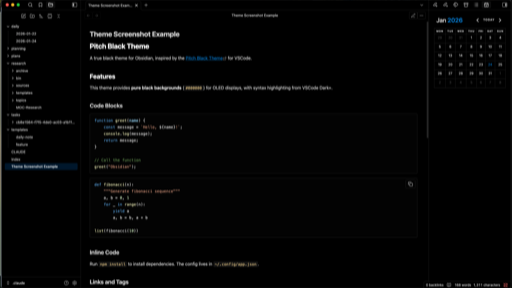
Features
- Pure black backgrounds (
#000000) throughout the entire UI - VSCode Dark+ inspired syntax highlighting for code blocks
- High contrast text on true black for OLED displays
- Consistent styling across all Obsidian UI elements
Installation
From Community Themes
- Open Obsidian Settings
- Go to Appearance → Themes
- Click Manage and search for "Pitch Black"
- Click Install and use
Manual Installation
- Download
theme.cssandmanifest.json - Create a folder called
Pitch Blackin your vault's.obsidian/themes/directory - Place both files in that folder
- Enable the theme in Settings → Appearance → Themes
Color Palette
| Element | Color |
|---|---|
| Background | #000000 |
| Primary Text | #d4d4d4 |
| Accent | #007acc |
| Inline Code | #d7ba7d |
| Code Background | #010101 |
Credits
- Inspired by VSCode Pitch Black Theme by Viktor Qvarfordt
- Syntax highlighting colors from VSCode Dark+
License
MIT License - see LICENSE for details.