
README file from
GithubKanso for Obsidian
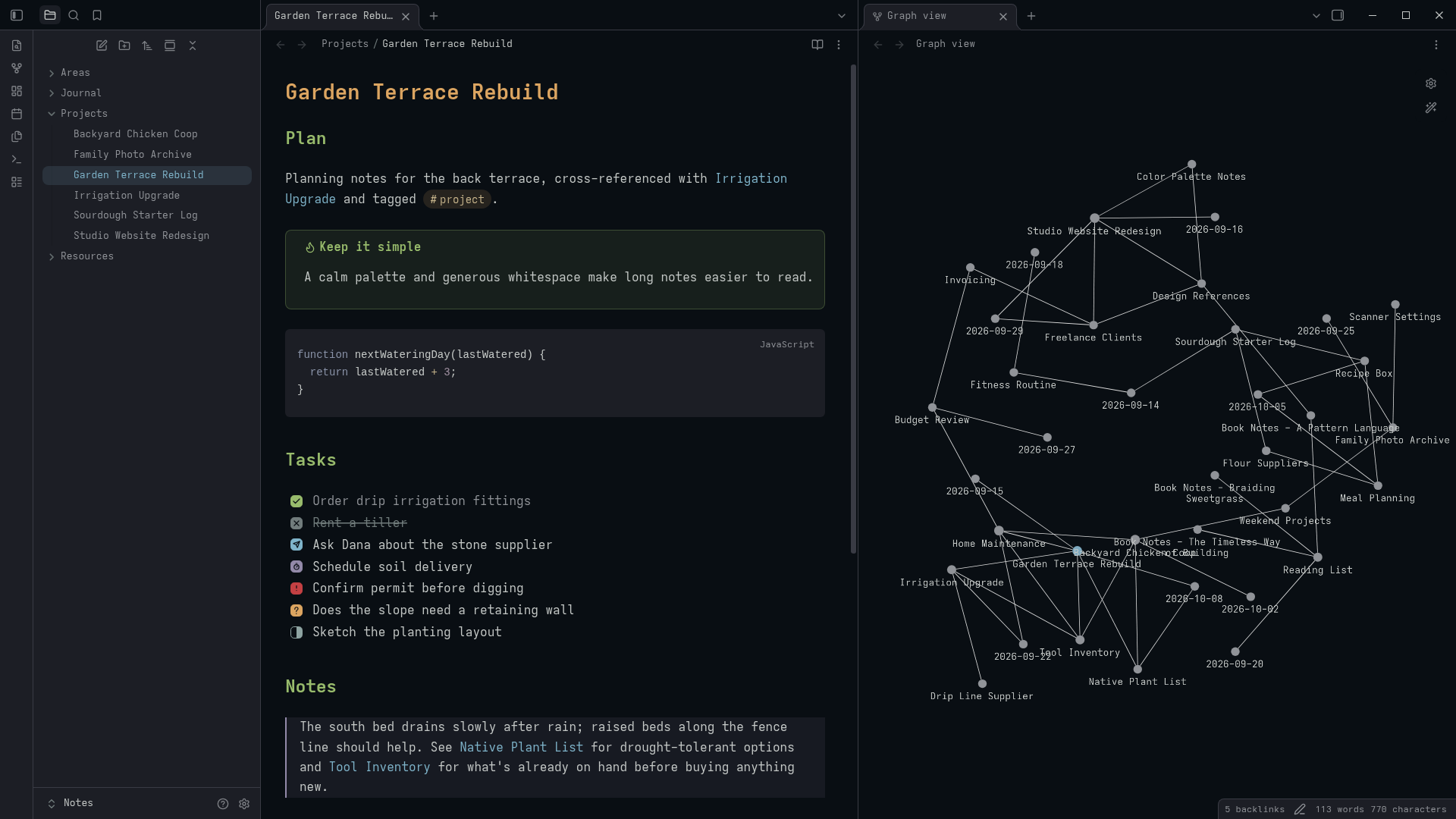
A calm, minimal Obsidian theme ported from kanso.nvim, with five variants: Zen, Ink, Mist, Void, and Pearl.
Features
- Five variants: Zen, Ink, Mist, and Pearl match kanso.nvim's palettes; Void is a true-black variant built on the same hues, for OLED screens
- Code blocks colored like kanso.nvim
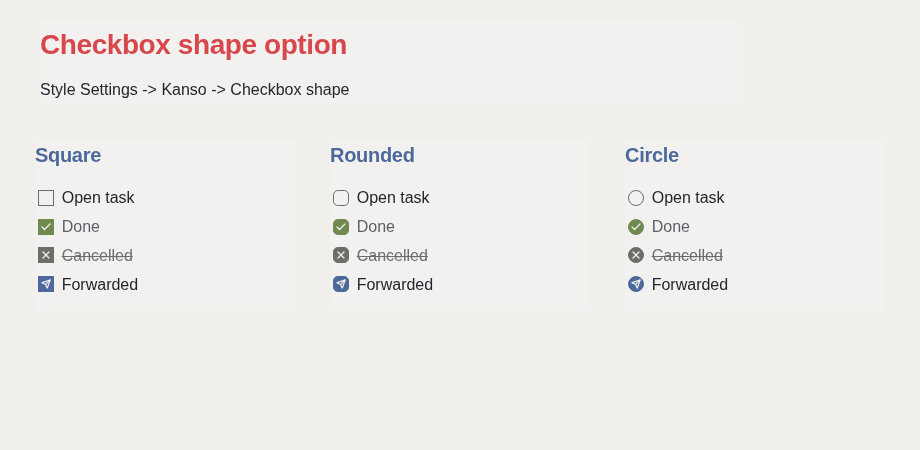
- Things-inspired task checkboxes, with eight styled markers and a choice of square, rounded, or circle
- Styling for the Tasks plugin's due, scheduled, and start dates
- Active line highlight while editing, like kanso.nvim's cursorline
- Focus mode, which hides the title bar, status bar, and ribbon for distraction-free writing
- Optional custom accent color, overriding a variant's accent without swapping variants
- Optional font-family choices for body text, headings, and code, each with web-safe fallbacks
- Styling for Dataview, Kanban, Excalidraw, and Calendar
- Image zoom: click and hold a rendered image in reading view to enlarge it
- Larger checkbox and tag tap targets on mobile
- Optional settings through Style Settings
- Minimal mode: a reduced, monochromatic color palette for distraction-free writing, with muted headings, subdued tags, neutral italics, and quiet code syntax from kanso.nvim
- Saturated foreground: increases the saturation of syntax highlighting and headings (+20% in dark mode, +40% in Pearl), matching kanso.nvim's saturated mode
- Search & Diff highlights: serene altBlue search matches and full diffGreen/diffRed/diffYellow palette for diff code blocks, File Recovery, and Obsidian Git
- Folder icons in the file explorer, open or closed to match the folder's state
Installation
From Obsidian (recommended): open Settings → Appearance → Themes → Manage, search for Kanso, then select Install and use.
Manually: download manifest.json and theme.css from the latest release, and put both in <your-vault>/.obsidian/themes/Kanso/. Then select Kanso under Settings → Appearance → Themes.
Settings
Kanso works without any plugins. With the Style Settings plugin installed, the Kanso section adds:
| Setting | Options | Default |
|---|---|---|
| Variant | Zen, Ink, Mist, Void, Pearl | Without the plugin: Zen in dark mode, Pearl in light mode |
| Checkbox shape | Square, Rounded, Circle | Rounded |
| Readable line width | Width in pixels | 760px |
| Radius | Size in pixels | 8px |
| Editor font size | Size in pixels | 16px |
| Disable active line highlight | On, Off | Off |
| Focus mode | On, Off | Off |
| Minimal mode | On, Off | Off |
| Saturated foreground | On, Off | Off |
| Custom accent color | Off, or a color picker | Off |
| Body font | Default, Sans-serif, Serif | Default (Obsidian's text font setting) |
| Heading font | Default, Sans-serif, Serif | Default (same as body) |
| Monospace font | Default, System monospace, Classic monospace | Default (Obsidian's monospace font setting) |
| Disable image zoom | On, Off | Off (zoom is on) |
| Disable folder icons | On, Off | Off (icons are on) |
Choosing a variant sets the color scheme: Pearl is always light, and Zen, Ink, Mist, and Void are always dark. Void sets the editor background to true black and raises the other surfaces just enough to stay distinguishable, for OLED screens, while keeping the same hue relationships as the other dark variants. The body, heading, and monospace font settings default to whatever you've chosen in Settings → Appearance → Font; picking anything other than Default here switches to that font instead.
Readable line width sets how wide a line gets, not whether the width is capped at all. Whether it's capped is Obsidian's own Settings → Editor → Readable line length toggle (also available as the Toggle readable line length command, so you can bind it to a hotkey). Turn that off and notes use the full pane width regardless of this setting; turn it on and notes are capped at the width you choose here, in both Reading view and Live Preview.
Turning on Custom accent color replaces the active variant's accent (links, the active nav item, focus rings, and interactive highlights) with your chosen color, without changing anything else about the variant. Leave it off to keep each variant's own accent.
Task checkboxes
| Marker | Meaning | Style |
|---|---|---|
[ ] |
To do | Outlined |
[x] |
Done | Green, muted text |
[-] |
Cancelled | Grey with an X, struck-through text |
[>] |
Forwarded | Blue, paper airplane |
[<] |
Scheduled | Violet, stopwatch |
[!] |
Important | Red, exclamation mark |
[?] |
Question | Yellow, question mark |
[/] |
In progress | Half-filled aqua |
Tasks plugin
If the Tasks plugin is installed, Kanso colors its dates. Due dates are red when overdue and orange when due today. Scheduled and start dates are orange once they have passed. Created, done, and cancelled dates are muted. You don't need any extra markup.
Active line highlight
Kanso highlights the line your cursor is on while editing, matching the cursorline kanso.nvim shows by default. It only appears in edit mode, while the editor pane is focused, and uses a translucent fill so it stays subtle under text selections. With the Style Settings plugin installed, turn on Disable active line highlight to remove it.
Focus mode
With the Style Settings plugin installed, turning on Focus mode hides the title bar, status bar, and ribbon for distraction-free writing. Hover near the left edge to bring the ribbon back, the bottom-right to bring the status bar back, or the window controls in the top-right to bring the title bar back; move the pointer away and each hides again. On touch devices, where there's no hover to rely on, nothing is hidden in the first place: the title bar and status bar stay visible (mobile Obsidian has no ribbon to hide). Turn the setting off to restore the normal layout.
Minimal mode
Ported from kanso.nvim's minimal = true option, Minimal mode subdues color variety across your notes for a cleaner, quieter writing and reading environment. When enabled via Style Settings:
- Headings (Muted): Replaces the multi-colored H1–H6 spectrum with a refined monochromatic hierarchy based on typographic weight and scale.
- Note title: Matches the prominent neutral foreground rather than carrying a bright yellow accent.
- Italics: Rendered cleanly through typographic slant alone, without adding yellow tint.
- Tags: Styled as subtle, quiet chips with neutral backdrops instead of bright colored labels.
- Links & Blockquotes: Softened and harmonized to prevent visual fragmentation across paragraphs.
- Code & Syntax: Code blocks and inline code adopt kanso.nvim's exact minimal syntax scheme:
| Element | Color |
|---|---|
| Variables, Constants | Foreground (white / neutral) |
| Parameters | Gray |
| Functions, Methods | Blue |
| Types | Aqua |
| Keywords, Statements | Gray |
Operators (=, +, *, etc.) |
Yellow |
| Brackets, Punctuation | Gray |
| Properties, Members | Violet |
| Strings | Green |
| Numbers | Pink |
Saturated foreground
Ported from kanso.nvim's foreground = "saturated" option, this setting enhances the saturation and vibrancy of syntax highlighting colors, headings, and tags (+20% in dark mode and +40% in Pearl/light mode). It is off by default and only affects foreground accents when enabled, leaving UI backgrounds and structural layout completely calm.
Plugin styling
Kanso recolors four popular community plugins with its own palette. No extra markup or settings are needed, and nothing changes if a plugin isn't installed.
- Dataview: query tables, lists, and inline fields read like the rest of Kanso.
- Kanban: lanes, cards, and tags already pick up Kanso through Obsidian's shared colors; Kanso also matches the lane corners to its radius setting and colors the WIP-exceeded badge.
- Excalidraw: the toolbar, side panels, and popups around the canvas follow Kanso's palette. This is most effective with Excalidraw's own "Match Obsidian theme" setting enabled. The canvas itself can't be recolored by a theme: it's painted pixel-by-pixel by Excalidraw's own code, which, with "Match Obsidian theme" on, paints it with Excalidraw's fixed default dark or light canvas color rather than the drawing's own saved background or any CSS variable, so it stays a neutral grey or white instead of Kanso's background.
- Calendar: day, week-number, and today colors already follow Kanso; Kanso also gives days with a note a subtle backdrop. Per-source dot colors are chosen in the plugin's own settings and are left as-is.
Image zoom
Click and hold a rendered image in reading view to enlarge it; release to shrink it back. It's on by default and works without any plugins. It only applies to images rendered in reading view, so it never interferes with Live Preview's image resize handles, and it skips images that are themselves links, so their normal click behavior is untouched. With the Style Settings plugin installed, turn on Disable image zoom to remove it.
Mobile
Kanso enlarges task checkboxes and inline tags on mobile, where Obsidian's own sizing (tied to the editor font) and Kanso's own tightened desktop tag padding otherwise leave both too small to tap reliably. This applies automatically on phones and tablets; desktop is unaffected. Obsidian's own mobile toolbar and safe-area handling are already generous and are left untouched.
Compatibility
Requires Obsidian 1.5.8 or later, on desktop and mobile.
Credits
- Colors from kanso.nvim by webhooked.
- The idea of styling alternate checkbox markers, and of a paper airplane for forwarded, comes from obsidian-things (MIT), which credits kepano's Minimal theme. Kanso's own selectors and colors are an independent implementation.
- Checkbox marker and folder icons from Lucide (ISC licence;
checkandxare Feather-derived icons bundled in Lucide under the MIT licence), except the question-mark glyph, which is Kanso's own original hand-drawn icon from 1.0.1. See THIRD_PARTY_LICENSES.md for the full notices. - The idea of a focus mode that hides the title bar, status bar, and ribbon comes from kepano's Minimal theme (MIT). Kanso's CSS is an independent implementation.
- The idea of click-and-hold image zoom comes from kepano's Minimal theme (MIT). Kanso's CSS is an independent implementation.
Feedback
Found a bug or have an idea? Open an issue.