
README file from
GithubEverforest Clarity
Everforest theme for Obsidian, tuned for long-form reading — LaTeX-heavy notes and CJK/Latin mixed text in particular.

Why another Everforest theme
Obsidian already has a few Everforest ports. This one exists because they left three things unaddressed:
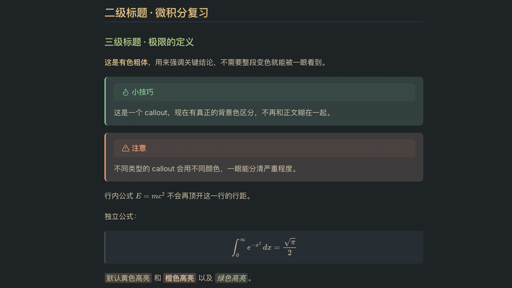
- Contrast wasn't verified. Several combinations across the existing ports fall below WCAG AA (4.5:1) for body text. Every color in Clarity — both dark and light mode — has been checked; the lowest ratio is 5.79:1 (dark) and 4.61:1 (light).
- Inline math breaks paragraph rhythm. MathJax's inline containers stretch line height unevenly, so paragraphs with formulas get inconsistent spacing. Clarity locks
line-height: 0on inline containers so this stops happening. - CJK/Latin mixed text looked cramped. Font stacks that list a CJK font first cause Latin characters to render through the CJK font too, flattening them. Clarity puts Latin fonts first so each script falls back correctly, and bumps line-height to 1.75 for the higher character density of Chinese text.
Features
- Dark background matches the Everforest Dark Hard terminal palette exactly (
#1E2326), not an approximation - Colored bold text (
#DBBC7F) instead of the usual near-white — carries more of the visual weight that headings alone can't - Seven-color highlight and text-color syntax, usable via Markdown nesting (no HTML required) or CSS classes
- Callouts render with a real background — a common regression in Everforest ports that only style the border
- Math (MathJax): scaled to match body text size, display equations scroll horizontally instead of clipping
Installation
From within Obsidian (once approved by the community directory):
- Settings → Appearance → Themes → Manage
- Search for "Everforest Clarity"
- Install and enable
Manual install:
cd <your-vault>/.obsidian/themes
git clone https://github.com/ziangchen7/obsidian-everforest-clarity "Everforest Clarity"
Then select it under Settings → Appearance → Themes. An accent color of #A7C080 is recommended.
Highlight syntax
==text==                          yellow highlight (default)
**==text==**                      orange highlight
*==text==*                        green highlight
***==text==***                    aqua highlight
<mark class="red">text</mark>     any of: red orange yellow green aqua blue purple
<span class="c-red">text</span>   color only, no background — same seven colors, `c-` prefix
The nested-Markdown forms work without HTML and without plugins. Highlight text always uses the normal foreground color rather than a matching accent color — same-hue combinations (e.g. red background with red text) drop below 4:1 contrast and become hard to read.
Contrast reference
| Dark mode | Light mode | |
|---|---|---|
| Body text | 9.39:1 | 6.34:1 |
| Lowest heading | 6.87:1 | 4.61:1 |
| Bold text | 8.70:1 | 5.20:1 |
| Highlight block, body text | 5.60 – 6.18:1 | 4.72 – 5.29:1 |
All values meet or exceed WCAG AA (4.5:1) for normal text.
Known limitation
Dark mode's background (#1E2326) matches the Ghostty terminal implementation of Everforest Dark Hard exactly. Light mode's accent colors do not come from the terminal's Light Med palette — those colors (e.g. #F57D26) were designed for a terminal and drop to ~2.2:1 against this theme's light background, which fails for headings and body text. Light mode uses a separately darkened set of the same hues instead.
Credits
Color palette: Everforest by sainnhe.
License
MIT