
README file from
GithubWeave Surface
Weave 官方 Obsidian 主题 · Official Obsidian theme by Weave
中文
简介
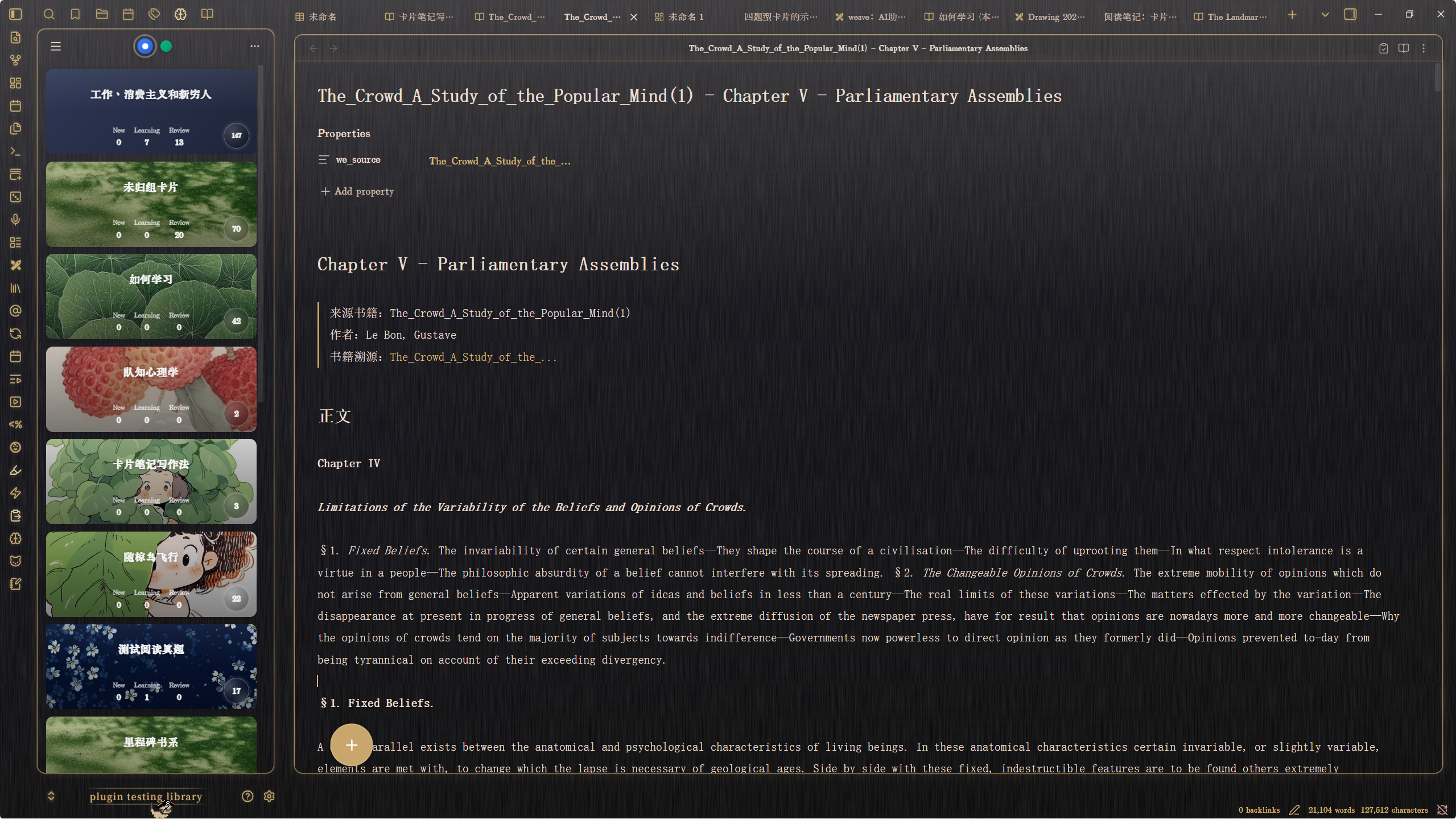
Weave Surface 是 Weave 官方 Obsidian 主题。整体气质是「文房书桌」:外框是书桌材质,笔记内容落在浮起的纸卡上;深色模式下,侧栏与主内容区使用鎏金描边。
特点
- 书桌外框 + 纸卡内容区
- 深色模式鎏金边框
- 九种可切换桌面材质(需 Style Settings)
- 未手动选择材质时:浅色默认为胡桃木,深色默认为漆器乌木
桌面材质
请先安装并启用社区插件 Style Settings,然后打开:
设置 → Style Settings → Weave Surface → 桌面材质
- 不选择:跟随主题默认(浅色胡桃木 / 深色漆器乌木)
- 选定某一种:浅色与深色都固定为该材质
木纹书桌
偏原木家具感。
| 名称 | Style Settings 值 |
|---|---|
| 橡木 | smartisan-desk-oak |
| 胡桃木 | smartisan-desk-walnut |
| 枫木 | smartisan-desk-maple |
| 竖纹橡木 | smartisan-desk-oak-vertical |
漆面精工
偏光滑漆器 / 乌木桌面。
| 名称 | Style Settings 值 |
|---|---|
| 漆器乌木 | smartisan-desk-lacquer |
书写垫 / 铺面
桌面上的垫面或席面,而非整张木板。
| 名称 | Style Settings 值 |
|---|---|
| 皮革桌垫 | smartisan-desk-leather |
| 竹席 | smartisan-desk-bamboo |
| 毛毡书写垫 | smartisan-desk-felt |
| 软木板 | smartisan-desk-cork |
安装
社区主题(推荐)
- 打开 Obsidian 设置 → 外观 → 主题
- 搜索 Weave Surface
- 安装并启用
手动安装
-
从本仓库或 GitHub Release 获取
manifest.json与theme.css -
放入库目录:
.obsidian/themes/Weave Surface/ -
在 设置 → 外观 → 主题 中启用 Weave Surface
切换桌面材质需额外安装 Style Settings。
要求
- Obsidian 1.5.0 或更高版本
- Style Settings:可选,仅在需要切换桌面材质时安装
作者
许可
MIT License — 详见仓库根目录 LICENSE。
English
Overview
Weave Surface is the official Obsidian theme from Weave. It presents a scholar’s desk: desk chrome around the workspace, notes on floating paper cards, and warm gilt frames for side docks and the main content area in dark mode.
Features
- Desk chrome + floating paper cards
- Gilt frames in dark mode
- Nine switchable desk surfaces (via Style Settings)
- Without a manual Style Settings choice: Walnut in light mode, Lacquer Ebony in dark mode
Desk surfaces
Install and enable the community plugin Style Settings, then open:
Settings → Style Settings → Weave Surface → Desk surface
- Leave empty: use built-in defaults (Walnut in light / Lacquer Ebony in dark)
- Pick one surface: that surface is used in both light and dark mode
Wood desk
Natural wood grain, furniture-like.
| Name | Style Settings value |
|---|---|
| Oak | smartisan-desk-oak |
| Walnut | smartisan-desk-walnut |
| Maple | smartisan-desk-maple |
| Vertical Oak | smartisan-desk-oak-vertical |
Lacquer finish
Smooth lacquer / ebony feel.
| Name | Style Settings value |
|---|---|
| Lacquer Ebony | smartisan-desk-lacquer |
Writing mats
A pad or mat on the desk, not a full plank.
| Name | Style Settings value |
|---|---|
| Leather Desk Pad | smartisan-desk-leather |
| Bamboo Mat | smartisan-desk-bamboo |
| Felt Writing Mat | smartisan-desk-felt |
| Cork Board | smartisan-desk-cork |
Install
Community themes (recommended)
- Open Obsidian Settings → Appearance → Themes
- Search for Weave Surface
- Install and enable
Manual install
-
Get
manifest.jsonandtheme.cssfrom this repository or a GitHub Release -
Place them in your vault:
.obsidian/themes/Weave Surface/ -
Enable Weave Surface under Settings → Appearance → Themes
Desk surface switching requires Style Settings.
Requirements
- Obsidian 1.5.0 or newer
- Style Settings: optional; only needed to switch desk surfaces
Author
License
MIT License — see LICENSE in the repository root.