
README file from
GithubAbsolutelyGlass
English | 中文
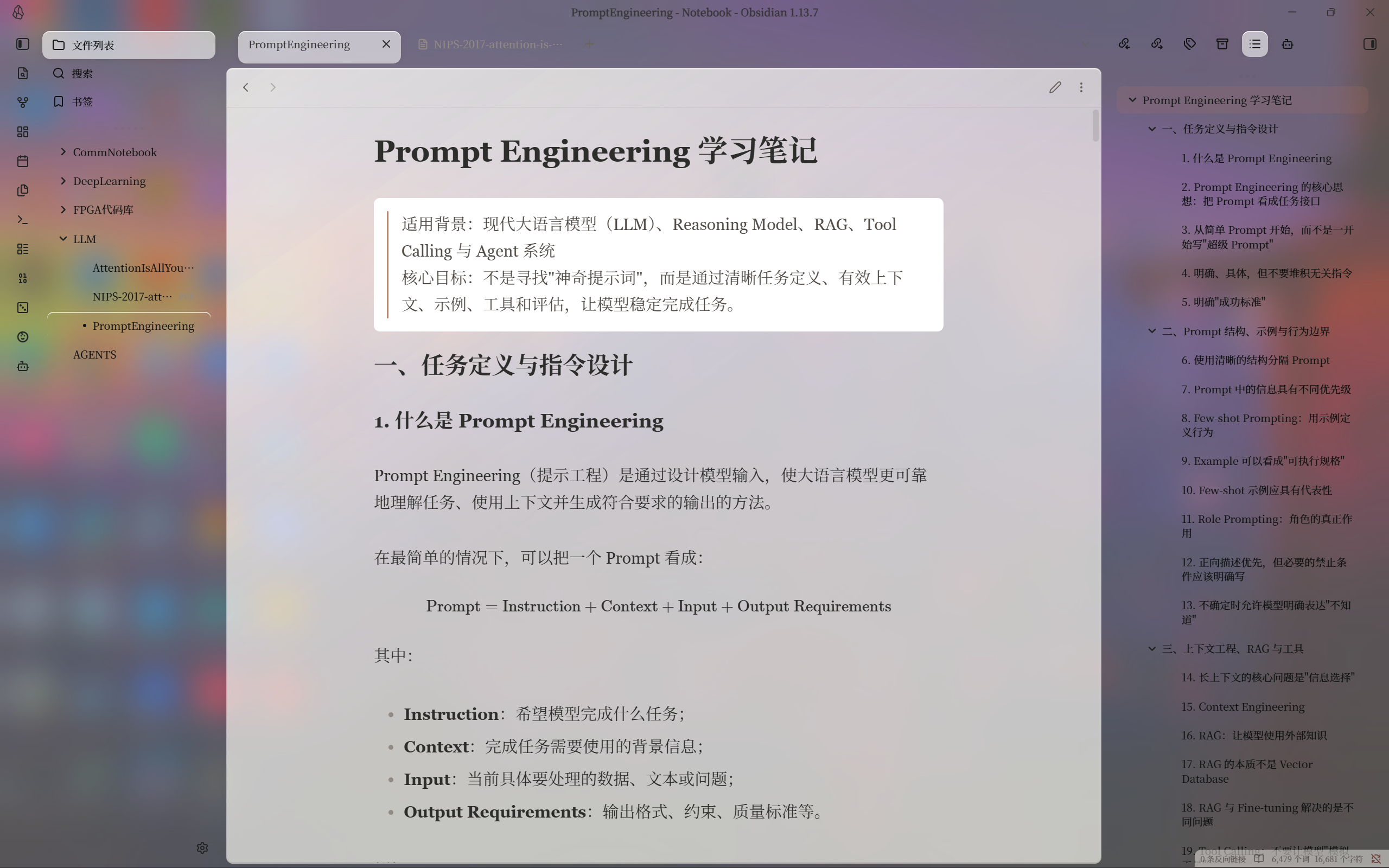
A warm Obsidian theme with frosted glass panels. Your notes rest on a soft, translucent surface instead of a flat slab of colour.
| Light | Dark |
|---|---|
 |
 |
Click either screenshot to open it full size.
Install
From Obsidian — Settings → Appearance → Themes → Manage, search for AbsolutelyGlass, then Install and use.
By hand — download manifest.json and theme.css from the latest release, put both in <your-vault>/.obsidian/themes/AbsolutelyGlass/, and reload Obsidian.
Seeing your desktop through the glass (Windows 11)
Out of the box the panels blur the theme's own background, so what shows through them is colour, not your wallpaper. It still reads as frosted — it just isn't your desktop.
To put your actual desktop behind the window, install the companion plugin:
AbsolutelyGlass Acrylic — Windows 11 22H2 or newer, desktop app only.
It's optional. If you just want a softer look, the theme on its own is enough. Don't run it alongside another Mica or Acrylic window plugin — they fight over the same window setting.
Worth setting expectations: this is Windows' own Acrylic material, the same one behind the Start menu. It is not Apple's Liquid Glass, and nothing refracts or moves.
Adjusting the glass
Install Style Settings, then open AbsolutelyGlass · Glass material:
| Setting | Default | When you'd change it |
|---|---|---|
| Panel opacity | 0.64 | Raise it when text is hard to read over a busy desktop |
| Window tint | 0.12 | The colour sitting behind the glass |
| Blur radius | 24 px | Lower it if scrolling feels sluggish |
| Corner radius | 16 px | Panel corners |
Light and dark are tuned separately. There is also High readability · solid mode, which removes transparency completely — handy on battery, or when you want the layout without the glass.
Everything else in the Style Settings panel comes from the base theme and works as before.
Set Style Settings → AbsolutelyGlass · Glass material → Panel opacity to 0 to clear the reading surface tint completely. Set panel blur to 0 separately if desired. Native window tint and Windows Acrylic remain independent; solid mode and reduced-transparency preferences override transparency. Document tab text stays near-black, so contrast is limited on dark backgrounds.
What you need
- Obsidian 1.13.4 or newer.
- The plugin additionally needs Windows 11 22H2 (build 22621+) and a recent Obsidian installer. On macOS, Linux and mobile you still get the theme's frosted panels; the plugin simply stays off.
Windows decides for itself whether to allow Acrylic. If your window stays opaque, check Settings → Accessibility → Visual effects → Transparency effects. Power saving, Remote Desktop, and some graphics drivers force it off too, and the theme can't override any of that.
If something looks wrong
My desktop doesn't show through. The plugin isn't running. Check that it's enabled and that you're on Windows 11 22H2 or newer. You can also run AbsolutelyGlass Acrylic: Reapply Acrylic backdrop from the command palette to retry.
I changed the theme but Obsidian looks the same. Save your notes and restart Obsidian completely — reloading the CSS doesn't replace plugin code that's already in memory.
Text is hard to read against my wallpaper. Raise panel opacity, or switch on solid mode.
How do I go back? Pick any other theme. The plugin notices and restores your window; disabling it does the same.
Credits
AbsolutelyGlass is built on other people's work, and most of what you see isn't ours.
- AbsolutelyBaseline — the theme this one extends, with its palette and typography unchanged.
- Baseline by aaaaalexis — MIT. Every layout, component and animation you see. If you like how this theme behaves, that's Baseline's doing.
- Instrument Serif — Copyright 2022 The Instrument Serif Project Authors, by Rodrigo Fuenzalida and Jordan Egstad. SIL Open Font License 1.1, bundled inside
theme.css. - Inter — by Rasmus Andersson, SIL Open Font License 1.1. Referenced by name; it ships with Obsidian.
The palette and typography take their direction from Claude, Anthropic's AI assistant.
AbsolutelyGlass is an independent community theme. It is not affiliated with, sponsored by, or endorsed by Anthropic. "Claude" is a trademark of Anthropic PBC, referenced here only to describe the visual style this theme draws on.
License
MIT © 2026 dingye0604, incorporating AbsolutelyBaseline and Baseline © 2025 aaaaalexis. Bundled and referenced fonts are licensed separately under the SIL Open Font License 1.1.
Building from source, or want to know exactly what has and hasn't been tested? See DEVELOPMENT.md and VALIDATION.md.