
README file from
GithubEnough Light
A calm, legible Obsidian theme. Enough light to read by, nothing more.
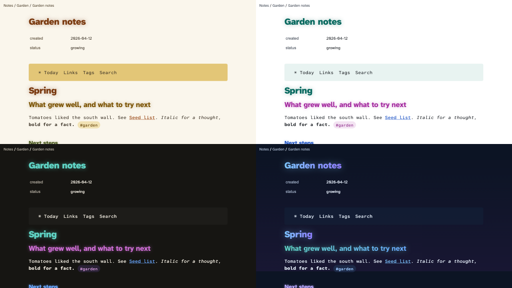
Light palettes
- Honey (default): warm yellow paper; rust, amber, olive
- Slate: cool blue-grey; navy, plum, teal
- Sage: soft green; forest, terracotta, indigo
- Daylight: bright white; Arcane's colours by day
Dark palettes
-
Arcane (default): teal, magenta, blue with a soft glow
-
Deep Sea: navy paper; sky, aqua, lilac; optional ombre
-
Ember: warm brown; gold, copper, rose
-
Seven palettes: light Honey · Slate · Sage · Daylight; dark Arcane · Deep Sea · Ember.
-
Optional effects: heading glow (all palettes), ombre page fade and gradient headings (dark).
-
Per-heading controls (H1–H6 colour, size, font, weight) and four bundled font pairings via the Style Settings plugin.
-
Legibility is tested, not eyeballed: body ≥ 7:1, headings ≥ 5.5:1, other text ≥ 4.5:1, on page and sidebar.
-
Say it once: every colour lives in
src/palettes.mjs; each element gets one visual signal.
Install
- From Obsidian: Settings → Appearance → Themes → Manage → search Enough Light → Install and use.
- By hand: download
theme.cssandmanifest.jsonfrom the latest release into<your vault>/.obsidian/themes/Enough Light/, then pick it under Settings → Appearance → Themes.
Customise it: install the Style Settings plugin, then Settings → Style Settings → Enough Light. The top line shows the installed version, with links to what's new and this README. You can set:
- the palette, separately for light and dark mode (each picker and its samples of every palette sit in one card, with the one in use ticked);
- whether to use Obsidian's own accent colour (Settings → Appearance → Accent color) instead of the palette's;
- colours for bold, italic and highlighted text;
- the width of the text column (when Readable line length is on);
- heading glow (on by default) and the dark-mode gradient effects;
- the font pairing;
- colour, size, font and weight for each heading level, with live samples (all six together, and each level in its own section) that update as you change them.
Without Style Settings you get Honey (light) and Arcane (dark).
Fonts: the bundled fonts only show when Settings → Appearance → Text font and Interface font are empty, because those fields override any theme.
Other devices: with Obsidian Sync, turn on Installed themes and snippets and Appearance settings on each device, then restart Obsidian there.
Your own Mac fonts on iPhone/iPad: Obsidian on iOS can't use fonts installed on the phone, and Sync copies
font names, not files. scripts/personal-fonts.sh "<vault>" embeds the fonts your Appearance settings use
into a vault snippet; turn it on under Appearance → CSS snippets. The output stays in your vault and is never
committed (some fonts are personally licensed).
Develop
npm test: legibility, build, font and manifest checksnpm run build: writestheme.css(fonts embedded)npm run dev -- "<vault path>" [--watch]: build and install into a vault./scripts/preview.sh: screenshots on Obsidian's real app.css, andcover.png./scripts/fetch-fonts.sh: rebuildfonts/woff2from google/fonts (needs uv)
Edit src/, never theme.css. Design: docs/enough-light-design.md ·
Plan: docs/enough-light-plan.md
Licence
MIT (see LICENSE). Bundled fonts are SIL Open Font License 1.1, see fonts/licenses/.