
README file from
Github"Harmonic" theme for Obsidian
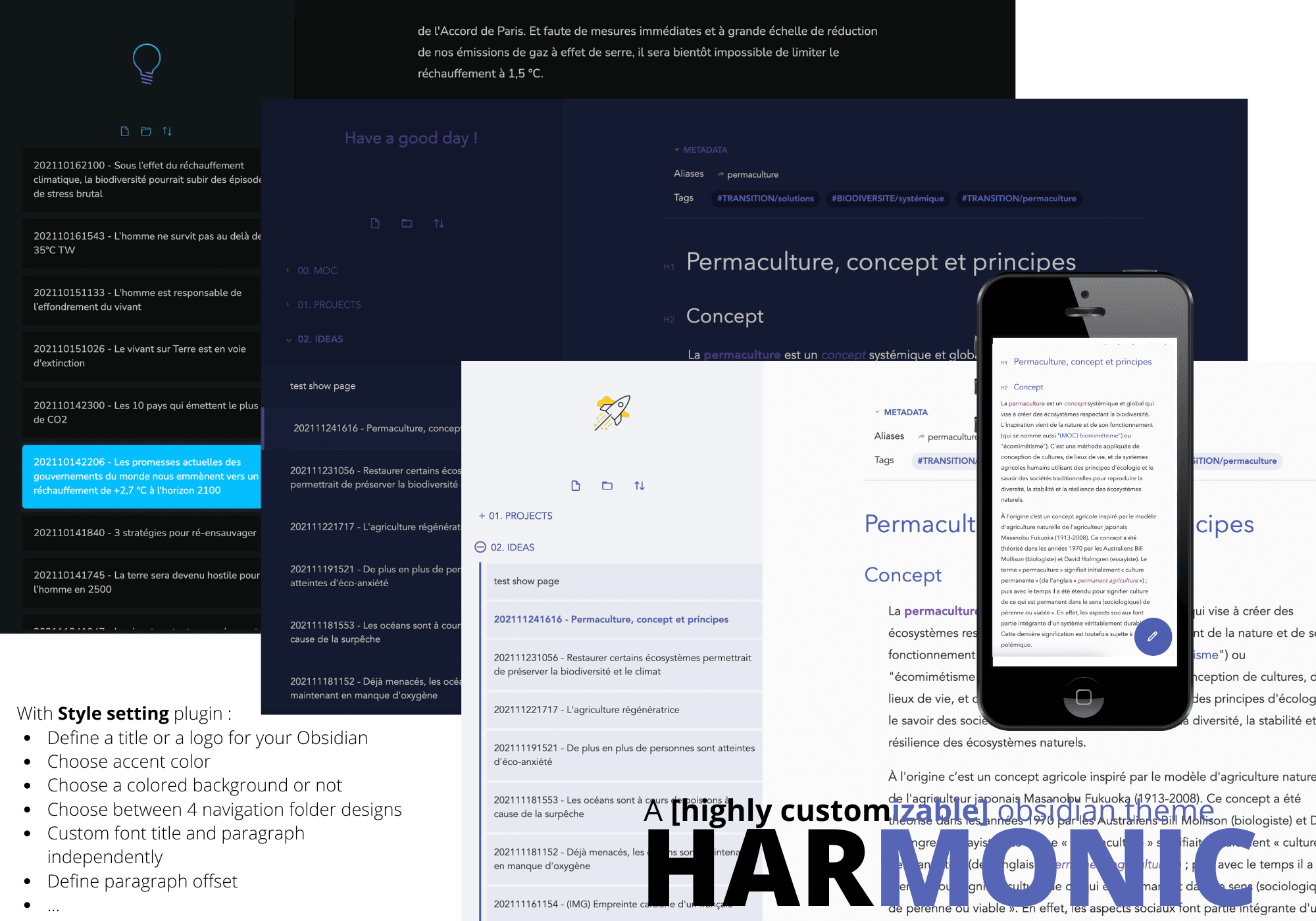
Harmonic is a minimal and highly customizable theme. You can easily change the entire design with just a few changes using the Style Settings plugin panel ✏️
Support my work
If you like using the theme, you can :
Plugins compatibility
This theme has adjustments or custom-made design for the following plugins :
- Kanban
- Calendar
- Sliding Panes
- Checklist
- File Explorer Note Count
How to install ?
- In your Obsidian go to
Settings>Appearance>Themes>Manage - Then browse for the Harmonic theme and click on
Use
How to customize ?
Firstly, install the Style Settings plugin :
- In your Obsidian go to
Settings>Community plugins>Browse - Then browse for the Style Settings plugin and click on
Installand then onEnable - You have now access to the customization panel by going to
Settings>Style Settings>Harmonic
What you can customize ?
Choose a logo or a title, an accent color, 4 different styles for menus (left sidebar and right sidebar)

Activate focus mode, make bold and italic pop (preview and edit mode)
-
Before focus mode:
-
After focus mode:
-
Bold and italic color accent in edit mode (same in preview mode)
-
Focus on the paragraph you are writing (edit mode)
Customize page settings : line width, paragraph offset, activate fullwidth mode
-
paragraph offset :
-
Fullwidth mode (in preview and edit mode)
Font
- Choose different font for titles, text preview, edit mode and phone
Titles
-
Make the "Hx" appear like in Bear app
-
Choose font style (normal, italic) for each level
Designed for phones
- you can choose a specific font size for phone
- texts (preview and edit mode) are displayed smaller
- an edit button is displayed automaticaly
Custom html elements
To have more information about the theme and custom css / html : Go there
- columns (.columns-2, columns-3) avec html :
<div class="columns-2>your text</div>
- cards (.cards-2, .cards-3) avec html :
 <div class="cards-2>
  <img src="https://raw.githubusercontent.com/thiews/Obsidian-Harmonic/HEAD/image url">
  <div class="card-title">Your title</div>
  <p>Your text</p>
  <button><a href="url of the page">Text of the button</a></button>
 </div>
- menu bar for page (.menu-page) avec html
  <div class="menu-page">
	  <a href="obsidian link of page 1">Page 1</a>
	  <a href="obsidian link of page 2">Page 2</a>
	  <a href="obsidian link of page 3">Page 3</a>
  </div>
- aside
Custom dataview
- list of articles style (.dataview-articles-style) With the following dataview code. "Cover" appear in page YAML (cover: url of the image)
table file.ctime, ("<img src="https://raw.githubusercontent.com/thiews/Obsidian-Harmonic/HEAD/ + cover + ">") as cover
from WHAT YOU WANT TO SHOW
sort file.ctime desc
How to contribute ?
Contribute by testing the theme
- Test the theme features
- Observe a bug or an improvement that could be made
- Report it by creating an issue
Contribute by coding the theme
- If you have found a bug or a potential improvement for the theme and want to code it, we would be happy to accept your PRs! Important : It'd be good to talk about it beforehand to make sure that no one else is working on it. You can open an issue for this.
- If you want to code but don't know where to start :
- Check out the issues labelled "help wanted".
- Check out our roadmap and choose an unassigned task
Here are the steps to contribute to the Harmonic's code :
- Fork this repository
- Clone your fork on your computer using
git clone https://github.com/<YourGithubName>/Obsidian-Harmonic.git - In local, navigate into the cloned folder called
Obsidian-Harmonic/ - Add the Harmonic project repository as the "upstream" remote using
git remote add upstream https://github.com/Thiews/Obsidian-Harmonic.git - Now you can easily pull the new updates on the Harmonic repository using
git pull upstream main - Apply changes in your local repository
- Commit your changes using
git add -A+git commit -m "<YourChangesDescription>" - Push your changes to your fork repository using
git push origin main - Return to your fork on Github, refresh the page and you should see an highlighted area that invites you to initiate a Pull Request. (alternatively you can click on the "New pull request" button)