
README file from
GithubBrutato
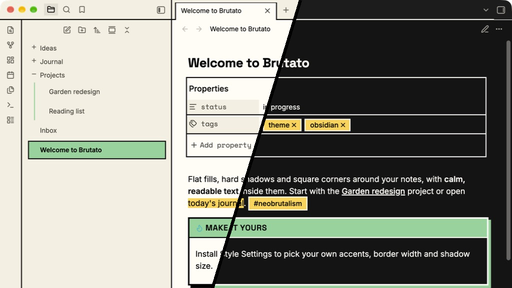
A neobrutalist theme for Obsidian. Flat fills, hard shadows, square corners and thick borders on the app around your notes, with calm, readable note text inside them. Light and dark modes.
Features
- One border system and one shadow style. 2px borders, 3px for emphasis, and solid offset shadows with no blur. Every corner is square, including on phones and tablets.
- Three accents, always behind black text. Green for active items and buttons, yellow for tags and highlights, orange for warnings. Muted, faint and accent text all meet WCAG AA contrast (4.5:1 or higher).
- Readable notes. The bold treatment stays on the frame: sidebar, tabs, buttons, callouts, menus and dialogs. Note text stays quiet unless you turn on full brutal mode.
- Bundled fonts. Space Grotesk for headings, Inter for text and Space Mono for code, all embedded. Nothing loads from the internet.
- Callouts with filled title bars. Yellow for note and info, green for tip and success, orange for warning and important, coral for error and bug.
- Canvas. Solid-fill cards in six matching colors, ink connection lines with square ends, and bordered toolbars.
- Graph view, Bases, Properties and embeds styled to match.
- File explorer. Plus and minus folder carets, a green guide line under open folders, and roomier list spacing.
- Clean PDF export. Hard shadows are dropped when you export or print, while borders and colors stay.
- Plugin support. Ultra Budget Tracker gets square corners to match the rest of the theme.
Install
From Obsidian: Settings → Appearance → Themes → Manage, search for Brutato, then select Install and use.
Manually: download theme.css and manifest.json from the latest release and put them in a folder named Brutato inside your vault's .obsidian/themes folder. Then pick Brutato under Settings → Appearance → Themes.
Requires Obsidian 1.14 or later.
Options
Install the Style Settings plugin to change Brutato's defaults. You'll find them under Settings → Style Settings → Brutato.
| Option | Choices |
|---|---|
| Accent 1, 2 and 3 | Any color. Pick light colors, since they sit behind black text. |
| Border width | 1 to 4px |
| Shadow offset | 0 to 10px (0 turns shadows off) |
| Dark mode shadow color | Accent 1, cream or accent 2 |
| Full brutal note text | Boxed H1, ruled H2, filled inline code and internal links, boxed quotes |
| Folder caret | Plus/minus or Obsidian's chevron |
| Canvas card style | Solid fill or tinted with a color bar |
Without the plugin, Brutato uses the defaults shown in the screenshot.
Known limits
- Graph view nodes are drawn on a canvas, so they take Brutato's colors but not its borders or shadows.
- Canvas connection lines keep Obsidian's curved paths. For straight or right-angle lines, use the Advanced Canvas plugin.
- The plus/minus caret and the Canvas line styles depend on Obsidian's internal class names. If an Obsidian update changes those names, these two features may need a Brutato update.
- Canvas cards with a custom color also get black text, so very dark custom colors are hard to read.
Inspiration
Brutato follows the guidance in Brutalist Web Design, Neobrutalism: Definition and Best Practices from Nielsen Norman Group, neubrutalism.com and neobrutalism.dev.
License
Brutato is released under the MIT License. The bundled fonts (Inter, Space Grotesk and Space Mono) are licensed under the SIL Open Font License 1.1. See OFL.txt.