
README file from
GithubAstrum
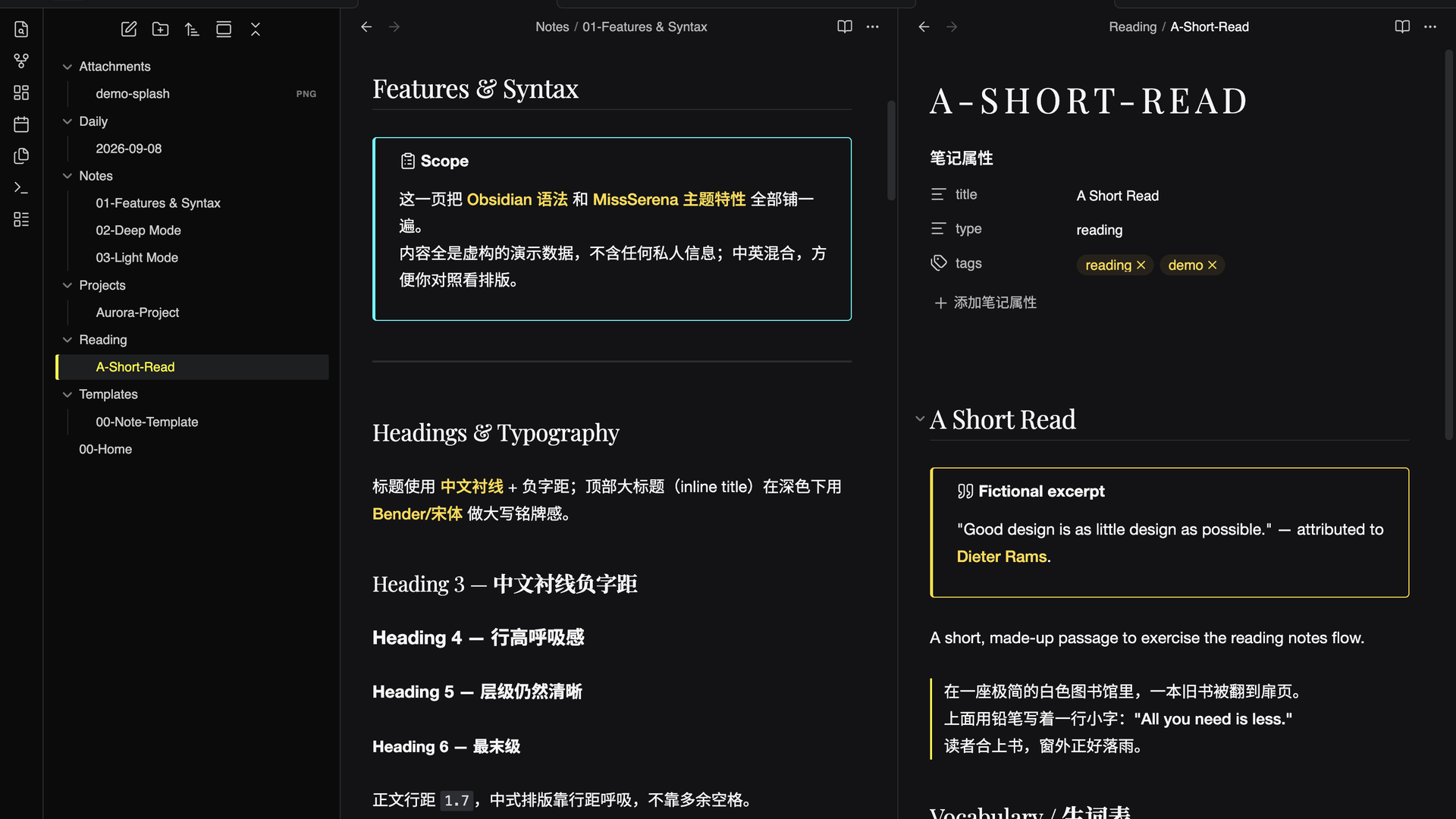
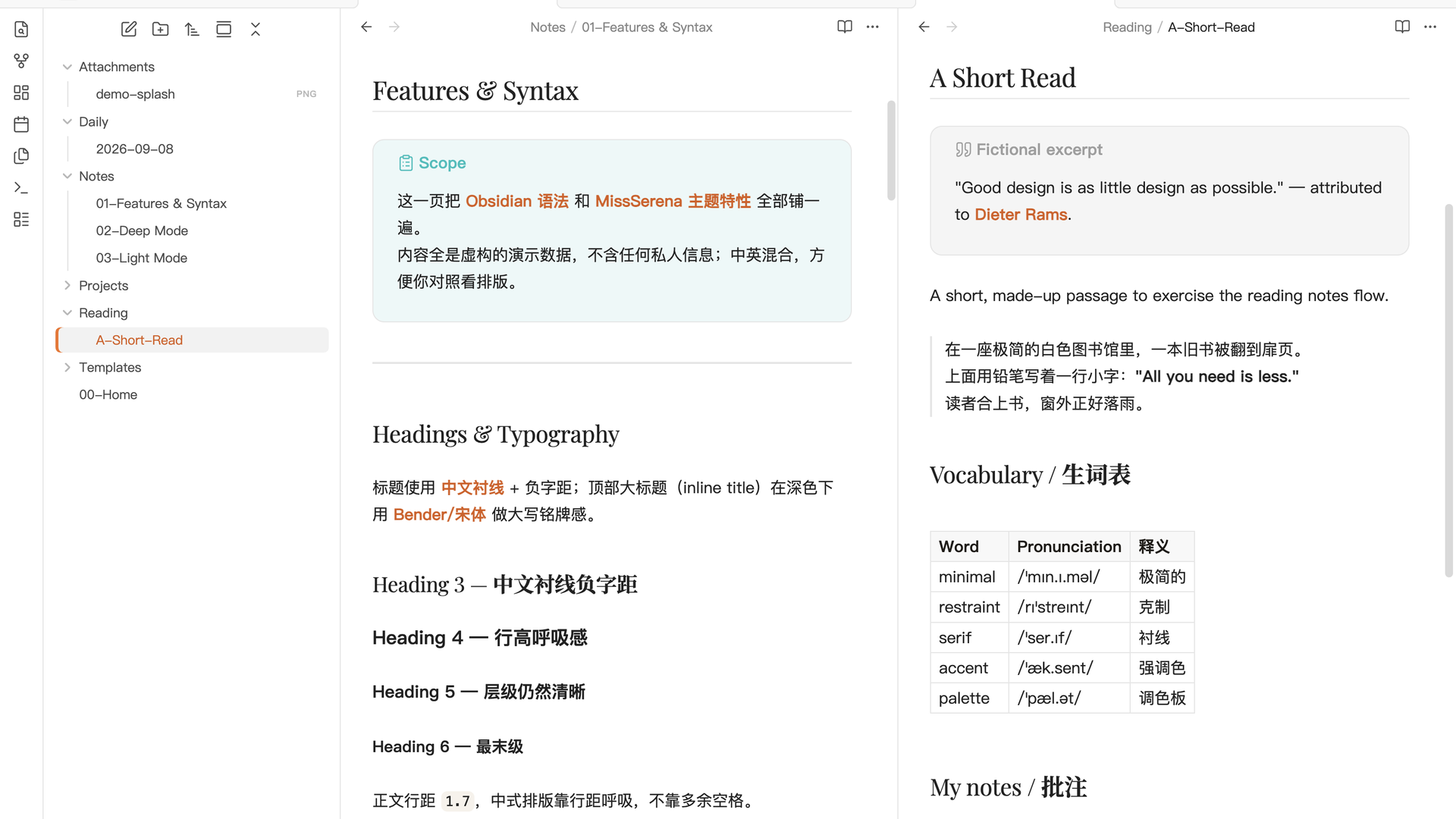
Astrum is a dual-mode Obsidian theme inspired by the visual language of Hypergryph studio — Arknights, Arknights: Endfield, and Ex Astris (来自星尘). It blends a black / white / gray base with a single saturated accent per mode, CMYK-style tricolor accents, serif Chinese headings, and a distinct shape language: sharp right angles in dark, soft capsule radii in light.
Astrum 是一款受鹰角网络(Hypergryph)视觉语言启发的双模式 Obsidian 主题——灵感来自《明日方舟》《明日方舟:终末地》与《来自星尘》。它以黑 / 白 / 灰为基底,每种模式搭配单一高饱和强调色,融合 CMYK 三色点缀、中文衬线标题,以及两种鲜明的形态语言:深色采用锐利直角,浅色采用柔和胶囊圆角。
This is an independent, fan-made theme. It is not affiliated with, endorsed by, or sponsored by Hypergryph or Obsidian. The colors and design cues are inspired by the studio's game art direction; no official assets or code are included.
这是一个独立、由爱好者制作的主题,与鹰角网络(Hypergryph)或 Obsidian 没有任何关联、背书或赞助。配色与设计语言仅受该公司的游戏美术方向启发,不含任何官方素材或代码。
模式 / Modes
深色 Dark —《明日方舟》×《终末地》/ Arknights × Endfield
- Cold deep-gray base from Endfield
#191919; hierarchy by lightness, not shadow.- 基底:终末地冷深灰
#191919系,靠明度分层而非阴影。
- 基底:终末地冷深灰
- Accent: Endfield alert yellow
#fffa00for interactions / state / selection.- 强调色:终末地警报黄
#fffa00(交互 / 状态 / 选中)。
- 强调色:终末地警报黄
- Links: Arknights tech cyan
#18d1ff.- 链接色:方舟科技青
#18d1ff。
- 链接色:方舟科技青
- Right-angle radii (2–4px). Heading font reverts to a serif / Bender.
- 圆角:直角(2–4px);标题回归宋体 / Bender。
浅色 Light —《来自星尘》/ Ex Astris
- A "luxury boutique" four-color system over a Chanel white base.
- 在 Chanel 白底上构建「奢侈品橱窗」四色体系。
- Chanel black/white — skeleton (paper & ink)
- Chanel 黑白 — 骨架(白纸黑字)
- Chanel gold
#C5A253— refinement layer (bold, rules, list markers)- Chanel 金
#C5A253— 精致层(加粗 / 线条 / 列表符)
- Chanel 金
- Hermès orange
#F37021— action layer (interactions, selection, checkboxes)- Hermès 橙
#F37021— 行动层(交互 / 选中 / 勾选)
- Hermès 橙
- Tiffany
#0ABAB5— information layer (links, text selection)- Tiffany 青
#0ABAB5— 信息层(链接 / 选区)
- Tiffany 青
- Dior pink
#F7CACA— soft layer (highlight, tags)- Dior 粉
#F7CACA— 柔和层(高亮 / 标签)
- Dior 粉
- Soft capsule radii (button
999px).- 圆角:胶囊(按钮
999px)。
- 圆角:胶囊(按钮
亮点 / Highlights
- Chinese-friendly typography:
PingFang SC/Source Han Sansinterface & body stack, serif headings, adjustable line-height for CJK breathing room (1.7), negative tracking on large titles.- 中文友好排版:
PingFang SC/Source Han Sans界面与正文栈、衬线标题、可调行高(1.7)让中文更透气、大标题负字距。
- 中文友好排版:
- Tricolor callout system (dark): note → cyan, warning → magenta, tip/success/etc. → gold — borders and title/icon colors per callout type, with inner text returning to body color.
- 三色 callout 系统(深色):note→青、warning→品红、tip/success 等→金,按类型区分边框与标题/图标色,正文回归正文色。
- Nav & tab accent indicators: left accent bar on active file, bottom accent line on active tab.
- 导航与标签页强调指示:当前文件左侧强调色条、当前标签页底部强调色线。
- CMY / alert-yellow accents tuned for dark readability (desaturated where needed) and luxury tones for light-mode legibility.
- CMY / 警报黄强调色针对深色可读性调校(必要时降饱和);浅色用奢华色系保证可读性。
- Code & blockquote styling: distinct base, thin hairline borders, warm gold-paper code block in light mode.
- 代码与引用样式:独立底色、细发丝边框、浅色模式温暖的金纸代码块。
- Consistent task checkbox radii and completed-task accent colors across both modes.
- 统一的任务复选框圆角,以及两种模式下完成任务的强调色。
安装 / Installation
- Open Settings → Appearance → Themes → Manage.
- 打开 Settings → Appearance → Themes → Manage。
- Click Community themes and search for Astrum.
- 点击 Community themes 搜索 Astrum。
- Install and Use.
- Install 并 Use。
You can also install it manually: copy this folder into your vault's .obsidian/themes/ directory, then enable it from Settings → Appearance.
也可以手动安装:把本目录复制到 vault 的 .obsidian/themes/ 目录,再到 Settings → Appearance 启用。
兼容性 / Compatibility
minAppVersion:1.0.0minAppVersion:1.0.0
- Works in both light and dark modes; follow your system appearance or toggle via Settings → Appearance.
- 深 / 浅模式均支持;跟随系统外观,或经 Settings → Appearance 手动切换。
许可 / License
Released under the MIT License. See the license file for details.
以 MIT 许可 发布,详见许可文件。