
README file from
Githubcode --install-extension sltsh.aion-theme
Then pick Aion or Aion Light from Preferences: Color Theme.
Why Aion
Your code sits deepest. In Aion the editor is the darkest surface. The sidebar, activity bar and status bar are raised one step above it, and the panel sits between the two, so the eye settles on the code rather than on the chrome around it. Of the four themes compared here, two do the opposite and two paint both one colour:
| Theme | Editor | Sidebar | Order |
|---|---|---|---|
| One Dark Pro | #282c34 |
#21252b |
sidebar below editor |
| Ayu Mirage | #242936 |
#1f2430 |
sidebar below editor |
| Nord | #2e3440 |
#2e3440 |
one surface |
| Catppuccin Mocha | #1e1e2e |
#1e1e2e |
one surface |
Nothing to relearn. Syntax follows the One Dark Pro role map: functions are blue, strings green, keywords violet, types gold. Each hue is solved again in OKLCH so that it clears its floor in every reading state the gate covers. Gold is the signature everywhere else: the cursor, the focus ring, the search hit and the active tab.
The contrast floor is a gate, not a claim. Every colour is checked against the surface it sits on, including under a current-line highlight, a selection, a word highlight and a diff fill, composited the way the renderer composites them. CI runs the gate on every branch, so a colour below its floor cannot ship.
Here is the lowest of eight syntax roles on a plain editor line, against each theme's own editor background:
| Theme | Lowest ratio | Below 4.5:1 | Source |
|---|---|---|---|
| Aion | 6.95 | none | — |
| One Dark Pro | 3.73 | comment, variable | One Dark Pro @ 54c3280 |
| Ayu Mirage | 3.42 | comment | Ayu Mirage @ 444ef92 |
| Nord | 2.43 | comment, number | Nord @ 8ead098 |
| Catppuccin Mocha | 5.81 | none | Catppuccin Mocha @ befc9e6 |
That compares eight colours on one background, read on 2026-09-05 at the revision named; it is not a measure of accessibility or usability. Comments are the usual casualty, and in Aion they stay quiet without going faint.
| What the gate checks | Count |
|---|---|
| Rows measured | 12633 |
| Below their floor | 0 |
| Exempt rows, all documented | 5 |
| Reading states per syntax colour | 559 |
| Lowest ratio in a reading state | 4.50:1 |
| Interface keys the theme sets | 624 |
| TextMate rules | 64 |
| Semantic tokens | 32 |
The gate covers bases and diff states with every subset of the three reading highlights, plus one other decoration at a time, intersected with producible renderer contexts. It omits word highlight with hover highlight and a find range over a selected diff word, as well as alternate find and diff-word registrations; it does not cover every combination VS Code can draw. Every exemption is documented. §3.1 of the design specification lists each state and the foreground that reads worst on it. Every table in this README is generated from the token package, so the copy cannot drift from what ships.
Install
| Use Aion in | Get started |
|---|---|
| VS Code | code --install-extension sltsh.aion-theme, or install from the Marketplace. |
| Cursor, Windsurf, VSCodium | Search for Aion in the extensions view; it is published to Open VSX. |
| Obsidian | Install from the community directory, or follow the manual steps. |
| Windows Terminal | Download aion.json and follow the terminal guide. |
| Herdr | Merge the theme from the terminal guide into your config. |
| CSS / Tailwind | npm install @sltsh/aion-css; see the CSS package. |
| Anything else | The portable colour-mapping guide maps every role for native editors, desktop tools and dashboards. |
The extension ships both Aion and Aion Light, and the npm packages expose both palettes. The integrated terminal uses a matching ANSI set whose bright eight are byte-identical to the syntax accents.
Aion Light
Aion Light keeps the dark theme's roles rather than inverting its values. The editor is the cleanest, lightest canvas, supporting surfaces deepen around it, and every syntax hue is solved again for a light background. Gold stays the interaction accent and comments stay quiet. The Light guide covers its design and availability.
Beyond the editor
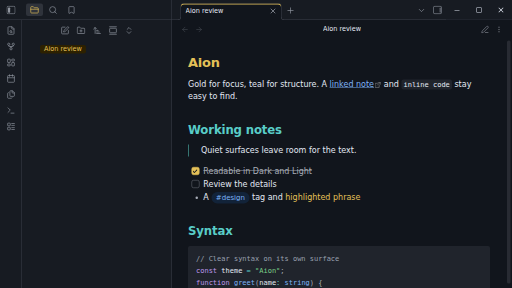
The same palette carries into Obsidian, in both modes:
The public site is built on @sltsh/aion-css and switches between
both palettes, and the palette reference lists every
colour with its role.
The name comes from the Ancient Greek αἰών: an age, an epoch, a span of existence.
Contributing
Bug reports and ports are welcome. For a rendering issue, include the app version, a
screenshot and the steps to reproduce it. Colours are defined once in OKLCH and generated
everywhere else, so a palette change starts in packages/tokens. See
CONTRIBUTING.md for the repository layout, commands and release process.
Licence
MIT. Archivo and Monaspace Neon are SIL OFL 1.1; see apps/lab/public/fonts/LICENSE.txt.