
README file from
GithubFactory
A quiet, minimal theme for Obsidian, inspired by Minimal, with a warm yellow accent and a pitch-black dark mode.
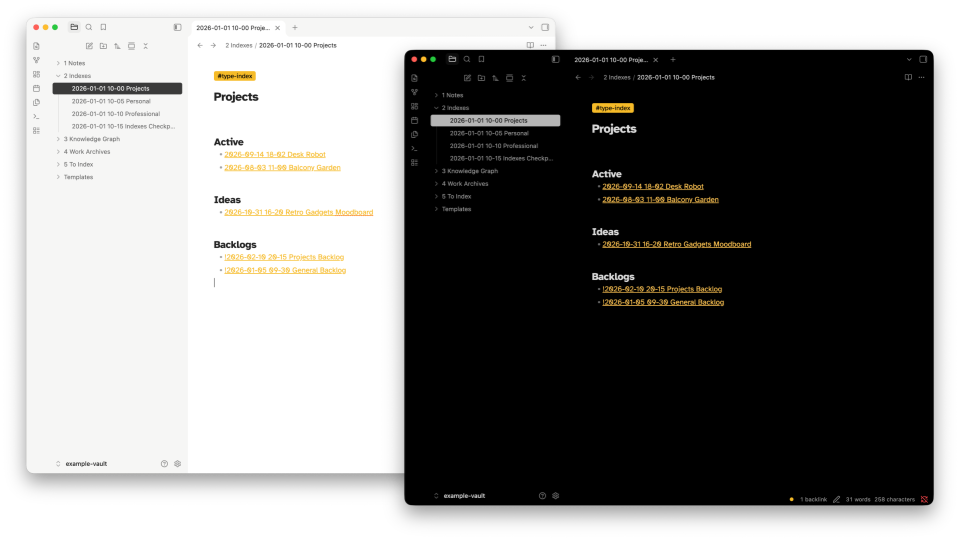
Screenshots
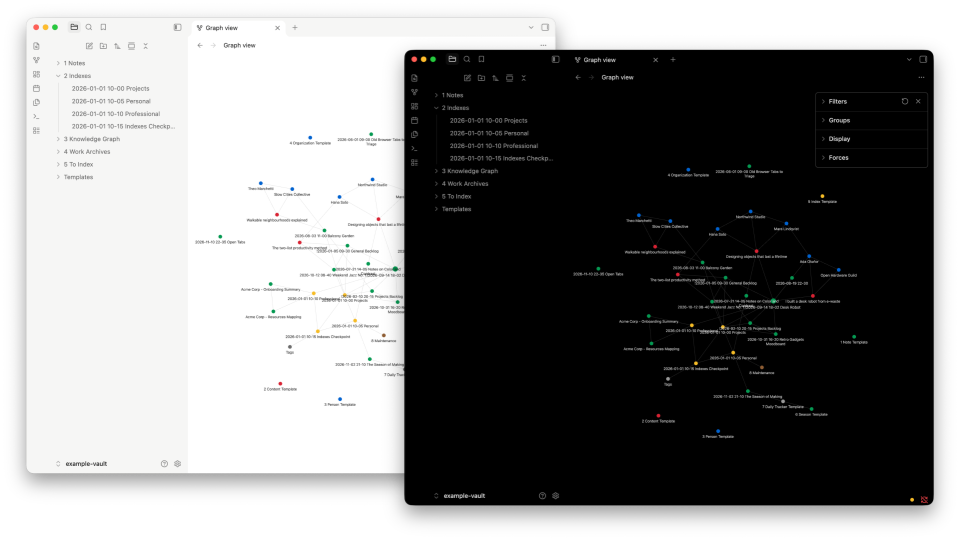
Features
- Accent color
#F6BC26, defined once as HSL so it's easy to change. - Solid tag chips in the accent color, with text that switches to black or white depending on how light the accent is.
- Solid grey highlights for the selected file, search matches and text selection, dark grey in light mode and light grey in dark mode.
- Pitch-black dark mode across the editor and sidebars.
- High-contrast graph view: hovered and open notes stand out in grey instead of the accent.
- Vault indicator: a small accent-colored dot in the status bar, handy when each vault has its own accent.
- Legible type with Atkinson Hyperlegible for text and Atkinson Hyperlegible Mono for code, when installed. See Recommended fonts.
Installation
From the community themes (once published)
- Open Settings → Appearance.
- Under Themes, click Manage.
- Search for Factory, then click Install and use.
Manually
- Download
manifest.jsonandtheme.cssfrom the latest release. - Create a folder named
Factoryin your vault's.obsidian/themes/folder. - Put both files in that folder.
- In Obsidian, open Settings → Appearance and choose Factory under Themes.
.obsidian is a hidden folder. On macOS, press Cmd+Shift+. in Finder to show it.
Recommended fonts
Factory is designed around two free fonts from the Braille Institute, built for legibility. Download them from Google Fonts:
- Atkinson Hyperlegible for note text
- Atkinson Hyperlegible Mono for code
On each page, click Get font, then Download all. Unzip the file, install the fonts (on macOS, double-click each one and click Install), and restart Obsidian.
Both are optional. Without them, Factory uses your system font for text and JetBrains Mono, SF Mono or Menlo for code. The interface always uses the system font.
Customization
All colors are CSS variables at the top of theme.css. You can override them with a CSS snippet instead of editing the theme:
body {
  /* Accent hue (0–360), saturation and lightness */
  --accent-h: 220;
  --accent-s: 80%;
  --accent-l: 55%;

  /* Corner radius for tags and the selected file */
  --tag-radius: 4px;
}

.theme-dark {
  --nav-active-background: #b5b5b5; /* selected file, search, selection */
  --graph-node-focused: #e6e6e6;    /* hovered and open graph node */
}
Recommended accent colors
Factory's palette is based on the NYC subway line colors. Yellow is the default. To use another one, copy its values into --accent-h, --accent-s and --accent-l:
| Color | Hex | --accent-h |
--accent-s |
--accent-l |
|---|---|---|---|---|
| Yellow (default) | #F6BC26 |
43 |
92% |
56% |
| Green | #009952 |
152 |
100% |
30% |
| Blue | #0062CF |
212 |
100% |
41% |
| Orange | #EB6800 |
27 |
100% |
46% |
| Brown | #8E5C33 |
27 |
47% |
38% |
| Red | #D82233 |
354 |
73% |
49% |
| Purple | #9A38A1 |
296 |
48% |
43% |
Tag text switches to black or white automatically, so every color stays readable on its chip.
One color per vault
If you use several vaults, try giving each its own accent, for example yellow for personal notes and blue for work. Add a CSS snippet with that vault's accent values in its .obsidian/snippets/ folder, then turn it on under Settings → Appearance → CSS snippets. Every vault keeps the same theme, but each one is easy to tell apart at a glance.
To make that work even when a note is plain text, Factory shows a small dot in the vault's accent color at the start of the status bar, in the bottom-right corner of the window. Change its size with --vault-dot-size.
Development
Link the repository into a vault's themes folder so edits show up after a reload (Cmd+R):
ln -s "$(pwd)" "/path/to/vault/.obsidian/themes/Factory"
To release, bump version in manifest.json, then create a GitHub release tagged with the same version (for example 0.1.0) and attach manifest.json and theme.css.
Credits
Inspired by Minimal by @kepano. Factory is written from scratch and does not include Minimal's code.
License
MIT © Eduardo Emery