
README file from
GithubHolstrom
One screen for every system: sheets of green film on a light table.
- Holstrom (light): white light from below, green film laid over it, one green signal.
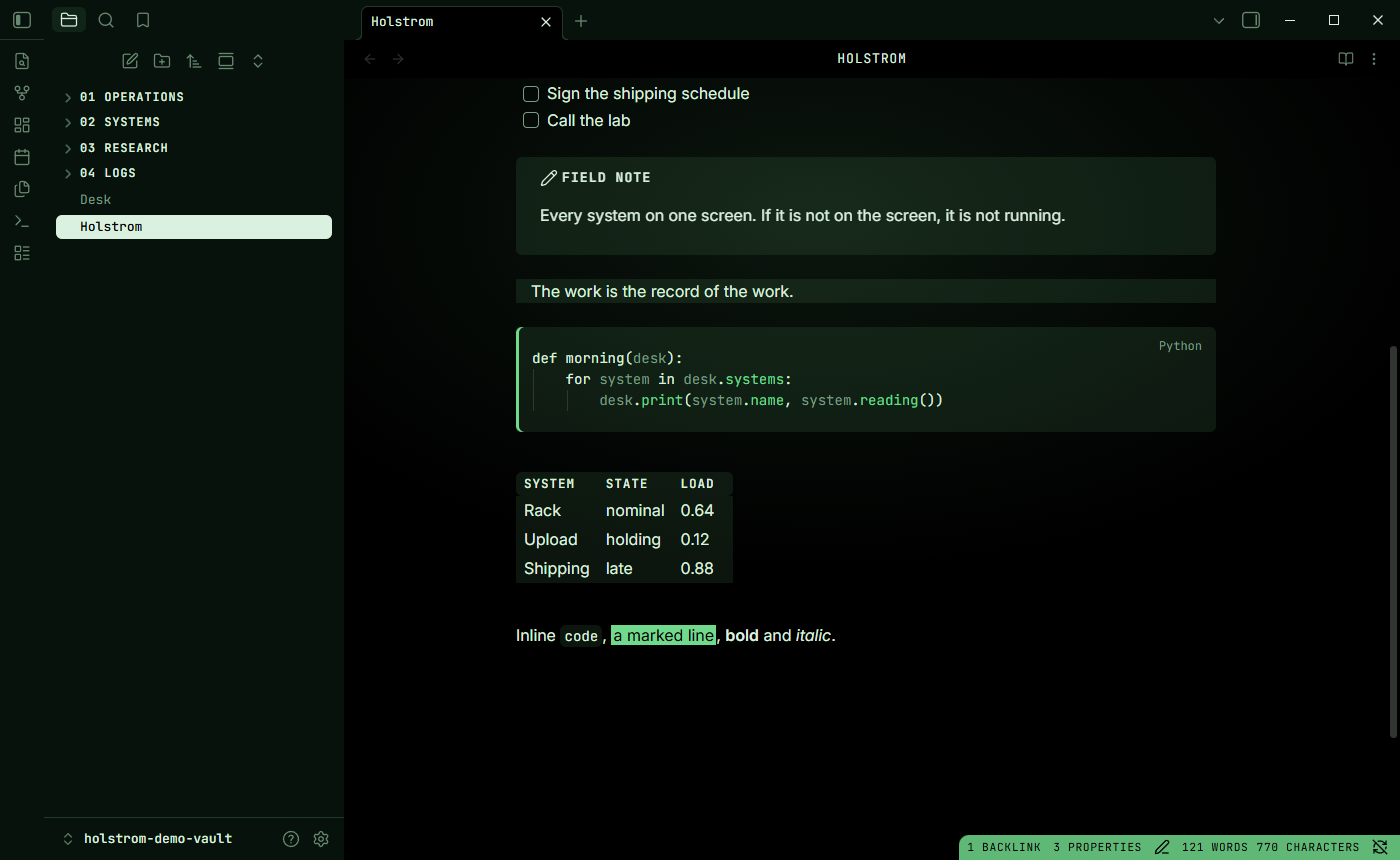
- Holstrom Night (dark): the same table lit from behind on black. Green phosphor.
Parts are set apart by a change of tint, never by a drawn line. Corners are soft. Behind the page there is a soft green light instead of a texture. Titles and readings are set in the mono, and whatever is chosen is printed in reverse. On the web, the panes drift a little with the pointer, the nearer ones more, like a monitor that moves with you.
This repository holds the design itself (tokens, parts and the drift, for any web page) and its ports: an Obsidian theme, a VS Code theme, and colour schemes for Windows Terminal, iTerm2, Alacritty, kitty and Ghostty. All of them are built from the same tokens.
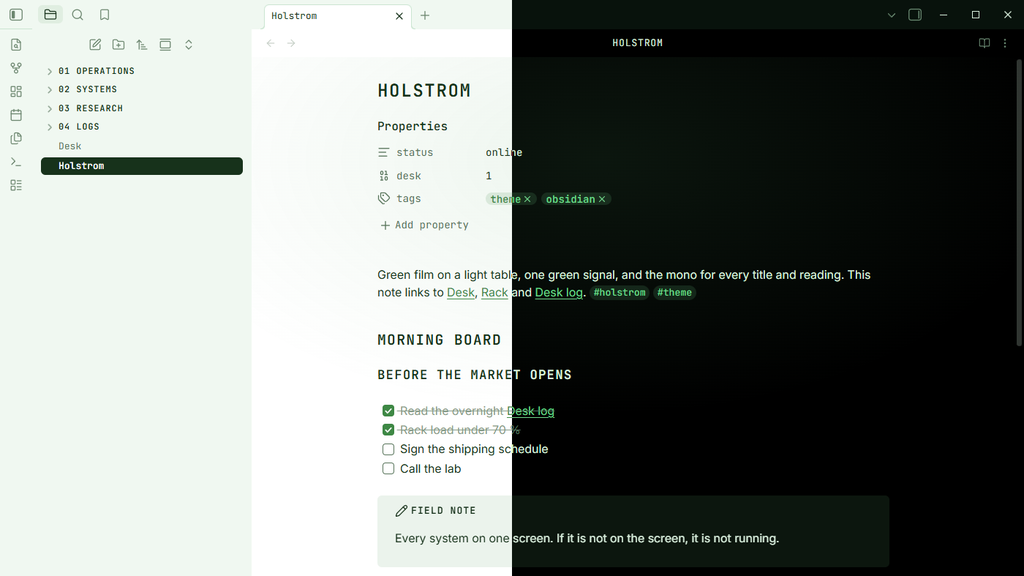
Obsidian
Install
From the community gallery: Settings, Appearance, Themes, Manage, search for Holstrom, then Install and use.
By hand:
- Download
manifest.jsonandtheme.cssfrom the latest release. - Put both in
<your vault>/.obsidian/themes/Holstrom/. - Settings, Appearance, Themes: pick Holstrom. Light and dark (Holstrom and Holstrom Night) follow Obsidian's base colour scheme.
What it does
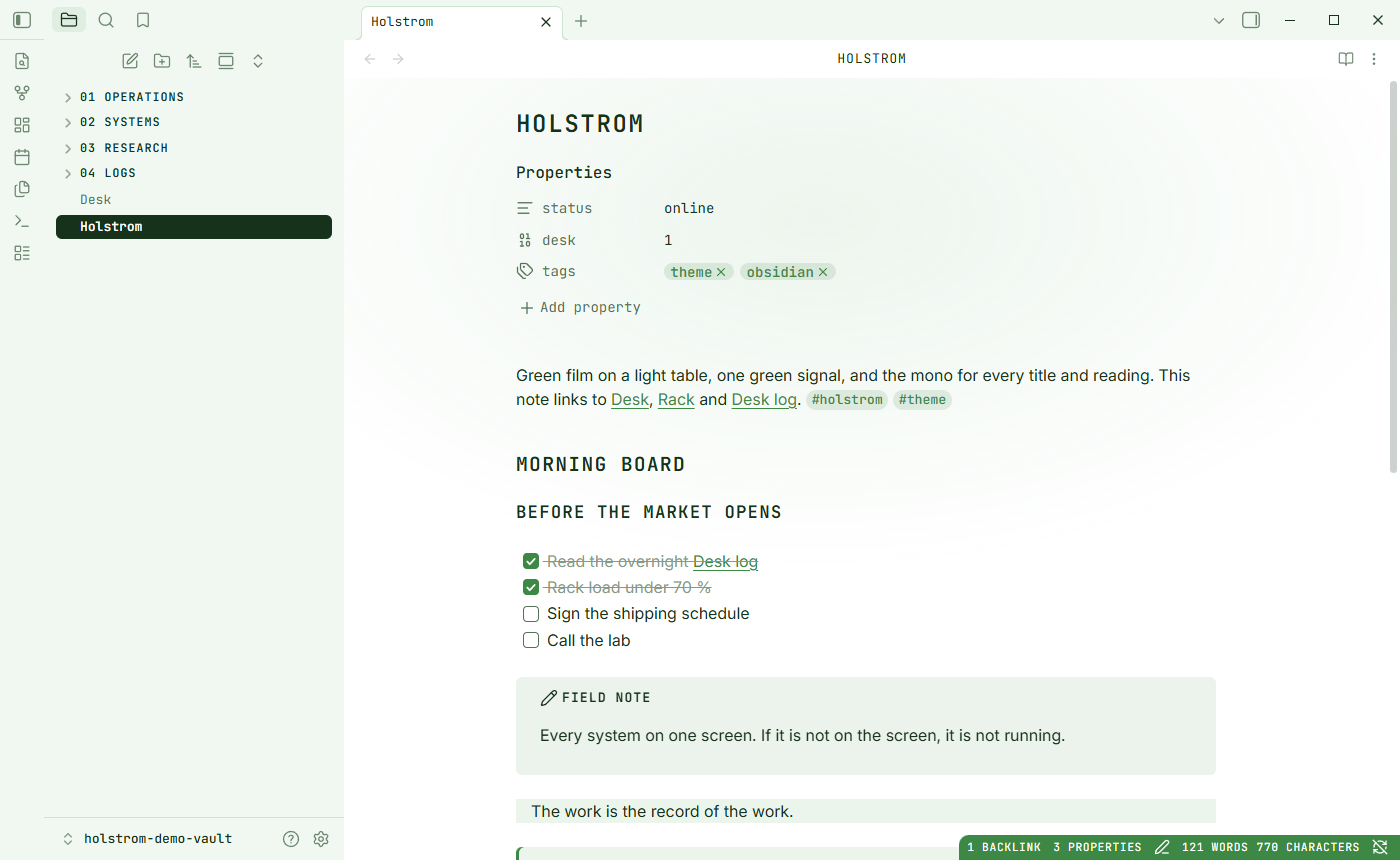
| Type | JetBrains Mono for the interface, titles, tags, tables and code (embedded, works offline); your system sans for body text |
| Light | A soft green light behind notes and canvases |
| Separation | Side panels, headers, code, tables, tags, buttons and callouts are tinted film; no borders |
| Corners | 10 px panes, 6 px controls, pill tags |
| Strip | The status bar printed in the signal green |
| Files | Folders as mono capitals; the active file printed in reverse |
| Code | A terminal inside the page with a signal bar on the left |
| Cursor | A block, half lit |
Style Settings
With the Style Settings plugin you can turn pieces off: the soft light, the signal status bar, reverse printing of the active file, capital headings, the mono interface and the block cursor. You can also set body text in the mono. Without the plugin everything is on.
VS Code
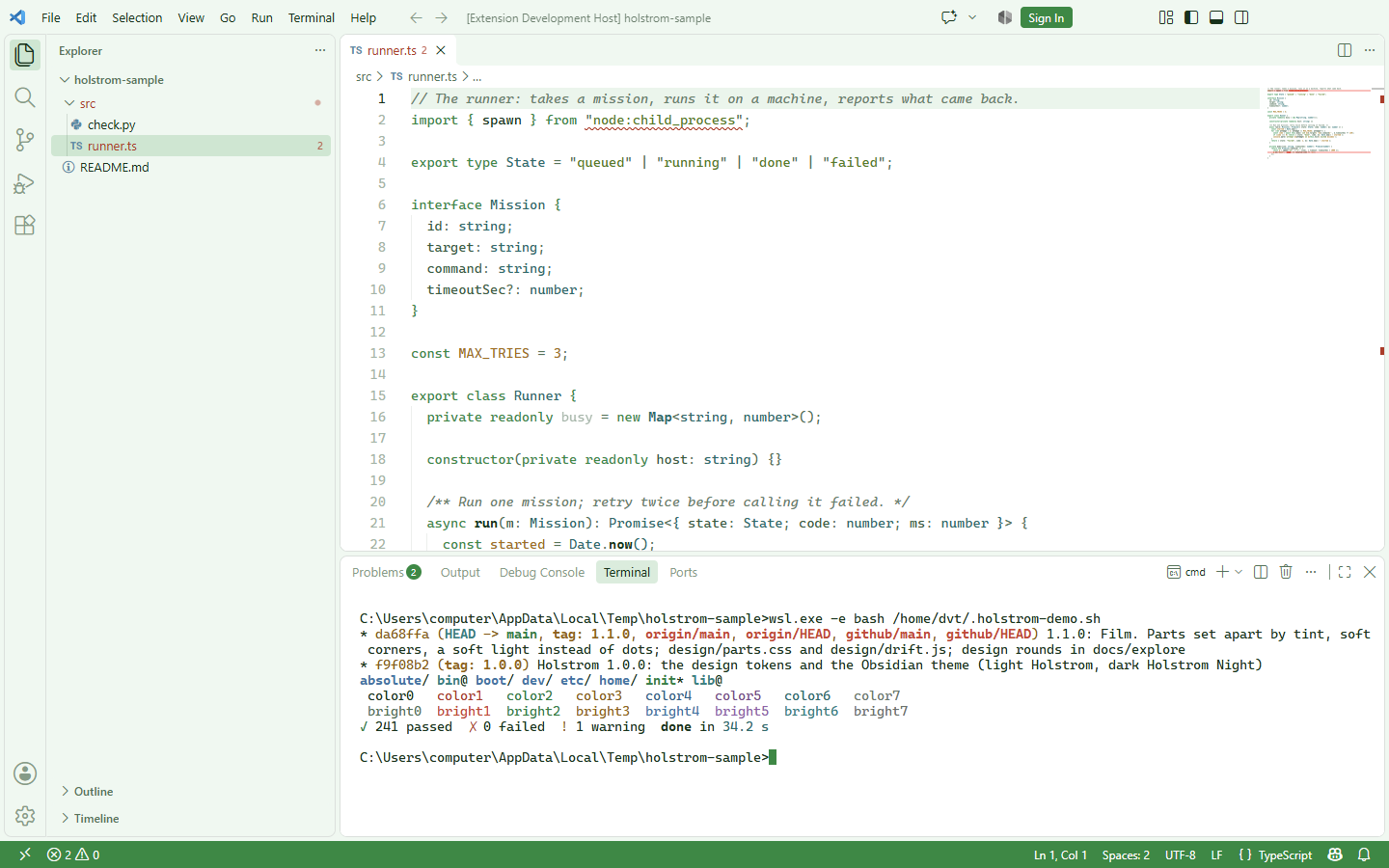
Install
Download holstrom-<version>.vsix from the latest release, then in VS Code: Extensions, the ... menu, Install from VSIX... (or code --install-extension holstrom-1.2.0.vsix). Pick Holstrom or Holstrom Night with Ctrl+K Ctrl+T.
What it does
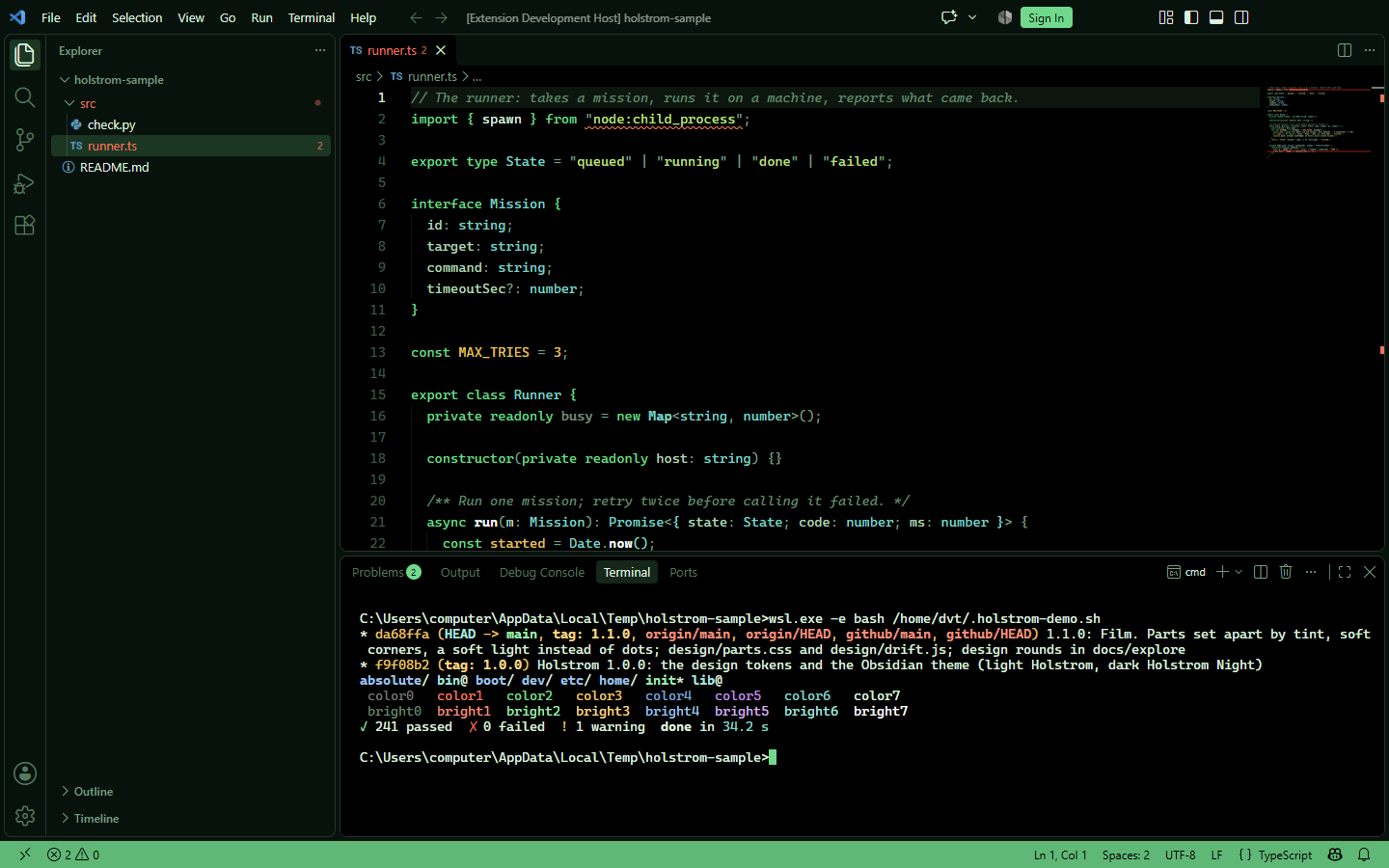
| Separation | Side bar, tabs, panel and widgets are tinted film; every border is transparent |
| Strip | The status bar printed in the signal green |
| Reverse | The focused row in lists, suggestions and the command palette is printed in reverse |
| Syntax | Keywords in the signal green, text in ink, strings a leaf green, types teal, numbers amber, comments a quiet italic |
| Terminal | The same 16 colours as the terminal schemes below |
The design goes with a monospaced face and a block cursor: "editor.fontFamily": "'JetBrains Mono', monospace", "editor.cursorStyle": "block".
Terminals
The 16 ANSI colours, day and night, in terminal/:
| Terminal | File | How |
|---|---|---|
| Windows Terminal | windows-terminal.json |
Settings, Open JSON file; add both entries to "schemes", then pick the scheme in a profile's Appearance |
| iTerm2 | holstrom.itermcolors, holstrom-night.itermcolors |
Settings, Profiles, Colors, Color Presets, Import |
| Alacritty | holstrom.alacritty.toml, holstrom-night.alacritty.toml |
general.import = ["~/.config/alacritty/holstrom-night.alacritty.toml"] |
| kitty | holstrom.kitty.conf, holstrom-night.kitty.conf |
include holstrom-night.kitty.conf in kitty.conf |
| Ghostty | holstrom.ghostty, holstrom-night.ghostty |
copy to ~/.config/ghostty/themes/ as Holstrom / Holstrom Night, then theme = Holstrom Night |
Green, red and yellow carry their usual meaning (ok, failed, a warning). Blue and magenta are there for programs that need them and are kept quiet, so a session still reads as green on black, or ink on white by day. Every normal colour reads at 4.4:1 or better on its background.
The design, for anything else
design/tokens.json is the source of truth. The build turns it into three files any web page can use:
| File | What it is |
|---|---|
design/holstrom.css |
the tokens as --hs-* custom properties, day and night |
design/parts.css |
the parts: .hs-desk, .hs-strip, .hs-pane, .hs-head, .hs-row, .hs-readout, .hs-btn, .hs-input, .hs-tag, .hs-alert, .hs-term, .hs-table |
design/drift.js |
the drift: panes marked data-drift="0.4" (far) to "1.3" (near) move with the pointer, and the light follows |
<html data-holstrom="night">  <!-- or "day"; without it, the system's colour scheme decides -->
<link rel="stylesheet" href="holstrom.css">
<link rel="stylesheet" href="parts.css">
<div class="hs-desk">
  <div class="hs-strip">Server <b>1.36.0</b></div>
  <section class="hs-pane" data-drift="0.6">
    <div class="hs-head"><h3>Systems</h3></div>
    …
  </section>
</div>
<script src="drift.js"></script>
The tokens come in three layers. The base is one green ramp and the light table. Roles say what a colour means (paper, surface, tint, ink, signal, sel, think…). Parts read only roles. Day and night are two mappings of the same roles, so a new face or a new app costs no new design. Two more groups serve code and terminals: syntax (text, comment, keyword, string, number, function, type, property, tag and the rest) and ansi (the 16 terminal colours).
| Role | Day | Night | Use |
|---|---|---|---|
--hs-paper |
#ffffff |
#000000 |
the light table, the page |
--hs-surface |
#eef8f1 |
#06120b |
side panels |
--hs-tint |
green at 11 % | green at 10 % | one sheet of film: heads, rows, tags, buttons, code |
--hs-glow |
green at 10 % | green at 10 % | the soft light |
--hs-ink |
#0b3318 |
#d6f2de |
text |
--hs-muted, --hs-faint |
#4c7356, #7f9c86 |
#6f9e80, #4a7a5e |
secondary text, hints |
--hs-signal |
#0a8a3c |
#3ddc84 |
the one colour that means something |
--hs-strip |
#0a8a3c |
#34bb70 |
the strip of readings |
--hs-sel |
#0b3318 |
#d6f2de |
what is chosen, printed in reverse |
--hs-think, --hs-think-ink |
deep green, phosphor | near black, signal | a terminal inside the page |
--hs-warn, --hs-danger |
#a86a00, #b8321f |
#f0c04a, #ff6b55 |
the only other colours |
--hs-radius, --hs-radius-sm, --hs-radius-pill |
10px, 6px, 999px |
same | corners |
--hs-drift |
6px |
same | how far a pane at depth 1 moves |
Rules of the design:
- One signal colour. Everything else is ink on a light table.
- Parts are set apart by a change of tint, never by a drawn line.
- Soft corners: 10 px panes, 6 px controls, pill tags.
- Behind everything a soft light, never a texture.
- Titles, labels and readings in the mono; running text in the sans.
- What is chosen is printed in reverse. What floats drifts a little with the pointer.
- Code and terminals keep the same rule: green for keywords and signals, ink for the rest; the other ANSI hues stay quiet.
The design rounds that led here are in docs/explore/.
Building
python3 build.py
Edit design/tokens.json, design/parts.css, src/theme.src.css and ports.py. The build writes design/holstrom.css, theme.css (the font embedded as base64), the VS Code themes in vscode/themes/ and the terminal schemes in terminal/. To package the VS Code extension: cd vscode && npx @vscode/vsce package.
Releasing
Bump version in manifest.json, build, commit, then create a GitHub release whose tag is exactly that version (no v), with manifest.json, theme.css, the .vsix and the terminal files attached. The Obsidian gallery reads the newest release.
Licence
MIT, see LICENSE. JetBrains Mono is embedded under the SIL Open Font License 1.1, see src/fonts/OFL.txt.
Holstrom first appeared as a theme in hyperspace, the author's own console. The name is a nod to a fictional character; the project is not affiliated with any show or studio.