
README file from
GithubHollow Knight and Silksong




A dark, ornate Obsidian theme inspired by the two kingdoms of Hollow Knight and Silksong. Hallownest is void black, pale bone and blue soul light. Pharloom is dark lacquer, crimson silk and bell gold. Switch between them in one click.
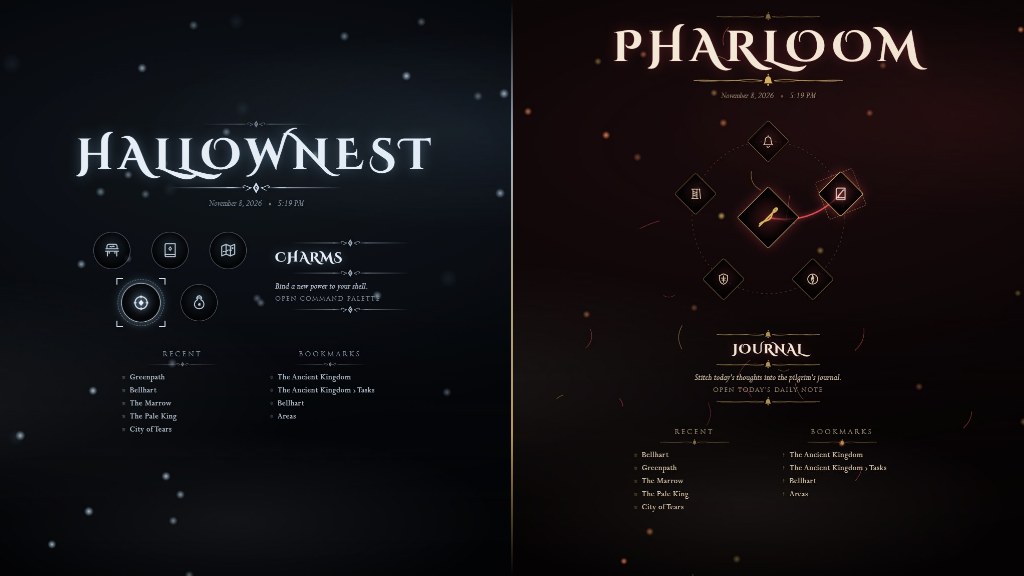
[!TIP] Pair it with the companion plugin. The title screens above, the area title cards, the soul vessel HUD and the bench rest on save come from the Hollow Knight and Silksong Companion plugin. The theme works fine on its own; with the plugin, Obsidian plays like the game.
Contents
- Two kingdoms
- Title screen menus
- Area title cards
- Notes
- Interface details
- Light mode
- Snippets
- Customise it
- Install
- Theme only, or with the plugin
- Performance
- Privacy
- Fonts and license
Two kingdoms
Title screen menus
With the companion plugin, every empty tab opens a title screen. Each kingdom has its own menu styles, and you can switch between them in Style Settings. Move the mouse or the arrow keys to select, Enter to open.
Area title cards
Opening a note dims the pane and fades in its name, with its folder above it, like entering a new area. It needs the plugin.
Notes
Every callout, list, task, table and code block is restyled. Callouts carry original game icons.
Interface details
Status bar HUD (plugin): soul vessel, streak masks and Geo in Hallownest; silk spool, masks and Rosaries in Pharloom.


Light mode
Light mode turns Hallownest into the White Palace and Pharloom into a gilded citadel.
Snippets
Optional extras in snippets/. Copy them into .obsidian/snippets/ and turn them on under Appearance, CSS snippets.
Customise it
Everything is in Settings, Style Settings, Hollow Knight and Silksong.
Install
From Obsidian (recommended):
- Open Settings, Appearance, then select Manage next to Themes.
- Search for Hollow Knight and Silksong, then select Install and use.
- Install and enable Style Settings from Settings, Community plugins, Browse. It holds the kingdom switch and every option.
- Optional: install Hollow Knight and Silksong Companion from Community plugins for the title screen, area cards, HUD and bench.
By hand:
- Download
theme.cssandmanifest.jsonfrom the latest release. - Put them in
<your vault>/.obsidian/themes/Hollow Knight and Silksong/. - Open Settings, Appearance and pick Hollow Knight and Silksong.
Snippets: copy the files in snippets/ into <your vault>/.obsidian/snippets/ and turn them on under Settings, Appearance, CSS snippets.
Theme only, or with the plugin
| Feature | Theme only | Theme and plugin |
|---|---|---|
| Kingdom palettes, fonts, fog and vignette | Yes | Yes |
| Fleur and needle pointers on menus, palette and settings | Yes | Yes |
| Dialog-style modals, notices and tooltips | Yes | Yes |
| Game icons on callouts, bullets, files, tabs and ribbon | Yes | Yes |
| Lore tablet quotes, charm-notch tasks, ornate rules | Yes | Yes |
| Title entrance (the note title fades in when a pane opens) | Yes | Yes |
| Title screen with particles and five menu styles | No | Yes |
| Area title card each time a note opens | No | Yes |
| Soul vessel, masks and Geo / Rosary HUD | No | Yes |
| Bench glow and "Rested" on save | No | Yes |
Performance
The theme is built to stay light on the GPU. The fog is static by default; Fog drift animates it, which redraws the whole window every frame. Low power turns off drift and idle animations and slows the plugin's particles. With the plugin, all motion pauses while Obsidian is in the background. The theme also follows your system's reduced motion setting.
Privacy
The theme makes no network requests. Every font, icon and ornament is embedded in theme.css, so it works fully offline.
Fonts and license
If Trajan Pro or Perpetua is installed on your computer, the theme uses it first. Otherwise it uses the embedded fonts: Cinzel and Cinzel Decorative for titles, Cormorant Garamond for note text. All three are under the SIL Open Font License; the texts are in fonts/. The embedded fonts are Latin subsets to keep theme.css small; text in other scripts, such as Cyrillic or Greek, uses your system serif font.
The code, ornaments and icons are MIT licensed, see LICENSE. The ornaments and icons are original drawings. No game art, logos or fonts from the games are included.
[!WARNING] This is an unofficial fan project, made because the author loves these games. It is not affiliated with or endorsed by Team Cherry.