
README file from
GithubEarthsong
A warm, dark theme for Obsidian with earthy brown surfaces, cream text and green accents.
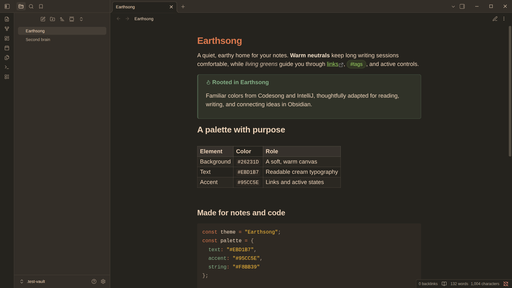
Features
- Low-contrast brown interface with readable cream text.
- Green links, active states, tags, and navigation highlights.
- Earthsong syntax highlighting in editing and reading modes.
- Styled headings, blockquotes, callouts, tables, code blocks, graph, and Canvas.
- Desktop and mobile support, with no remote fonts, images, or other network resources.
- One dark palette for both Obsidian base color scheme settings.
Installation
Community themes
Open Settings → Appearance → Themes → Manage, search for Earthsong, and select Install and use.
Manual installation
- Download
theme.cssandmanifest.jsonfrom the latest release. - Create an
Earthsongfolder inside your vault's.obsidian/themes/directory. - Place both files in that folder.
- In Obsidian, open Settings → Appearance → Themes and select Earthsong.
For local development, clone this repository into .obsidian/themes/Earthsong inside a vault.
License
References
- Dayle Rees — Earthsong: original editor and syntax color scheme.
- Connor Peet — Codesong: editor and syntax palette.
- Gabriel Nakic — Earthsong IntelliJ: interface neutrals and selection colors.
- Earthsong for Telegram: adapted application palette.