
README file from
GithubCosmos
An opinionated Obsidian theme — a fork of Baseline by Alexis C — with a custom CSS layer and three curated flavours switchable from a single dropdown.
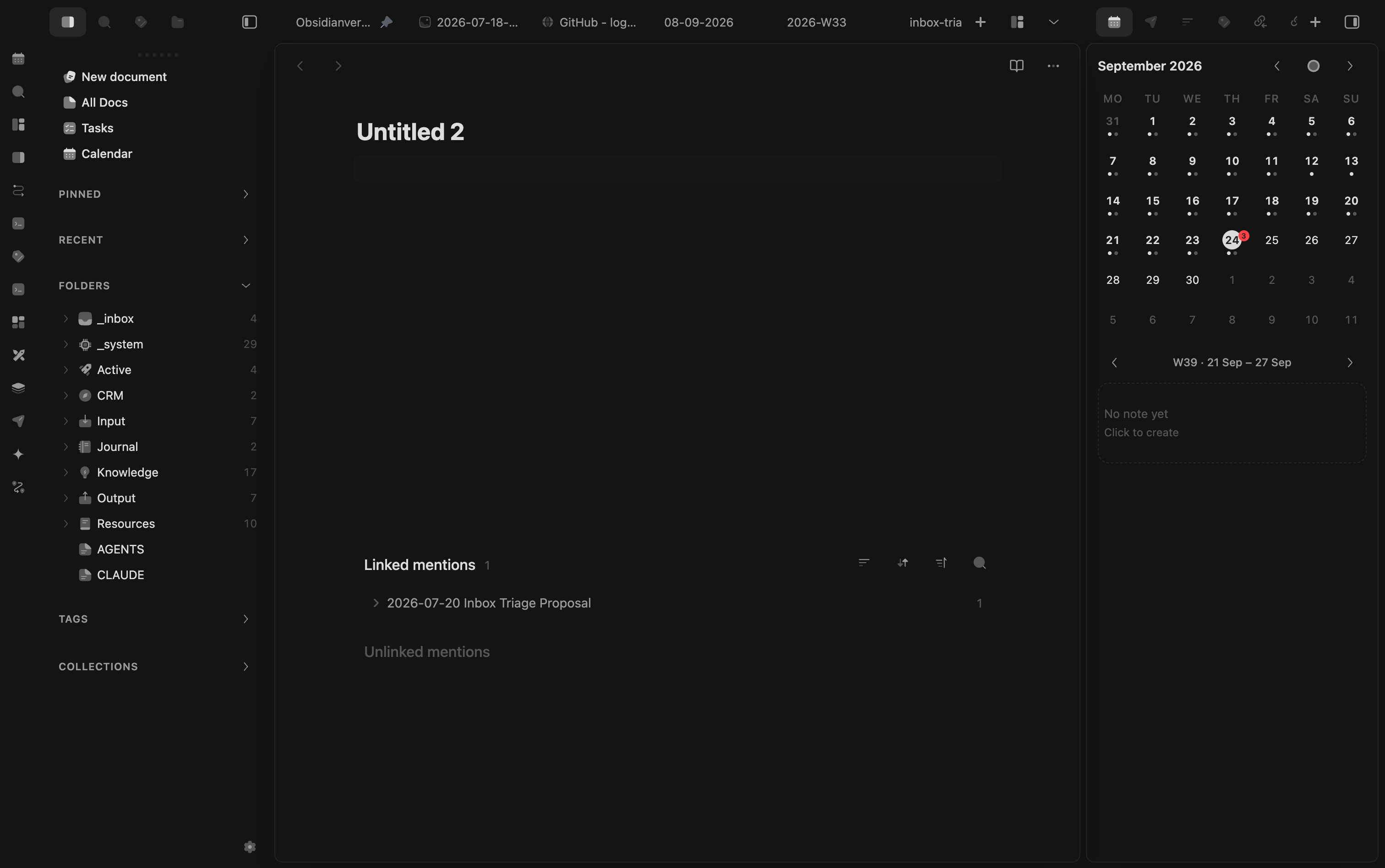
Cosmos ships pre-configured to the "Cupertino" look (Apple/macOS-style spacing, floating tabs, a unified dark surface). It is opinionated / vertical: Baseline's option lists are intentionally curated (Style Settings machinery is fully preserved).
Flavours
Switch via Settings → Style Settings → Cosmos → Cosmos Flavour:
| Flavour | Workspace layout | Cosmos skin | Right sidebar island |
|---|---|---|---|
| Fusion Glass | layout-cosmos-fusion-glass |
on + full glass preset | yes |
| Cupertino (default) | layout-cupertino |
on | yes |
| Fusion | layout-fusion |
on | yes |
| Border | layout-border |
on | no |
| Standard | layout-baseline |
off → clean Baseline | no |
The Cosmos skin (Craft-style compact pill tabs + a darker, uniform dark surface) is scoped :not(.layout-baseline), so Standard falls back to a clean Baseline workspace.
Fusion Glass is the opt-in expressive preset: Fusion capsule tabs and entrance motion, floating editor/settings/ribbon, mirrored sidebar islands, translucent native overlays, blur, and tablet pinned-drawer treatment. It uses only Obsidian-native surfaces—no Omnisearch or plugin-specific selectors. Existing flavours keep their current output because every added module is gated and defaults off.
Right sidebar island — in Cupertino & Fusion the right sidebar becomes a floating "island" matching the editor's native island (radius + hairline outline + shadow, top-aligned).
Cupertino Light — the "Superfici chiare" toggle
A class-toggle in Style Settings (cosmos-light, off by default). When on, it disables the Cosmos darker surfaces → the theme falls back to Baseline's native (lighter) Cupertino greys. Combine with Cupertino/Fusion to get "Cupertino Light": same craft tabs + island, lighter surfaces. Works in dark and light mode.
Fusion tabs — optional Craft capsule treatment
The Fusion tabs (Craft) toggle (cosmos-fusion-tabs, off by default) reuses Baseline Fusion's full-round capsule, translucent active surface, and elevated shadow without switching the whole workspace to the Fusion flavour. It applies to desktop editor tabs only and intentionally stays off in Standard, preserving Standard's clean-Baseline contract.
Additional independent toggles—Floating editor surface, Floating settings panel, and Floating ribbon—apply the corresponding Fusion/Craft treatment without changing flavour. All default to off; Fusion Glass includes all three as a preset.
Filled navigation icons — optional Craft object language
The Filled navigation icons (Craft) toggle (cosmos-filled-icons, off by default) uses solid monochrome glyphs for destinations and objects such as folders, files, books, archives, people, tags, and collections. Action icons such as search, add, close, chevrons, and settings remain outline, preserving control legibility. The masks inherit currentColor, so native hover, active, muted, light, and dark states continue to work unchanged on desktop and mobile.
Curated Style Settings (vertical)
Curated option lists:
| Setting | Options kept |
|---|---|
| Cosmos Flavour | Cupertino · Fusion · Border · Standard |
| Dark / Light color scheme | Cupertino only |
| Personality · Status bar · Property style | Cupertino only |
| Editor tab style | Floating · Floating (Center) |
| Callout style | Tactile |
| Code style | Tactile |
The removed color-scheme palettes (Nord, Dracula, Flexoki, …) remain inert in the CSS — re-adding an option is a one-line change in the @settings block.
What's baked in
The COSMOS LAYER at the end of theme.css is built from the layer sources in this repo. It originated as a bake of local marioverse-* snippets (historical copies in reference/), but since the 2026-07-10 tokenisation the repo is the source of truth — sync-snippets.sh is retired and now refuses to run, because re-syncing would reintroduce raw hex/ms values above the design-contract ceilings and delete both § ANGLAGE and the card elevation contract. Edit the layer files directly, then ./build.sh.
- Tabs behavior — min-width + horizontal scroll for the editor tab bar.
- Craft tabs — compact centered pill tab-bar (geometry only, no permanent background) + active pill (
#242424in dark) + soft lift. Editor + sidebars. Off in Standard. - Darker — unified, darker, opaque dark surface. Off in Standard and in Cupertino Light (
cosmos-light). - Bases skin — Craft/Notion-style skin for native Bases views +
.mv-*utilities shared with the marioverse plugin suite (superbasetags). Global. - Right sidebar island —
cosmos-islands.css(frommarioverse-sidebar-island), gated onlayout-cupertino/layout-fusion.
Build & sync
theme.css = pinned cosmos-base.css + four Cosmos layer sources. The generated file never acts as a build input, so a clean checkout is reproducible.
./build.sh                      # rebuild theme.css from the layer sources only
pnpm release:check              # rebuild twice + prove byte-for-byte stability
./deploy.sh /path/to/your/vault # copy theme.css + manifest.json into a vault
Then: Settings → Appearance → Themes → Cosmos. Cosmos needs the Style Settings community plugin for the flavour dropdown + Cupertino Light toggle.
Try it
See it running in the Obsidianverse sample vault, a small, fictional vault with the whole plugin suite pre-configured.
Credits & license
Forked from Baseline (Alexis C, MIT). Cosmos is MIT — see LICENSE. All original Baseline capability and Style Settings are preserved.