
README file from
GithubDedication Theme for Obsidian
A beautiful, highly customizable dark/light theme for Obsidian with extensive color customization options and elegant design features.
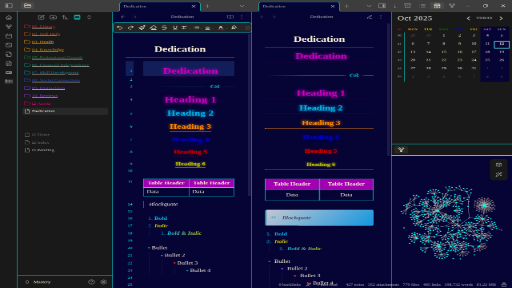
✨ Features
🎨 Comprehensive Color Customization
- 6 Beautiful Presets: Dark Modern, Dracula, Nord, Gruvbox, Monokai, and Custom
- Complete Color Control: Customize every aspect of both dark and light themes
- Adaptive Accent: Automatically adjusts accent colors for optimal contrast
- Individual Heading Colors: Set unique colors for H1 through H6 headings
🖋️ Typography Options
- Font Family Selection: Choose from System UI, Roboto, Inter, Georgia Serif, Monospace, or Custom fonts
- Adjustable Font Size: Custom base font size
- Line Height Control: Perfect text readability
📁 File Explorer Enhancements
- Rainbow Folders: Color-coded folder hierarchy
- Customizable Spacing: Adjust folder indentation and item padding
- Beautiful Icons: Custom file and folder icons
🎯 Design Features
- Centered Headers: Beautiful centered headings with colored underlines
- Modern Blockquotes: Elegant styled quotations
- Glowing Tables: Enhanced table styling with accent colors
- Round Checkboxes: Stylish circular task items
- Custom Calendar: Colorful weekly calendar view
🚀 Installation
- Open Obsidian Settings
- Go to Appearance → Themes
- Click "Manage" and search for "Dedication"
- Select and apply the theme
⚙️ Customization
Using Style Settings Plugin
For full customization, install the Style Settings plugin:
- Go to Community Plugins → Browse
- Search for "Style Settings"
- Install and enable the plugin
- Access customization options in Settings → Style Settings
Available Customization Sections
Theme Presets
- Switch between pre-designed color schemes
- Custom preset for manual color configuration
Colors
- Dark Theme: Primary/secondary backgrounds, text colors
- Light Theme: Primary/secondary backgrounds, text colors
- Accent Colors: Main accent, hover states, border colors
- Heading Colors: Individual colors for H1-H6
Typography
- Font family selection
- Base font size (px)
- Line height multiplier
Layout
- Sidebar width
- Content max width
File Explorer
- Rainbow folders toggle
- Folder indentation
- Item vertical padding
🎨 Color Presets
Dark Modern
- Deep blue backgrounds with bright accent colors
- Modern, professional appearance
Dracula
- Purple-based theme inspired by Dracula color scheme
- High contrast and vibrant
Nord
- Arctic, north-bluish color palette
- Calm and focused
Gruvbox
- Retro groove color scheme
- Warm and comfortable
Monokai
- Classic Monokai-inspired colors
- Vibrant and energetic
🤝 Contributing
Found a bug or have a feature request? Please open an issue on GitHub.
📄 License
This theme is released under the MIT License.
🙏 Acknowledgments
- Inspired by various modern design systems
- Community feedback and contributions
- Obsidian team for the amazing platform
Enjoy using Dedication Theme? Consider starring the repository and sharing it with other Obsidian users!