
README file from
GithubGruber Darker — Obsidian Theme
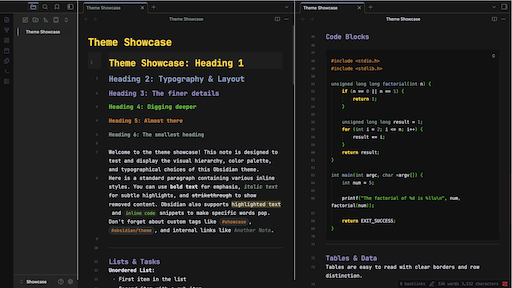
A faithful Obsidian port of the beloved Gruber Darker color theme.
Deep blacks. Rich warm accents. Comfortable at any hour.
Originally created for BBEdit by John Gruber, adapted for Emacs by Jason R. Blevins and Alexey Kutepov (rexim). Now brought to Obsidian.
Features
- ✅ Full dark mode with the canonical Gruber Darker palette
- ✅ Warm light mode fallback
- ✅ All Obsidian 1.0+ CSS variables — clean, low-specificity selectors
- ✅ Rich syntax highlighting (editor + reading view)
- ✅ Style Settings plugin support — tweak almost everything without touching CSS
- ✅ Vim cursor — block / underline / bar shapes, per-mode colors, 5 blink animations
- ✅ Vim mode status bar indicator (color-coded per mode)
- ✅ Headings H1–H6 each with a distinct palette color
- ✅ Graph view, callouts, tables, tags, blockquotes, frontmatter
- ✅ Canvas, Mermaid diagrams, PDF embeds
- ✅ No remote assets — fully offline compatible
-> see Theme Preview

Style Settings
Install the Style Settings plugin to access the full settings panel under Settings → Style Settings → Gruber Darker.
Available settings
| Section | Options |
|---|---|
| Palette Overrides | All 17 palette colors individually, OLED Mode toggle |
| Editor | Font size, line height, max width, readable line length, line numbers, active line highlight, indent guides, smooth scrolling |
| Headings | H1–H4 size sliders, text transform |
| Code Blocks | Font size, border toggle |
| Interface | Sidebar width, tab style (default / underline / pill), hide ribbon, compact status bar |
| Callouts | Corner radius, icon blend mode |
| Vim & Cursor | Cursor color, Vim NORMAL shape (block/underline/bar), blink style (static/blink/fade/pulse/expand), per-mode colors (NORMAL/INSERT/VISUAL/REPLACE), mode indicator in status bar |
Vim Cursor Details
| Setting | Options |
|---|---|
| Shape | Block █ · Underline _ · Bar | |
| Blink | Static · Blink · Fade · Pulse · Expand |
| NORMAL color | Default: yellow #ffdd33 |
| INSERT color | Default: green #73c936 |
| VISUAL color | Default: wisteria #9e95c7 |
| REPLACE color | Default: red #f43841 |
The status bar indicator requires a plugin that adds a Vim mode element to the status bar (e.g. Vim Mode Status Bar).
Palette
| Name | Hex | Role |
|---|---|---|
| bg-1 | #101010 |
Deepest background, gutters |
| bg | #181818 |
Primary background |
| bg+1 | #282828 |
Secondary background |
| bg+2 | #453d41 |
Borders, dividers |
| bg+3 | #484848 |
Selection |
| bg+4 | #52494e |
Tooltips, match highlight |
| fg | #e4e4ef |
Main body text |
| fg+1 | #f4f4ff |
Bright foreground / bold |
| yellow | #ffdd33 |
Keywords, H1, cursor |
| green | #73c936 |
Strings, H4, success |
| niagara | #96a6c8 |
Links, functions, H2 |
| wisteria | #9e95c7 |
Visited links, H3 |
| brown | #cc8c3c |
Comments, H5 |
| quartz | #95a99f |
Constants, muted text |
| niagara-dim | #5f627f |
Faint text, line numbers |
| red | #f43841 |
Errors, tags |
| red+1 | #ff4f58 |
Brighter errors |
Installation
Via Community Themes (recommended)
- Settings → Appearance → Themes → Manage
- Search for
Gruber Darker - Click Install and use
Manual
- Copy the
gruber-darker/folder intoYourVault/.obsidian/themes/ - Settings → Appearance → Themes → select Gruber Darker (you may need to rename the folder to something else like Gruber Darker, also reopen Obsidian)
License
Color palette ported from:
- Gruber Dark for BBEdit — © John Gruber, Daring Fireball
- gruber-darker-theme.el — © 2009–2016 Jason R. Blevins; © 2013 Alexey Kutepov (rexim)
Both released under the MIT License. This Obsidian port is also MIT licensed.
Contributing
Issues and PRs welcome. If you find an element that needs styling, or something looks off, please open an issue.
Changelog
2.1.2
- Simplified frontmatter and properties styling for a cleaner look (#2).
2.1.1
- Added 'OLED Mode' under Style Settings (pure black background).
- Added Zen mode