README file from
GithubCrafted Theme for Obsidian
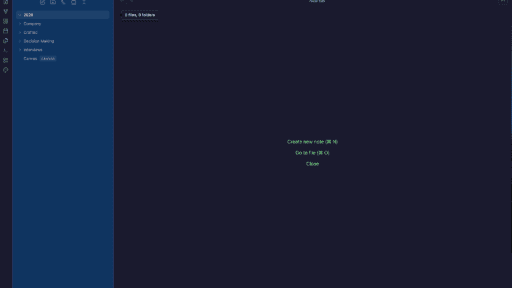
A meticulously dark theme for Obsidian by Crafted (we-crafted.com) that's easy on the eyes and optimized for readability. Built for those who spend hours writing, coding, and thinking.

Features
- Dark & Readable: Deep navy background (#1a1a2e) with soft green accents for comfortable extended use
- High Contrast: Carefully tuned text colors that reduce eye strain
- Modern Design: Rounded corners, smooth transitions, and polished UI elements
- Code-Friendly: Optimized monospace fonts and syntax highlighting
- Mobile Responsive: Fully functional on desktop and mobile devices
- Print Ready: Clean styling when printing your notes
Installation
Community Themes (Recommended)
- Open Obsidian Settings
- Go to Appearance → Themes
- Click Manage and search for "Crafted"
- Click Install and then Use
Manual Installation
- Download
manifest.jsonandtheme.cssfrom the latest release - Create a folder named
Craftedin your vault's.obsidian/themes/directory - Copy the downloaded files into the folder
- Open Obsidian Settings → Appearance → Themes
- Select "Crafted" from the dropdown
Color Palette
Dark Theme
| Color | Hex | Usage |
|---|---|---|
| Primary Background | #1a1a2e |
Main editor background |
| Secondary Background | #0f3460 |
Sidebar, panels |
| Accent | #7ee787 |
Links, highlights, interactive elements |
| Text | #eaeaea |
Primary text |
| Muted | #a0a0b0 |
Secondary text, icons |
Light Theme
| Color | Hex | Usage |
|---|---|---|
| Primary Background | #fafafa |
Main editor background |
| Secondary Background | #e8e8ef |
Sidebar, panels |
| Accent | #48bb78 |
Links, highlights, interactive elements |
| Text | #2d3748 |
Primary text |
Typography
- Interface: System UI font stack
- Editor: -apple-system, BlinkMacSystemFont, "Segoe UI", Roboto, sans-serif
- Code: "JetBrains Mono", "Fira Code", "Cascadia Code", Menlo, monospace
Customization
You can customize the theme by adding CSS snippets in Obsidian:
- Open Settings → Appearance → CSS Snippets
- Click the folder icon to open the snippets folder
- Create a new
.cssfile with your overrides
Example: Adjust accent color
.theme-dark {
--interactive-accent: #ff7b72;
--interactive-accent-hover: #ff9a90;
}
Compatibility
- Obsidian Version: 1.0.0+
- Desktop: macOS, Windows, Linux
- Mobile: iOS, Android
Changelog
1.0.0
- Initial release
- Dark and light theme support
- Full UI component styling
- Mobile responsiveness
Credits
Created by Seyhun Akyurek by Crafted
License
MIT License - feel free to use, modify, and distribute!