README file from
Github🌗 Canvas and Cargo for Obsidian Canvas and Cargo is a highly functional, utilitarian, and high-contrast theme for Obsidian. Built for those who need a pristine, structured canvas during the day and a deep, tactical environment for late-night focus.
This theme strips away unnecessary visual clutter, prioritizing readability, structural clarity, and seamless transitions between its two core states.
✨ Core Features Flawless Duality: A meticulously balanced light mode that feels like a clean, bright canvas, paired with a heavy, industrial dark mode (cargo) designed to reduce eye strain.
Engineered for Code: Custom syntax highlighting optimized for complex languages and scripts, ensuring C++, Python, and Verilog blocks are instantly readable.
Advanced Typography: Clean, geometric sans-serif fonts that make reading long-form documentation effortless.
Custom Callouts: Redesigned blockquotes and callouts that pop without breaking the utilitarian aesthetic—perfect for highlighting abstract concepts or critical warnings.
Beautiful Math: Full support for complex rendering, making formulas and mathematical proofs look sharp and integrated.
Structured Tables & Tasks: Highly defined table borders and custom checkbox states to keep daily logs and project scratchpads organized.
📸 Screenshots
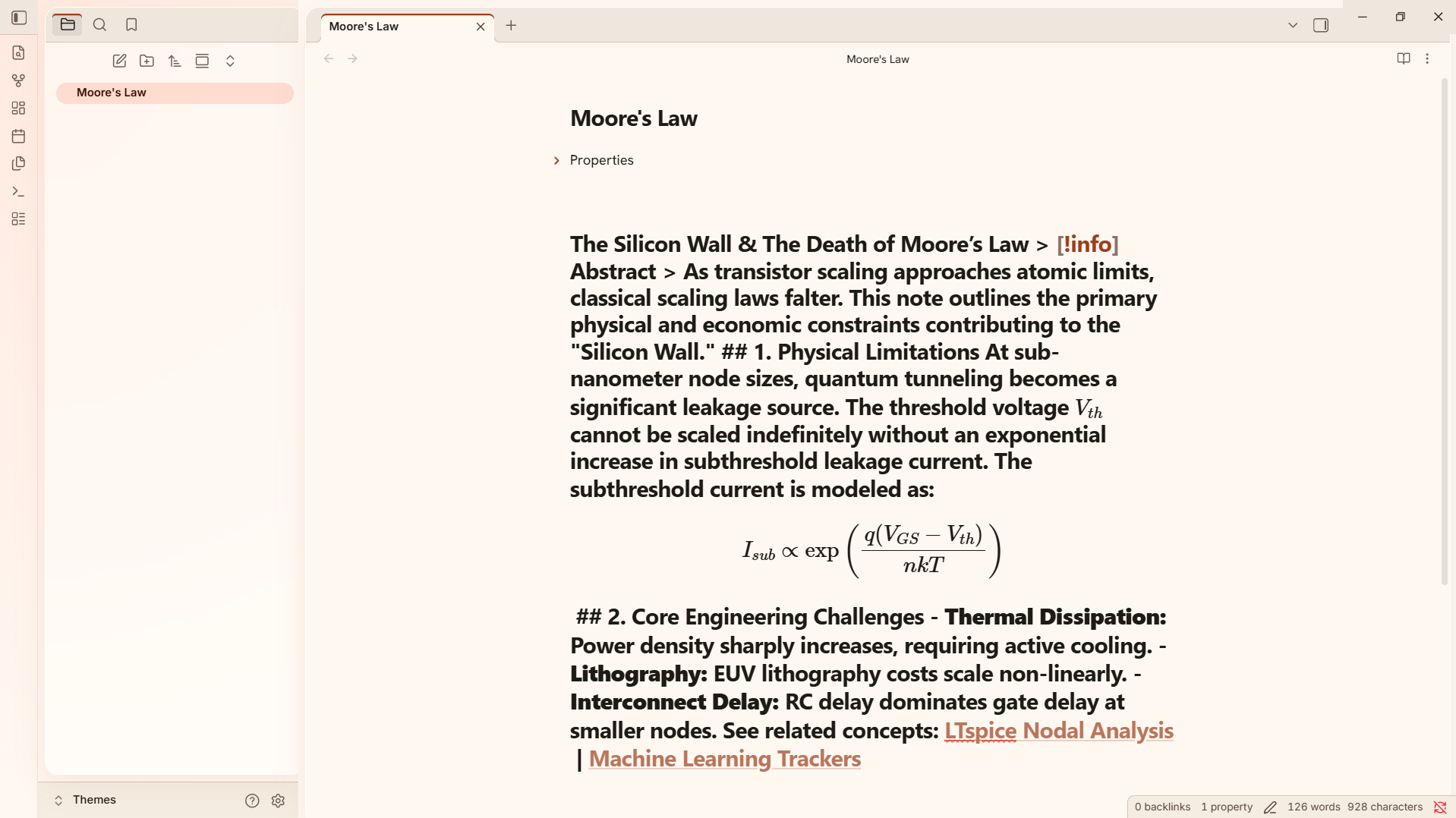
The Cargo Space (Dark Mode) ![Dark Mode - Technical Notes]
Writing scripts, parsing netlists, and analyzing data in an eye-friendly, high-contrast environment.
The Daylight Canvas (Light Mode) ![Light Mode - Daily Tracking]
Perfect for tracking daily goals, resistance training logs, and morning routines.
🛠️ Ideal Use Cases Canvas and Cargo isn't just about looks; it is built to handle heavy, structured information. It thrives when used for:
Engineering & Architecture: Documenting LTspice nodal analysis, tracking machine learning startup ideas, or mapping out logic gates.
Hardware Project Management: Organizing mechanical tolerances, CAD files, and component lists for 3D-printed DIY control decks.
Fitness & Routine Tracking: Keeping a strict, highly readable log of progressive overload, muscle tracking, and body recomposition goals.
🚀 Installation Option 1: Community Themes (Recommended) Open Obsidian Settings.
Navigate to Appearance > Themes > Manage.
Search for Canvas and Cargo.
Click Install and then Use.
Option 2: Manual Installation Download the theme.css file from the latest Release.
Open your Obsidian vault folder.
Navigate to .obsidian/themes/. (Create the themes folder if it doesn't exist).
Create a new folder named Canvas and Cargo and place the theme.css file inside.
Open Obsidian Settings > Appearance and select Canvas and Cargo from the dropdown menu.
☕ Support the Grind If this theme helps you stay focused during those late-night coding sessions or keeps your daily notes looking fresh, consider fueling the development!
Every coffee helps keep the theme updated and the bugs away. Thank you! 🖤 buymeacoffee.com/relks
📝 License This project is licensed under the MIT License - see the LICENSE file for details.