
README file from
GithubRetro Relay
A warm analog theme for Obsidian — graphite-and-cream in the dark, ink-on-paper in the light, with an amber accent running through both. Every colour pair it ships with has been measured against WCAG 2.1 AA rather than eyeballed.
Features
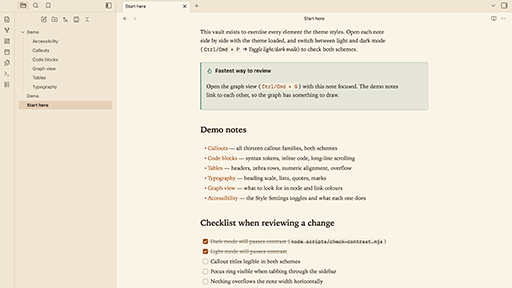
- Both colour schemes, equally finished. Light mode is a full paper-and-ink palette, not a washed-out inversion of the dark one.
- Measured contrast. 34 foreground/background pairs are checked by a script
in this repo. Body text and accents target 4.5:1; code comments and border
seams target the large-text and non-text thresholds. Run it yourself:
node scripts/check-contrast.mjs. - Meaning is never colour-only. Callouts carry icons, unresolved links get a dotted underline, the active tab gets an accent rule, and heading hierarchy steps down by weight and size as well as hue — so the theme survives greyscale printing and colour-blind viewing.
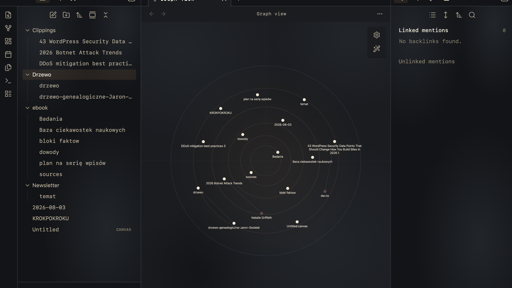
- Graph view styled in both schemes. Notes, tags, attachments and unresolved nodes are separated, links sit back, and the canvas uses the theme ground instead of black.
- An orbital plate behind the graph. A faint star glow, coloured orbits and a reticle give the force-directed layout a chart to drift across — faint by default, and adjustable, since the graph itself stays the subject.
- A chromatic spectrum band and drifting atmosphere. A broadcast-style colour bar along the window's top edge (smooth by default, or a hard-edged VHS variant) and a faint cloud wash across dark-mode panes, both optional.
- All thirteen callout families. Every Obsidian callout keyword resolves to an intentional colour, aliases included.
- Polished code. Full syntax token palette, bordered inline-code chips, a language badge on hover, and long lines that scroll inside the block instead of widening the note.
- Tables that behave. Shaded headers, zebra rows, tabular numerals, and horizontal overflow contained to the table.
- Visible keyboard focus. A two-pixel accent ring on every focusable
element, via
:focus-visible. - Respects system preferences.
prefers-reduced-motionandprefers-contrast: moreare both honoured with no configuration. - Seventeen user settings via the optional Style Settings plugin — and sensible defaults without it.
- No network, no build step. One
theme.css, local font stacks only. Nothing is fetched at runtime.
Screenshots
| Dark | Light |
|---|---|
|
 |
Installation
From the community directory
Once the theme has been published to the directory:
- Settings → Appearance → Themes → Manage
- Search for Retro Relay
- Install and use
Manually
- Download
theme.cssandmanifest.jsonfrom the latest release. - Create a folder named exactly
Retro Relayin your vault at.obsidian/themes/. - Drop both files into it.
- Restart Obsidian, then pick Retro Relay under Settings → Appearance → Themes.
The folder name has to match the name in manifest.json exactly, or Obsidian
will not list the theme.
With the install script
From a clone of this repository:
bash scripts/install-local.sh          # finds your vaults, asks which
bash scripts/install-local.sh --all    # install into every vault found
bash scripts/install-local.sh --vault "/path/to/vault"
Development
git clone https://github.com/RahelaQ/retro-relay.git
cd retro-relay

# Verify the palette still passes contrast after any edit
node scripts/check-contrast.mjs

# Build the clean release payload into dist/
node scripts/build-release.mjs
test-vault/ is a ready-made vault that exercises every element the theme
styles — open it in Obsidian and the theme is already selected. After editing
theme.css, run node scripts/build-release.mjs --sync-vault to refresh the
copy inside it.
Customization
Without any plugin
All colour lives in two blocks in theme.css — .theme-dark (section 3) and
.theme-light (section 4). Everything from section 5 onward only references
those tokens, so re-skinning the theme means editing the palette and nothing
else:
.theme-dark {
  --rr-accent: #F0A055;   /* links, H1, warnings, focus ring */
  --rr-teal:   #62C3B2;   /* tags, external links */
  --rr-ink:    #F2E9D8;   /* body text */
  --rr-bg-1:   #191C20;   /* editor background */
}
After changing anything, re-run node scripts/check-contrast.mjs — a custom
accent is not verified automatically.
With Style Settings
Install the Style Settings community plugin and the theme exposes these under Settings → Style Settings → Retro Relay:
| Setting | Default | Effect |
|---|---|---|
| Always underline links | off | Links stop relying on colour (WCAG 1.4.1) |
| Increase contrast | off | Pushes ink to the extremes, firms up borders |
| Disable animations | off | Manual equivalent of prefers-reduced-motion |
| Dyslexia-friendly body font | off | OpenDyslexic / Atkinson Hyperlegible, looser spacing |
| Body font size | 16px | 12–24px |
| Body line height | 1.6 | 1.2–2.2 |
| Readable line length | 42rem | 30–90rem |
| Accent colour | per scheme | Separate light and dark values |
| Plain table rows | off | Turns zebra striping off |
| Scanline texture on headings | off | Cosmetic CRT nod |
| Hide the spectrum bar | off | Removes the chromatic band along the window's top edge |
| Hard-edged spectrum bar | off | Discrete broadcast colour bars instead of a smooth blend |
| Spectrum bar height | 6px | 2–12px |
| Stronger atmospheric wash | off | Deepens the dark-mode cloud field (still clears its contrast target, with less margin) |
| Hide the orbital plate | off | Removes the graph view's orbits, reticle and star glow |
| Orbit and reticle strength | 0.12 | 0–0.6 |
| Star glow strength | 0.05 | 0–0.4 |
Every toggle defaults to the theme's shipped behaviour, so installing the plugin changes nothing until you touch a switch.
Compatibility
- Requires Obsidian 1.5.0 or newer (the theme uses
:has()andprefers-contrast). - Desktop and mobile. No plugins are required; Style Settings is optional.
Contributing
Issues and pull requests are welcome. Before opening a PR:
node scripts/check-contrast.mjspasses.- You have checked the change in both light and dark mode.
- Any new colour is added to the palette blocks, not inlined in a rule.
Credits
- Built for Obsidian, following the official theme guidelines.
- Optional settings integration via Style Settings by mgmeyers.
- Icon paths in the development preview pages under
scripts/are from Lucide (ISC licence), the icon set Obsidian itself uses. - Font stacks reference Iosevka, JetBrains Mono, IBM Plex Mono, Iowan Old Style and Charter where installed, falling back to system fonts. None are bundled or downloaded.
Licence
MIT © 2026 RahelaQ