
README file from
GithubCordyceps
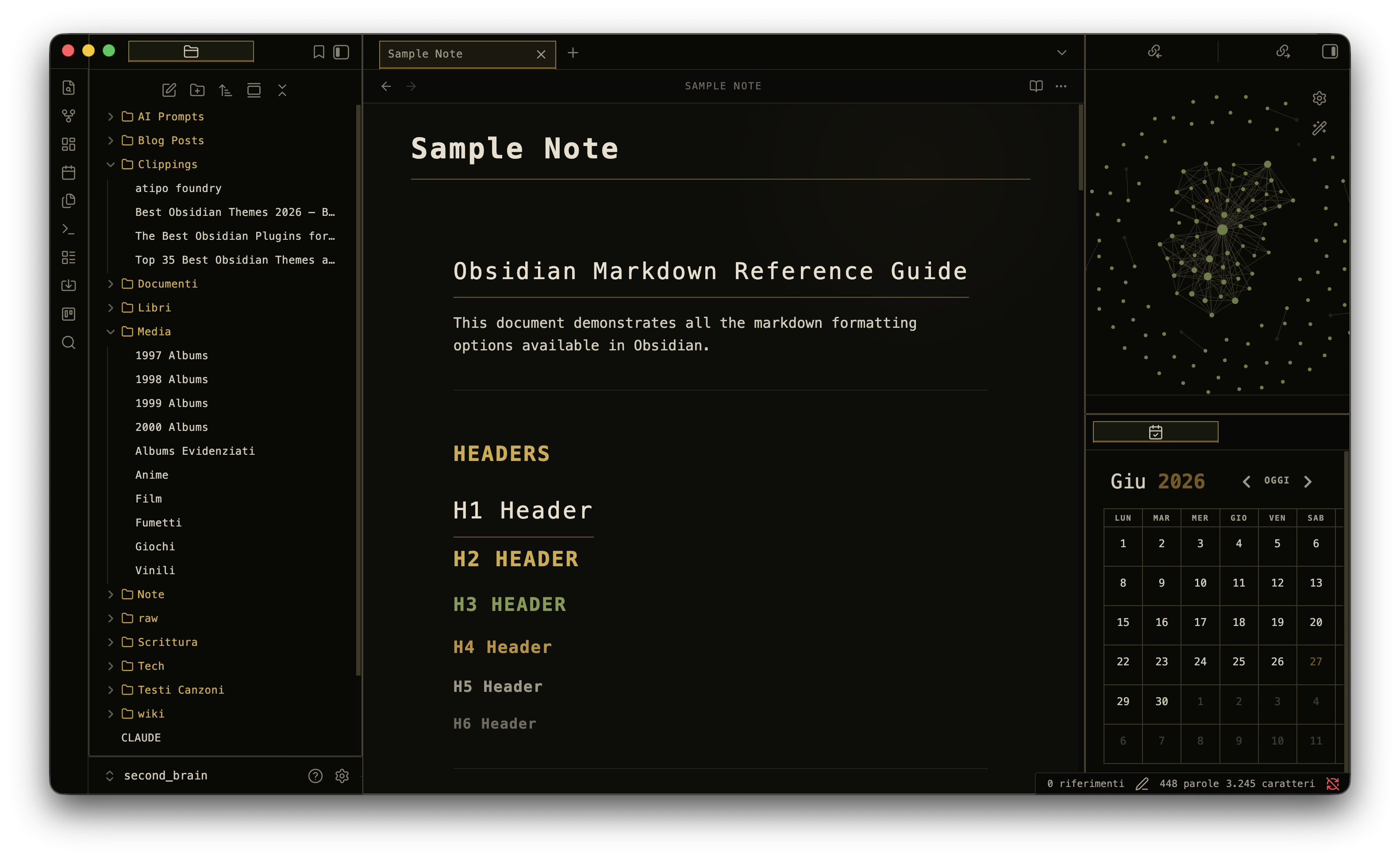
An Obsidian theme inspired by The Last of Us — survival logs, tarnished gold, worn borders, and the quiet weight of a world after, with dark and faithful light modes.



Preview
Design
The theme draws from the visual language of The Last of Us: blackened charcoal panels, olive-green navigation, tarnished-gold accents, faded paper text, worn borders, and a subtle CRT grain layered over everything. The dark palette keeps the theme weathered and high-contrast, while light mode translates the same mood into aged paper, charcoal text, field olive, rust, and burnt orange. It is built entirely in CSS — no plugins, no external assets, no fonts that need downloading (the theme falls back to system monospace if IBM Plex Mono is absent).
Color palette
| Token | Hex | Role |
|---|---|---|
| Background | #090906 |
Main canvas |
| Panel | #0d0d0a |
Sidebars, tabs |
| Text | #d3cbb7 |
Body copy — faded paper |
| Gold | #d0aa43 |
Accents, active tabs, links |
| Olive | #819a4e |
Navigation, H3 headers, folder icons |
| Orange | #d87425 |
Warm warning accents |
| Rust | #7a553d |
Subtle warmth |
| Border | #3b3727 |
Worn edges |
Features
- Pure CSS — no snippets, plugins, or internet connection required
- Dark and light modes — light mode keeps the worn survival-log mood instead of flattening into a neutral theme
- Subtle CRT scanline overlay via a single
::beforepseudo-element - Panel frames — each workspace section has a thin gold-olive border around it
- Infected panel glow — very subtle olive-amber radial gradients at panel corners
- File explorer folder icons — outlined folder shape in gold via CSS mask, no arrows
- Monospace typography throughout using IBM Plex Mono (or system fallback)
- Styled headings: H1 with a bottom rule, H2 in warm gold uppercase, H3 in olive uppercase, plus distinct H4–H6 accents
- Blockquote as card — full four-sided border with dark background
- Solid HR separators between content sections
- Callouts, tables, code blocks — all reskinned to match the palette
- Custom checkboxes with a gold fill and tick on completion
- Sidebar section labels (VAULT, TAGS) — 10px uppercase, dim color, spaced apart
- All view headers — uppercase label style (GRAPH VIEW, BACKLINKS, etc.)
- Tag pane — styled items with gold hover
- Formatting toolbar — muted icons, gold on hover
- Custom scrollbars, graph view colors, metadata panel, modal and menu styling
- Mobile-ready — adjusted padding for small screens
Installation
Via Obsidian Community Themes (recommended)
- Open Settings → Appearance → Themes
- Click Manage and search for
Cordyceps - Click Install and use
Manual
- Download or clone this repository
- Copy the
Cordycepsfolder into your vault's themes directory:
<your vault>/.obsidian/themes/Cordyceps/manifest.json
<your vault>/.obsidian/themes/Cordyceps/theme.css
- In Obsidian go to Settings → Appearance → Themes, refresh the list, and select Cordyceps
Note: do not nest the folder — Obsidian requires the
manifest.jsonto sit directly inside.obsidian/themes/Cordyceps/.
Optional font
The theme is designed with IBM Plex Mono. Install it on your system for the intended look; the theme degrades gracefully to SFMono-Regular, Menlo, or Consolas if it is absent.
Compatibility
- Obsidian 1.5.0 and later
- Dark and light mode