
README file from
GithubAmber Glass Phosphor
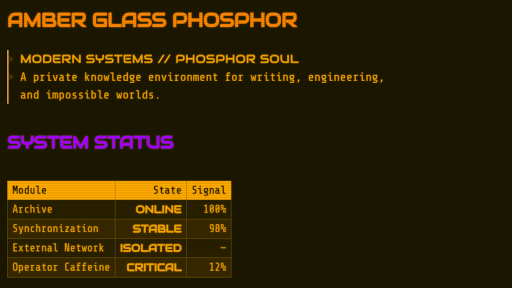
Amber Glass Phosphor is a dark, CRT-inspired theme for Obsidian. It is intended to bring my vision of a retro-futuristic interface to Obsidian while remaining easy on the eyes and helping with concentration. Multicolored headings make navigation quicker.
Features
- Amber, green, and white phosphor palettes.
- Embedded offline fonts with no network requests.
- Matching Reading view, Live Preview, interface, and PDF-export styling.
- Optional CRT scanlines and vignette.
- Optional phosphor text glow.
- Square, terminal-inspired controls and panes.
- Style Settings integration.
Changelog
Version 1.0.1
- Reduced the embedded 3270 Nerd Font size by removing unused private-use icon glyphs.
Version 1.0.2
- Fixed the settings menu tabs so they are now readable.
Version 1.0.3
- Improved phosphor palette consistency across tabs, links, checkboxes, highlights, and dropdown menus.
- Fixed inactive and unfocused tab readability.
- Corrected white-phosphor glow and selection colors.
- Removed redundant CSS while retaining Style Settings compatibility.
Version 1.0.4
- Added palette-aware styling for buttons and status labels in the Community Themes browser.
- Added phosphor-matched borders to workspace tabs and pane dividers.
- Added spacing between tabs for clearer visual separation.
- Replaced Obsidian’s curved tab decorations with clean, terminal-style rectangular tabs.
- Improved active, inactive, and unfocused tab readability across all phosphor palettes.
Version 1.0.5
- Removed fixed font height to allow Obsidian's native slider for font size to function.
Version 1.0.6
- Targeted the line numbers with specified phosphor colors.
Installation
Manual installation
- Create a folder named
Amber Glass Phosphorinside your vault's.obsidian/themesdirectory. - Copy
theme.cssandmanifest.jsoninto that folder. - Open Settings → Appearance → Themes in Obsidian.
- Select Amber Glass Phosphor.
Community Themes
Once the theme is accepted into the Obsidian Community directory, it can be installed through Settings → Appearance → Themes → Manage.
Style Settings
The optional Style Settings community plugin exposes the theme's built-in controls. After enabling the plugin, open Settings → Style Settings → Amber Glass Phosphor.
Available controls:
- Phosphor palette: Amber, Green, or White.
- Disable CRT overlay: Removes scanlines and the edge vignette.
- Disable text glow: Removes glow while retaining the selected palette.
Amber remains the default when Style Settings is not installed.
Fonts
The theme embeds WOFF2 conversions of:
- Share Tech Mono
- 3270 Nerd Font
- Audiowide
The embedded copies use theme-specific internal aliases. Their original copyright notices, project links, and SIL Open Font License information are available in licenses/fonts.
License
Amber Glass Phosphor is released under the MIT License.
The embedded fonts are separately licensed under the SIL Open Font License 1.1. See licenses/fonts for attribution and license details.