
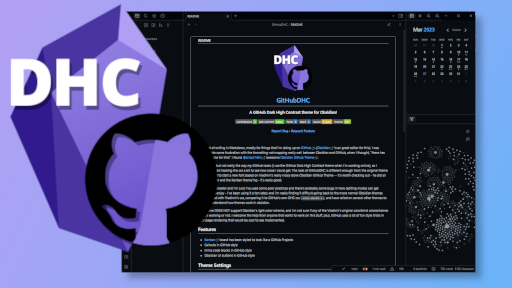
README file from
GithubGitHubDHC 
I do a lot of writing in Markdown, mostly for things that I'm doing up on GitHub. (Obsidian is an great editor for this). I was running into some frustration with the formatting not mapping really well between Obsidian and GitHub, when I thought, "there has to be a theme for this!" I found @krios2146's awesome Obsidian GIthub Theme.
It was close, but not really the way my GitHub looks (I use the GitHub Dark High Contrast theme when I'm working online), so I decided to start hacking the css a bit to see how close I could get. The look of GitHubDHC is different enough from the original theme that I decided to start a new fork based on Vladimir's really nicely done Obsidian GitHub Theme -- it's worth checking out - he did all the initial work and the Kanban theme'ing - it's really good.
Features (v2.0)
- Dual Theme Support: Full support for both Dark High Contrast and Light Default themes
- Accurate GitHub Colors: Uses official GitHub Primer color primitives for authentic appearance
- Enhanced UI Components (for settings dialog, Obsidian UI, etc.):
- Form elements (dropdowns, inputs) now match GitHub styling
- GitHub-Style Callouts: GitHub's NOTE, TIP, IMPORTANT, WARNING and CAUTION alerts in GitHub's own colours, in dark and light mode
- Improved Typography: Bold navigation items and better text hierarchy
- Accessible Contrast (WCAG AA): Text is easy to read in both themes. See Accessibility
- Colorblind Variants: Protanopia & Deuteranopia and Tritanopia variants built on GitHub's own colorblind palettes
- Plugin Support: Styled for Kanban, and checked with Dataview, Tasks, Excalidraw, Iconize and Notebook Navigator
Installation
Obsidian Marketplace (Recommended)
- Open the Settings in Obsidian
- Navigate to Appearances tab under Options
- Choose your Base color scheme:
Darkfor GitHub Dark High Contrast,Lightfor GitHub Light Default, orAdapt to systemto switch with your operating system - Under the Themes section, click on the
Managebutton across from Themes - Search for
GitHubDHCin the Filter text input - Click
Useand then you're done! 🎉
Manual Install
- Download and unzip (or clone) this repo into your vault's
/.obsidian/themesdirectory (if that directly doesn't exist yet, create it) - Open Settings in Obsidian
- Navigate to the Appearances tab under Options
- Under the Themes section, click on the
Managebutton across from Themes - Search for
GitHubDHCin the Filter text input - Click the reset button for the Accent color, and set your preferred Zoom level.
- That's it! You're set up - Enjoy!
Theme Settings
Theme settings can be found in the Style Settings plugin.
Current settings include:
- Header colors
- On/Off kanban styles
- On/Off callout styles
- Colorblind colorscheme variants
Accessibility
GitHubDHC meets the WCAG 2.2 Level AA contrast requirements for text, in both Dark High Contrast and Light Default:
- Readable text everywhere: body text, headings, code, callouts, tags, menus, settings, search and sidebars all reach at least 4.5:1 contrast (3:1 for large text), the AA minimum (SC 1.4.3).
- Links you can spot: links are underlined, headings included, so they never rely on color alone (SC 1.4.1).
- Everywhere you use Obsidian: reading view and live preview, Canvas, Bases, printing and right-to-left text, on desktop, phone and tablet.
- Colorblind-friendly: both colorblind variants meet the same contrast bar.
- True to GitHub: every color comes from GitHub's own Primer design system, the palette GitHub uses for its accessible themes.
Every change to the theme is checked against these requirements before it's released.
A theme can only control its own colors, so a few things are outside what it can guarantee: text drawn over images, an accent color you pick yourself in Obsidian's settings, and community plugins other than those listed above.
Feedback
For any bugs or ideas for new features, please submit a New Issue . The best way to contribute directly is to make the changes yourself and submit them as a New Pull Request. Have a quesiton? Join the Obsidian Members Group (OMG) Discord server - I'm @cptvideo - reach out and say, "hi!" 👋
Credits
A huge thank you and all creds due to @krios2146 and his Obsidian GitHub Theme.
Vladimir Kidyaev (2022-2023)
This code includes modifications by Scott Kirvan. Modifications (c) 2026 Scott Kirvan
Contributors: @saberzero1 (Obsidian community reviewer)
The QA audit in qa/ is adapted from Riccardo Bartoli's QA harness for the Tela theme (MIT, see qa/LICENSE-tela), described in the post How I check every screen of my Obsidian theme. Thank you, Riccardo! Contrast checking uses axe-core by Deque Systems.
Project Link: https://github.com/ScottKirvan/GitHubDHC
If you're writing markdown, and not using Obsidian, check it out: https://obsidian.md/