
There are 3 new plugins and 59 plugin updates during the week 2025-12-14 to 2025-12-20.
Merry Christmas! The holiday mood is in full swing. During the last week 3 new plugins were released along with 59 plugin updates, quietly improving day-to-day workflows. No big noise, just steady progress landing right before the break.
I have updated Obsidian Wrapped 2025 with the latest metrics.
David V. Kimball released Sample Plugin Plus and Sample Theme Plus - powerful templates for plugin and theme development in AI assisted environment.
⭐ New Plugins
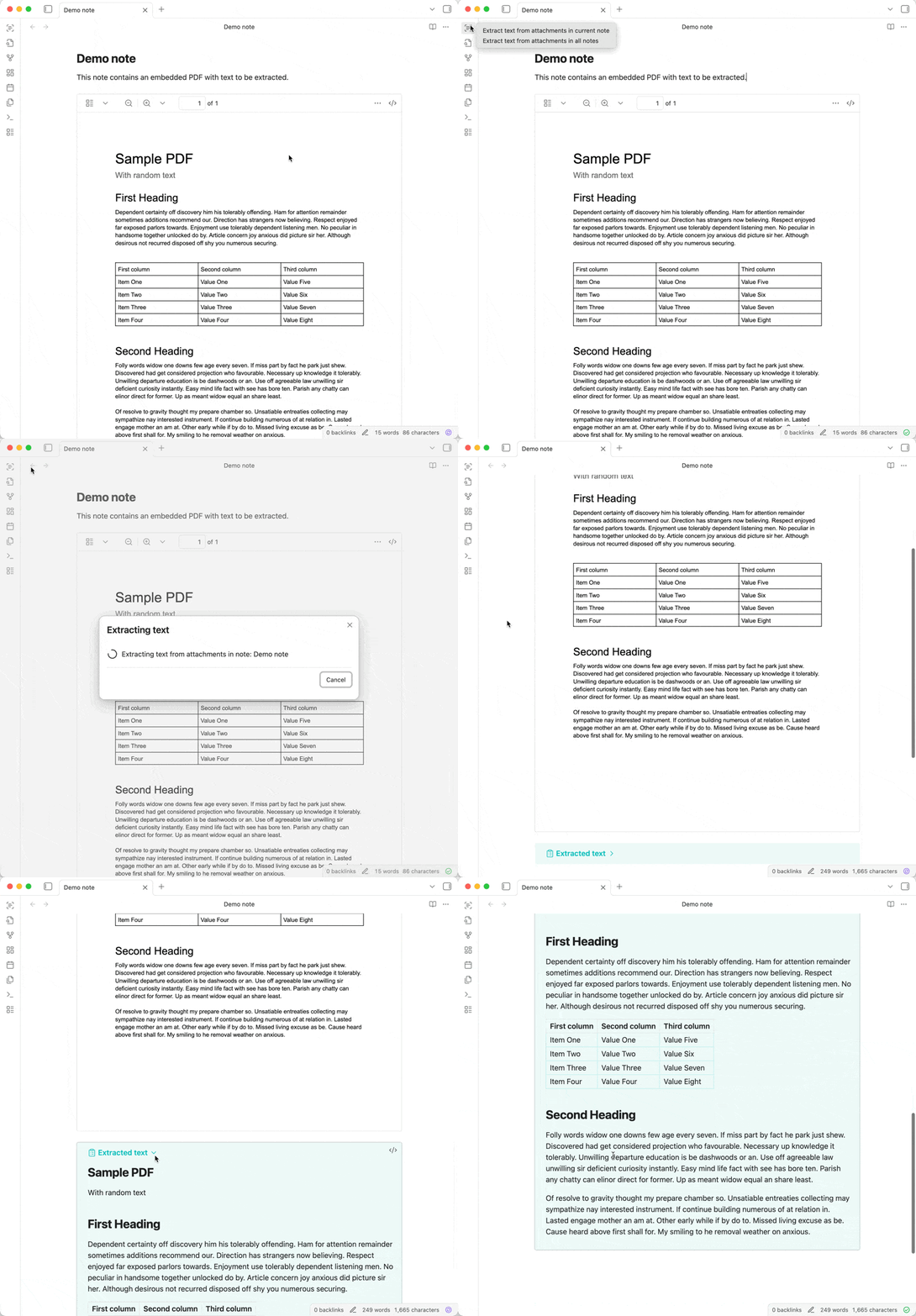
The OCR Extractor plugin focuses on turning embedded documents and images into searchable text using optical character recognition. It processes attachments already present in notes and converts the extracted content into clean Markdown, placing it directly below the original file inside a collapsible callout. This approach keeps the raw files untouched while still making their contents visible, searchable, and indexable by both internal search and system-level tools. The plugin supports batch extraction, either for a single note or across the entire vault, with progress shown in the status bar and the option to cancel midway. Text extraction is powered by Mistral OCR, which handles complex layouts better than basic OCR engines.
The Reading Progress Desktop plugin adds a persistent reading indicator to the status bar, aimed squarely at long-form reading on desktop screens. Once active, it surfaces three elements: a progress bar that reflects how far you have read, a full-screen toggle, and a small view-type label that changes based on the active pane. These elements work quietly in the background and stay out of the editor itself. The progress bar adapts to supported views such as markdown, pdf, search, and a few specific third-party layouts, while clearly disabling itself when tracking is not possible. Behaviour is configurable. You can adjust the bar's length, control animations, or turn off individual components entirely. The design is practical and restrained, built for users who read extensively and want constant spatial awareness without visual clutter.

3. AI Companion
The AI Companion plugin adds an in-note AI assistant that can be summoned instantly using a simple slash command. It allows users to ask questions, get written responses, and pull content from existing notes to shape more relevant answers. Context handling is central here. You can attach one or more pages before asking, which makes the output grounded in your own material instead of generic text. Responses are not locked inside a modal either; they can be inserted straight into the current note with a single action, keeping the writing flow intact. The plugin relies on OpenAI's language models, so behaviour and quality are consistent with that ecosystem.
🔁 Plugin Updates
We got 59 plugin updates in the last one week's time. You can see all the plugin updates on Obsidian Plugin Stats webapp.
Notable Updates
- Notebook Navigator - v1.9.2 - Changelog
🫡 Themes Removed
- Atomus - Repository archived
- Dust - Repository archived