

when someone shares a vault and asks you to enable community plugins or plugin sync, pause and check what you are trusting.
I spend a lot of time looking at Obsidian plugins and themes. Most of that exploration is fun because the Obsidian community keeps building useful little tools.
The PhantomPulse attack stood out to me because it used that same plugin trust in a harmful way. This was not about every plugin suddenly becoming dangerous. It was about an attacker abusing a shared vault, plugin sync and a user's normal trust in Obsidian.
That is the part worth slowing down for.
If you regularly try new plugins, open shared vaults or follow setup instructions from other people, this attack has a simple lesson. A plugin can improve your workflow but plugin permissions and sync settings deserve the same care you would give to a browser extension or a script someone asks you to run.
I am writing this as a quick safety note, not a deep malware analysis. The main thing to remember: when someone asks you to enable community plugins or plugin sync for a vault you did not create, pause first.
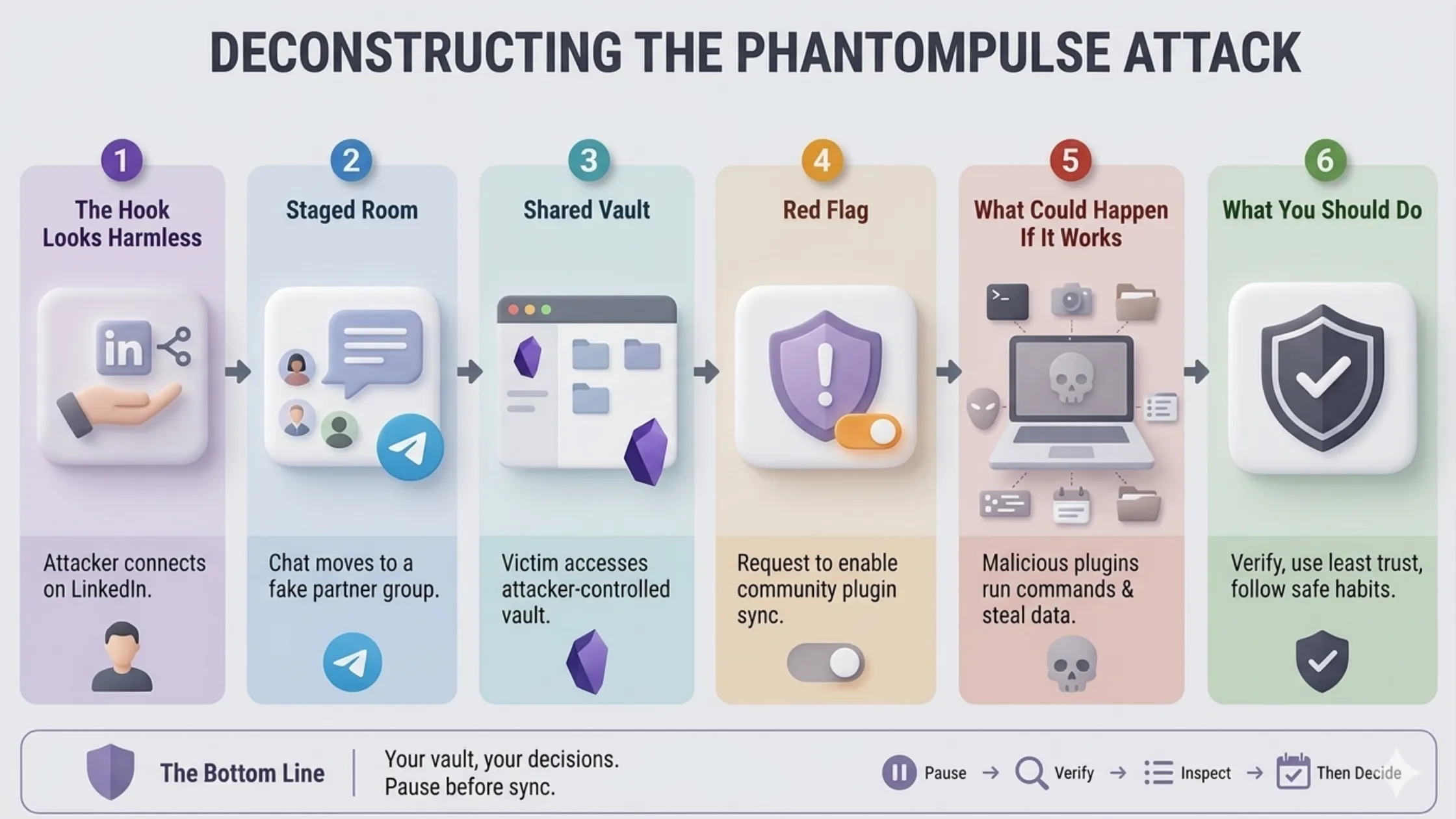
The Hook Looks Harmless
The attack starts in a way that does not feel like an attack.
According to Elastic Security Labs, the campaign began with attackers approaching targets on LinkedIn while pretending to be connected to a venture capital firm. The targets were people in financial services and cryptocurrency, so the business context already made sense.
That is what makes this kind of attack uncomfortable. The first message is not necessarily weird. It can look like networking, a possible partnership or someone wanting to discuss a business opportunity.
From my experience, this is where security advice often becomes too abstract. It is easy to say "do not trust strangers online" but real work often starts with people you do not know yet. The better question is: what are they asking you to do next?
The Chat Moves Into a Staged Room
After the LinkedIn conversation, the attackers moved the target into a Telegram group. That group had multiple people pretending to be partners, which made the setup feel more real.
This is a common social engineering pattern. One person starts the conversation, then a small group creates the feeling of a team, company or internal process. The conversation becomes less like a random cold message and more like you have been invited into an existing workflow.
In this campaign, the topic was financial services and cryptocurrency liquidity. That matters because the request that came next had a business wrapper around it. The victim was not just asked to download something. They were asked to use a shared workspace.
Then Comes The Shared Obsidian Vault
The attackers presented Obsidian as a kind of management database or shared dashboard. The victim was given credentials and asked to connect to a cloud-hosted vault controlled by the attacker.
That detail is important. A shared vault can feel safer than a random attachment because Obsidian is familiar, useful and trusted by many people. If you already use Obsidian, opening another vault does not feel like a big jump.
But a vault is not just a folder of notes once plugins enter the picture. Obsidian's community plugins are powerful. Some plugins can change the interface, automate behavior or run commands depending on how they are configured.
That power is useful when you control the vault and understand the setup. It is risky when a stranger controls the vault and asks you to enable features before you inspect what is inside.
The Red Flag: Enable Community Plugin Sync
The key warning sign in this attack was the request to enable community plugin sync, especially installed community plugins.
Obsidian keeps this disabled by default and that default matters. The attacker could not simply force the dangerous plugin setup onto the victim through vault sync alone. They needed the victim to manually cross that trust boundary.
Once plugin sync was enabled, the attacker-controlled vault could bring down a plugin setup that abused legitimate community plugin behavior. In the reported case, the attackers used the Shell Commands plugin to execute commands and the Hider plugin to hide interface elements.
The important lesson is not "Shell Commands is bad" or "community plugins are bad." The lesson is that powerful plugins should not be enabled blindly from a vault you did not create.
If someone says a shared vault will not work unless you enable community plugins, slow down. Ask why. Check the plugins. Verify the person through another channel if this is related to work.
What Could Happen If It Works
If the attack works, the risk is much bigger than a messy vault.
On Windows, the reported chain used Obsidian to start PowerShell, download additional payloads and eventually attempt to load a remote access tool called PHANTOMPULSE. On macOS, the attack used AppleScript and persistence through a LaunchAgent.
You do not need to memorize those details to protect yourself. The user impact is simpler:
- The attacker may get remote access to your computer, which can turn one trusted device into a long-running foothold.
- They may capture screenshots, which can expose private notes, dashboards, chats, financial documents or client data.
- They may record keystrokes, which can expose passwords, wallet details, recovery phrases or private messages.
- They may collect files and system details, which helps them understand what machine they landed on and what to do next.
- On a work device, the risk can spread beyond you because one compromised machine may expose company workflows and sensitive data.
The scary part is not only the malware. The scary part is that the first few steps look like normal collaboration.
What We Should Do Instead
From my experience, the safest rule is simple: treat a shared Obsidian vault like a shared code repository. It may be useful but it is not automatically safe.
Here are the habits I would keep:
- Do not enable community plugin sync for a shared vault unless you fully trust the source.
- Ask why plugin sync is needed before turning it on.
- Check which plugins the vault wants to use before enabling anything.
- Be extra careful with plugins that can run commands, fetch remote content or automate your local machine.
- Be suspicious if a new contact pushes you to move quickly or says the vault will not work unless you enable plugins.
- If this happens in a company context, verify the request through another channel before continuing.
- If you already enabled plugin sync for a suspicious vault, disconnect from it, review installed plugins and ask your security team to check the device.
This does not mean you should stop using plugins. I still think community plugins are one of the best parts of Obsidian. It only means the source of the vault matters.
Your own vault, your own plugins, your own decisions. A stranger's vault, a stranger's plugin setup and a request to enable sync deserves a pause.
Obsidian is a great tool and community plugins are one of its best parts. But plugins are powerful and powerful features need a little caution.
I have not explored every possible plugin abuse path yet but this one lesson is clear: do not let a new contact talk you into changing security settings casually.