Emoji Picker

by Ali Faraji
5
4
3
2
1
Score: 41/100

Description

The Emoji Picker plugin enhances the Obsidian editor by providing a convenient way to insert emojis through a searchable emoji picker. A dedicated toolbar button and customizable hotkey allow quick access to a modal where users can browse emojis by category or search for specific ones. The plugin also supports selecting different skin tones for applicable emojis, making customization easier. Unlike built-in system emoji pickers, this plugin ensures access to the latest emoji versions, keeping up with evolving standards.

Reviews

No reviews yet.

Stats

3
stars
2,095
downloads
0
forks
439
days
18
days
526
days
5
total PRs
0
open PRs
0
closed PRs
5
merged PRs
2
total issues
1
open issues
1
closed issues
21
commits

README file from

Github

Emoji Picker plugin for Obsidian

Selecting Emoji by Emoji Picker

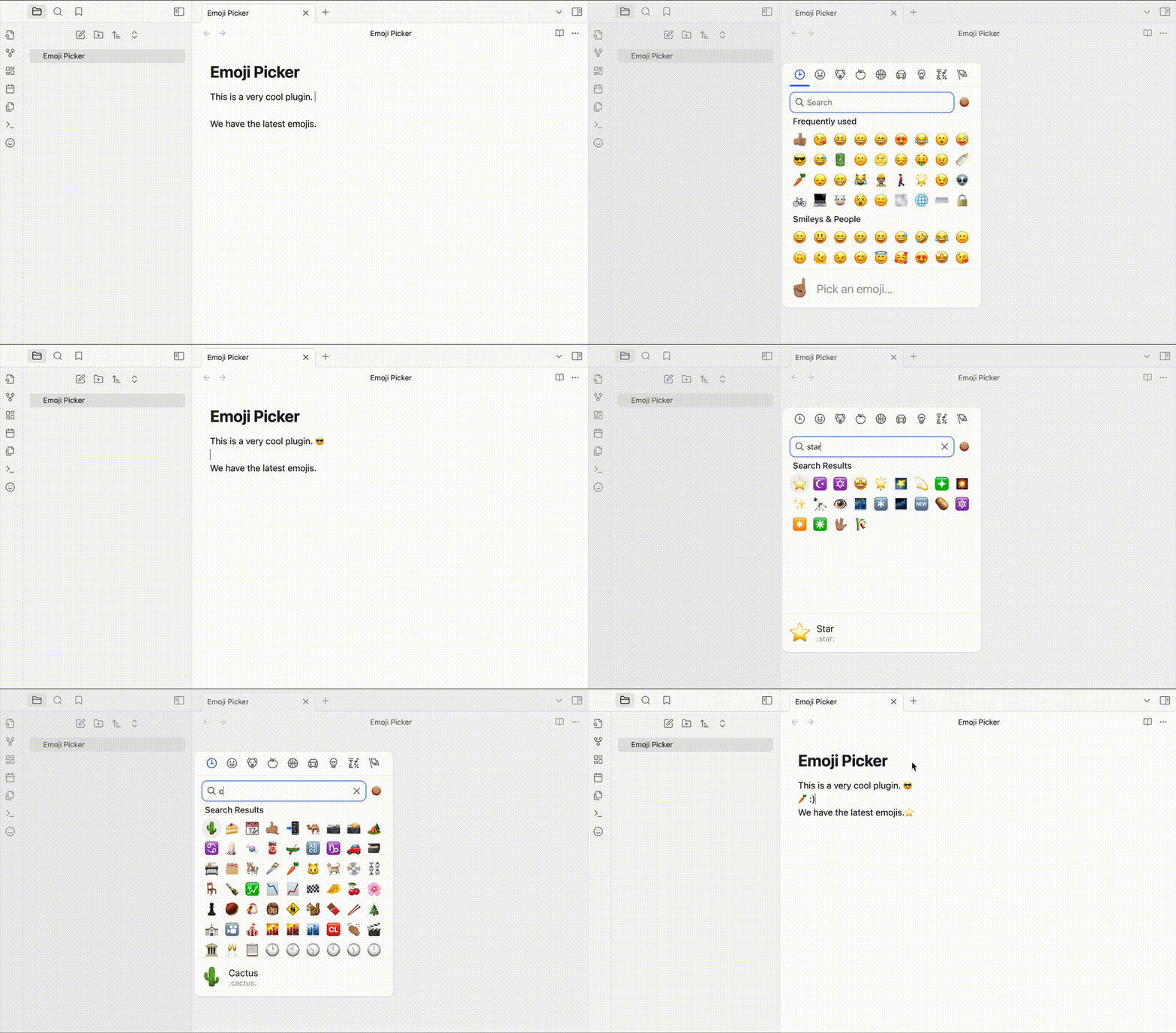
This plugin adds a button to the editor toolbar that opens a modal with a searchable emoji picker. Clicking an emoji inserts it at the cursor position in the editor.

You can also set a hotkey to open the emoji picker. The recommended hotkey is Ctrl+., but you can set it to any key combination you like.

Why use this plugin?

Unlike other plugin this plugin is using the latest versions of the emoji and also have the search functionality along skin tone and category selection which lacks in other plugins and core features of the operating systems that provides emojis picker.

Emoji Version

As of November 2024, we are using the emoji-mart library so the emoji version is 15.

Installation

From within Obsidian

  • Open Settings > Community plugins > Browse
  • Search for "Emoji Picker"
  • Click "Install"
  • Go to "Installed plugins" and enable the plugin
  • Set a hotkey for the plugin in the settings; the command to set is Emoji Picker: Select and Insert Emoji

Manual installation

  • Download the latest release from the releases page. (You can download the zip file from the latest release it includes the three files needed for the plugin or you can simply download the main.js, styles.css, and manifest.json files from releases)
  • When you got the files, create a folder in your vault's .obsidian/plugins/ directory named emoji-picker.
  • Put main.js, styles.css, and manifest.json in the created folder, such as VaultFolder/.obsidian/plugins/emoji-picker/.
  • Reload Obsidian.
  • Enable the plugin in the settings.
  • Set a hotkey for the plugin in the settings; the command to set is Emoji Picker: Select and Insert Emoji

Similar Plugins

info
• Similar plugins are suggested based on the common tags between the plugins.
Icon Shortcodes
4 years ago by AidenLx
Obsidian Plugin: Insert emoji and custom icons with shortcodes
Editing Toolbar
3 years ago by Cuman
An obsidian toolbar plugin, modified from the Cmenu plugin
Text Progress Bar
3 years ago by Michael Adams
Low-fi text-based progress bar for Obsidian
Emoji Magic
3 years ago by simplgy
Makes it easier to add emojis using an improved keyword search
Emoji Titler
3 years ago by Hyeonseo Nam
EmoTagsTitler
3 years ago by Cyfine
Mini Toolbar
3 years ago by AidenLx & Boninall
mini context toolbar in editor for Obsidian
Emoji Autocomplete
2 years ago by KraXen72
Emoji Shortcodes Autocomplete for Obsidian
Note Toolbar
2 years ago by Chris Gurney
Flexible, context-aware toolbars for your notes in Obsidian.
PopKit
2 years ago by Zhou Hua
Tokenz
2 years ago by Ferenc Moricz
Use any kind of short codes in Obsidian! Comes with a map for smileys (:), ;), ...) and one for emojis (:smile:, :wink:, ...).
Vimrc Support
6 years ago by esm
A plugin for the Obsidian.md note-taking software
Emoji Toolbar
5 years ago by oliveryh
An Obsidian plugin to quickly add emojis into your notes
cMenu
5 years ago by Chetachi
An Obsidian.md plugin that adds a minimal text editor modal for a smoother writing/editing experience ✍🏽.
Emoji Shortcodes
5 years ago by phibr0
Emoji Shortcodes - Obsidian Plugin | Adds Support for Emoji Shortcodes to Obsidian
Gay Toolbar
a year ago by Chas Kane
Colorful, customizable toolbar for Obsidian, designed for mobile.
TG Emoji Search
a year ago by MarsBatya
Format Automatically with Prettier
a year ago by Dylan Armstrong
Format with Prettier using built-in settings for Obsidian
Simple Tab Indent
a year ago by Thiago Frias
Scrolling
10 months ago by omeyenburg
Obsidian plugin to keep your cursor centered, disable code wrapping, remember position in a file, and more.
PDF Emojis
10 months ago by Marcel Marusiak
Obsidian plugin that allows you to export your notes as PDFs while retaining emojis in headings, bold texts, and anywhere else in your notes! 🎉
Emoji selector
7 months ago by summer
Insert custom emojis with quick search, auto-suggestions, and customizable templates.
Table Line Break Mobile
3 months ago by marcelflymark
Obsidian plugin: Insert a new line break inside a table cell using the <br> HTML element
Post To Bluesky
2 months ago by Rie Tamura
Post selected text or entire note to Bluesky.
Auto Math
2 months ago by Vladislav Sorokin
Auto-expands LaTeX snippets. External rules with live reload, Custom Rules Editor, and default math pack.