Completed Area

by Daha
5
4
3
2
1
Score: 24/100

Description

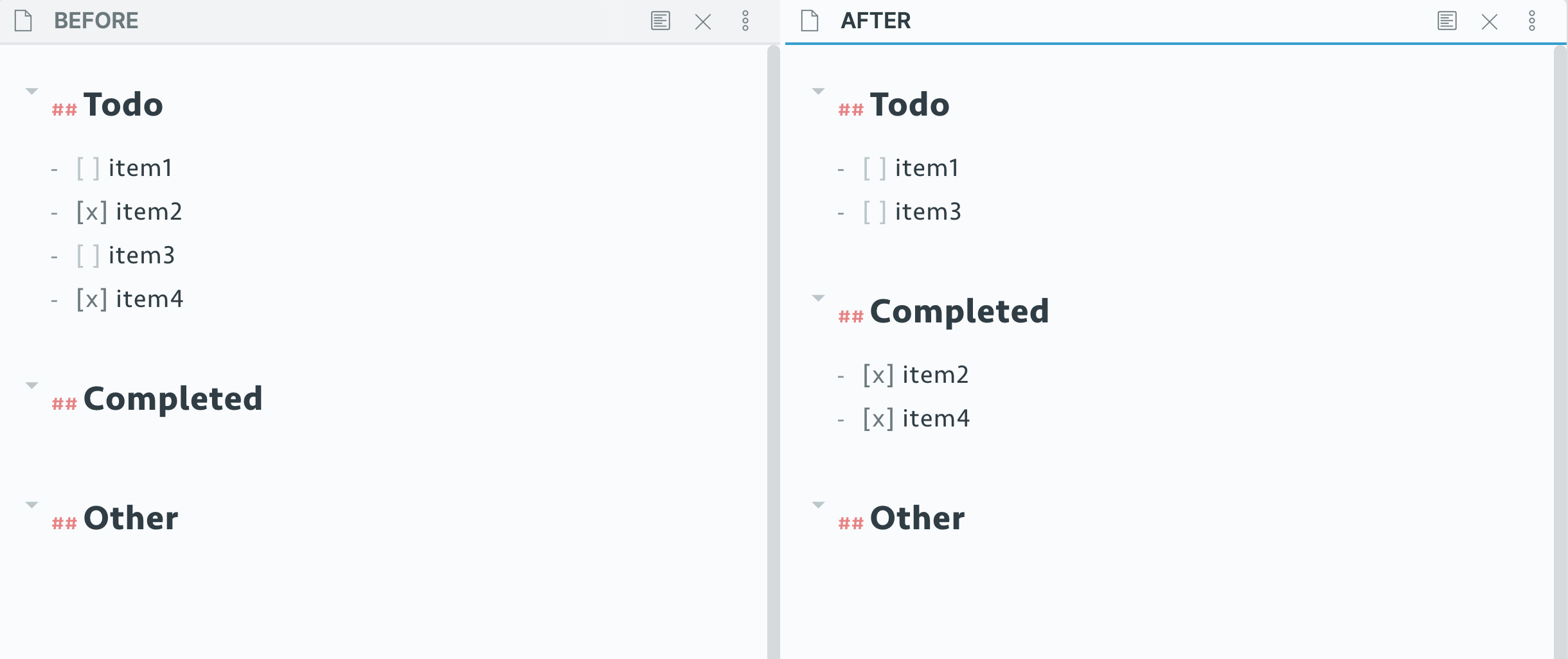
The Completed Area plugin streamlines task management in Obsidian by moving completed to-do items into a designated 'Completed' section. Users can toggle this feature through a sidebar icon or a default shortcut (Control + Enter). The plugin allows customization of the completed area's header level (h1 to h6) and header name, with defaults set to h2 and 'Completed,' respectively. Users can also choose to disable the sidebar icon and rely solely on commands for a cleaner interface.

Reviews

No reviews yet.

Stats

21
stars
8,598
downloads
4
forks
1,975
days
1,966
days
1,974
days
1
total PRs
1
open PRs
0
closed PRs
0
merged PRs
8
total issues
5
open issues
3
closed issues
0
commits

Latest Version

5 years ago

Changelog

README file from

Github

Completed Area

En |

⚠️ This plugin may contain bugs, and more features are developing.
Demo

Use

It toggles the item and moves the completed to-do items to a seperate completed area, by:

  • Clicking the icon on left sidebar, or
  • Using shortcut: Control + Enter (default)

Preference

Set header level

You can set the level of completed area with number from 1 to 6, standing for h1 to h6.

Default is 2, i.e.h2.

Set header name

Default is Completed.

Show icon or not

You can turn sidebar icon off and use command instead, if you don't like sidebar icons.

Credits

  1. Hotkey++ Plugin

Similar Plugins

info
• Similar plugins are suggested based on the common tags between the plugins.