
README file from
GithubThings3 Sync
A cross-platform Obsidian plugin for syncing todos (as well as tags, dates) between Obsidian and Things3 (with multi-language support).
Features
- Cross-Platform: Works on both macOS and iOS
- Multiple Languages: Use any language when creating todos
- Todo Tags: You can enter tags after your todo text, or via the default tags in the settings
- Date Capture: If the Obsidian note includes a date, it will be included when creating the todo in Things3.
- Permanent Links: Optionally link todos via the Advanced URI plugin using a uid stored in the note's frontmatter (field configurable via UID frontmatter field, default
id), so backlinks survive renames, moves, and duplicate note names (enable Advanced URI mode in the settings).
How It Works (and What It Doesn't)
This plugin is one-way: you push changes from Obsidian to Things3. Things3's URL scheme doesn't allow listening for changes, so:
- ✅ Creating a todo and toggling its status are triggered from Obsidian, per line.
- ✅ Toggling status updates both Obsidian and Things3.
- ❌ Completing or editing a task in Things3 does not update Obsidian — there is no automatic sync back.
- ℹ️ Only the title, tags, and done/not-done state are synced. Tags must already exist in Things3 (see the note under Creating A Todo).
- ℹ️ Creating a Todo from a Note adds a backlink to your note inside the Things3 todo, but does not modify the Obsidian note itself.
Usage
Creating A Todo
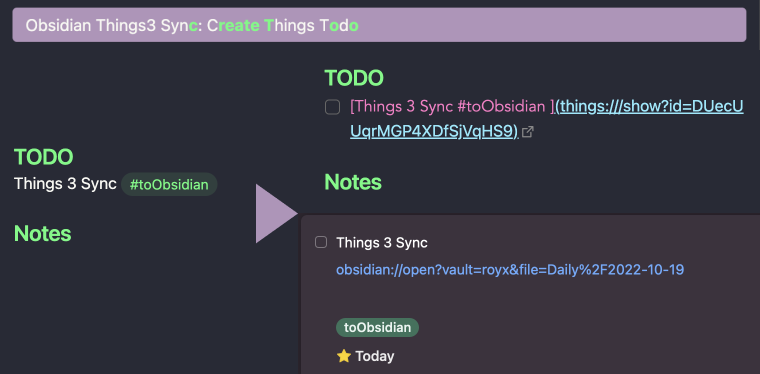
-
Select the line of the todo
-
Using
cmd + pand run theThings3 Sync: Create Todo -
Note: The tags feature currently only supports tags that already exist in Things3. To add a new tag, you'll need to first create it in Things3, and then you will be able to use it in this plugin.
Toggling a Todo's Status
-
Select the line of the todo
-
Using
cmd + Pand run theThings3 Sync: Toggle Todo -
The status of the todo will be toggled in both Obsidian and Things3
Pro Tip: This feature can be assigned a hotkey for faster, more convenient toggling.
Creating a Todo from a Note
You can create a Things3 todo from an Obsidian note. This plugin will automatically include a backlink to the Obisidian note in the todo in Things3
Roadmap
-
Multiple Markdown elements support.
-
Permanent URL support.
-
Better tags support.
-
Better toggle trigger method.Not (currently) possible due to a limitation in the Things3 API -
Multi-line support.Not (currently) possible due to a communication limitation between Things3 and Obsidian -
Obsidian Note to Things3 Todo
Security
This plugin requires an authentication token from Things3 in order to sync data between Obsidian and Things3. That auth token will be stored in plain-text inside your Obsidian vault's plugin folder (e.g., ./obsidian/plugins/obsidian-things3-sync). As a result, you should be cautious when syncing or sharing the settings for this plugin.
Feature Requests/Feedback
Both feature requests and feedback are welcome. Please feel free to submit an issue for either ;)
Thanks a lot.
Attribution
The folliwng repositories offered great help during the development of this plugin: