
README file from
GithubXeno Clinic
A minimalist white-and-signal-red theme for Obsidian by splicer scorn.
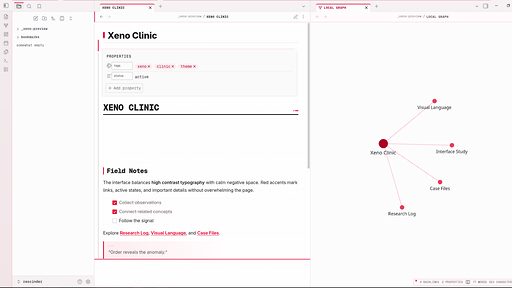
Xeno Clinic combines a clean medical interface with restrained extraterrestrial geometry, warm-white surface depth, red graph networks, and focused typography. It is designed to remain visually distinctive without overwhelming the writing environment.
Features
- Warm clinical white surfaces with subtle depth between editor, sidebars, tabs, cards, and overlays
- Signal-red navigation, focus, selection, metadata, and interaction cues
- High-visibility red nodes and connections in Graph View
- Geist-inspired technical interface typography with readable body-text fallbacks
- Optional cognitive focus mode for reducing peripheral distraction
- Adjustable reading width, text size, line height, accent color, and grid strength through Style Settings
- Refined editor, reading mode, Canvas, PDF, properties, search, command palette, and settings UI
- Styling for Dataview, Tasks, Calendar, and Kanban
- Reduced-motion, high-contrast, print, and mobile considerations
Installation
From the Obsidian community directory
Once published, open Settings → Appearance → Themes → Manage, search for Xeno Clinic, and select Install and use.
Manual installation
- Download
theme.cssandmanifest.jsonfrom the release matching the version inmanifest.json. - Create
<vault>/.obsidian/themes/Xeno Clinic/. - Place both files in that folder.
- Open Settings → Appearance and select Xeno Clinic.
Optional customization
Install the community plugin Style Settings to access Xeno Clinic's controls:
- Signal color
- Reading width
- Reading text size
- Reading line height
- Clinical grid strength
- Cognitive focus mode
- Pure white writing surface
Custom callouts
> [!protocol]
> Procedural or operational information.

> [!signal]
> High-priority information.

> [!specimen]
> Observations, records, or reference material.
Fonts
Xeno Clinic uses local font stacks and does not make network requests. GeistMono Nerd Font Propo and Adwaita Sans are preferred when available; compatible system fallbacks are used otherwise.
Compatibility
- Minimum Obsidian version: 1.4.0
- Desktop and mobile
- Light interface presentation in both Obsidian appearance modes
License
Xeno Clinic is released under the MIT License.
Author
splicer scorn — @numbpill3d