
README file from
GithubTwilight Bento — Obsidian Theme
Twilight Bento is a clean, low-glare Obsidian theme combining a 1-Viewport Bento Dashboard (cssclasses: dashboard-v4), native Obsidian Bases styling (Calendar, KanbanProjects), 8 modular reading & writing enhancements, and 13 curated Dark & Light color palettes via Style Settings.
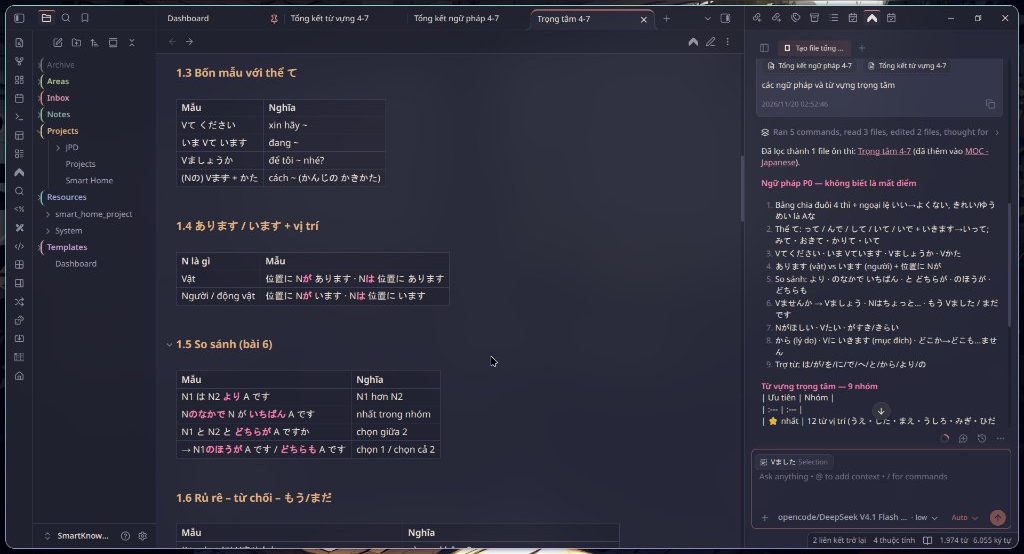
Highlights
- 1-Viewport Laptop Bento Dashboard (
cssclasses: dashboard-v4): Compact top action bar, FullCalendarProjects.base#Calendar, Urgent Tasks,Projects.base#KanbanProjects, and Quick Notes index cards. - 13 Curated Color Palettes (switchable in Style Settings):
- Dark Mode (8 palettes):
ITS Dark(ITS Theme — Midnight#070b11& Crimson#aa3333) — defaultTwilight Sunset(Dusk Indigo#282a3a& Sunset Orange#e88358)Catppuccin Mocha(AnuPpuccin —#1e1e2e& Mauve#cba6f7)Rosé Pine(AnuPpuccin —#191724& Rose/Gold#ebbcba/#f6c177)Dracula(AnuPpuccin —#282a36& Purple/Pink#bd93f9/#ff79c6)Tangerine Dunes(ITS Theme — Deep Charcoal#1c1917& Tangerine#e67e22)Topaz Nord(Blue Topaz —#2e3440& Frost#88c0d0)Hazelnut Chocolate(Blue Topaz —#261c18& Caramel#d49b6a)
- Light Mode (5 palettes):
Fieldline Archival Paper(Ivory#efeae0& Charcoal#23201c) — defaultCatppuccin Latte(AnuPpuccin —#eff1f5& Blue#1e66f5)Everforest Light(AnuPpuccin —#fdf6e3& Forest#8da101)Honey Milk(Blue Topaz —#fbf5e9& Honey#d48c2a)School Days(ITS Theme — Cream#f7f3e8& Ink Blue#2b5b84)
- Dark Mode (8 palettes):
- Built-in Reading & Writing Modules (
.dashboard-v4safely excluded):- Vertical indent lines for nested lists
- PDF dark mode tint/inversion
- Image flags (
|left,|right,|center,|banner) + click-and-hold image zoom - Floating
> [!aside]margin notes - Frosted backdrop for Command Palette & Empty Tab
- Compact
![[Embed]]+> [!infobox],> [!timeline],> [!column]callouts - Colored Bold / Italic + floating Find & Status pills
- 28 custom checkbox states (
[/],[>],[-],[!],[?],[i],[*], ...)
Installation
- Copy
theme.cssandmanifest.jsoninto<your-vault>/.obsidian/themes/Twilight Bento/(or install via BRAT). - In Obsidian: Settings → Appearance → Themes → Twilight Bento.
- Install Style Settings from Community Plugins to switch between all 13 Dark & Light palettes.
- (Optional) Copy
examples/Dashboard.mdandexamples/Projects.baseto use the 1-viewport Bento Dashboard.
Credits
- Base theme architecture: Things by @colineckert (MIT)
- Image adjustments, click-hold zoom, aside & ITS Dark / Tangerine Dunes / School Days palettes: ITS Theme by SlRvb
- Custom checkboxes, emphasis & Catppuccin / Rosé Pine / Dracula / Everforest palettes: AnuPpuccin by AnubisNekhet
- Vertical list lines, PDF dark tint & Topaz Nord / Hazelnut Chocolate / Honey Milk palettes: Blue Topaz by WhyI & Pkmer