
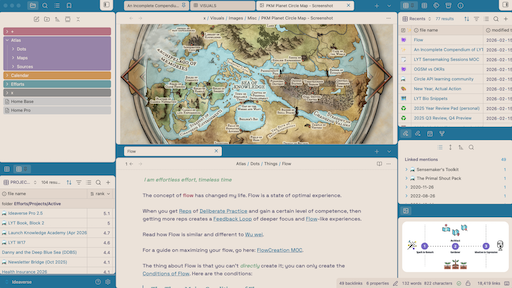
README file from
GithubSoft Paper
A custom Obsidian theme to feel more reflective.
I've heavily customized a theme based on the AnuPpuccin theme. After a year with it, I went ahead and forked this for performance reasons (and to keep it updated), because with multiple bases open (or even just in heavily-linked notes), it slowed down more than other themes. That slowdown is no good, and more importantly, I made that theme the standard for Ideaverse Pro, so it has gotten in the way of a fast experience for some people.
I was determined to keep my Soft Paper visuals, but to make things noticeably faster. And I have been successful!
This theme reduces the code by 86% and is much, much faster. For example, the CPU-expensive tab switching animation is gone. (This alone makes a big difference when you have multiple bases open.) Any option from the previous theme has been completely removed.
This is solely for Soft Paper lovers.
Rainbow Folders (NEW a/o 2026-05-23)
Yes my friends, the oft-requested Rainbow Folders are now available under Style Settings. The default style is the ACE-colored folders. If you want rainbow-colored folders, you have to toggle on that setting within the Style Settings plugin.
Style Settings
If you install the 3rd-party plugin "Style Settings," I have a few style settings for you to toggle. These are settings I toggle, so I thought you might like them too.
The "See More" Section
- Condense everything
- Enables all condensing settings at once
- Make bases condensed
- Tighter vertical spacing in Bases plugin tables
- Make file explorer condensed
- Tighter vertical spacing in the file explorer
- Make file explorer extra condensed
- Even tighter spacing (18px rows, matches sidebar panes)
- Make sidebar panes condensed
- Tighter vertical spacing in Tags, Properties, Backlinks, Outgoing Links, Outline, Bookmarks, and Search panes
- Make in-note properties condensed
- Tighter vertical spacing in the properties/metadata section of notes
- Make body text condensed
- Tighter line spacing and paragraph gaps in the editor (keeps font size unchanged)
- Make settings popup condensed
- Tighter spacing in the Settings modal sidebar and main content
Special Tweaks
- Hide "Add property" button
- Remove the "Add property" button below properties
- Hide scrollbars
- Make status bar blue
- Toggle the lower-right file details bar between blue and beige
- Make settings see-through
- Settings window at 90% opacity so you can see changes live
- Rainbow-Colored Folders
- Switch from ACE-colored (5 hues) to full 11-color rainbow folders (snippet provided by Joel Anderson)
I especially like toggling the options to make the bases and file explorer compact. Look at the before and after below.
Before compact toggles are turned on
After compact toggles are turned on
Performance Benchmarks (2026-02-15)
| Metric | AnuPpuccin | Soft Paper | Reduction |
|---|---|---|---|
| File size | 350 KB | 69 KB | 80% smaller |
| Lines | 8,519 | 1,416 | 83% fewer |
| Selectors | 1,024 | 223 | 78% fewer |
| Conditional classes | 2,211 | 0 | 100% gone |
| Animations/transitions | 50 | 7 | 88% fewer |
| Box shadows/filters | 31 | 6 | 81% fewer |
Roadmap
I won't update often. But here are a few things I might want to develop.
- Dark mode: The dark mode "works" but is far from optimized.
- Graph view: It's pretty lame. Honestly, switch themes if you want a cool graph screenshot.
Credits
Based on AnuPpuccin by Anubis. If you enjoy this theme, consider supporting the original author.