
README file from
GithubOscura Theme for Obsidian
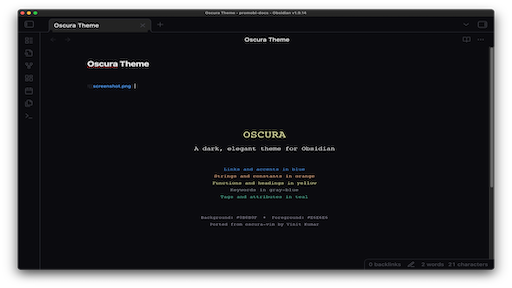
A dark, elegant theme for Obsidian, ported from the oscura-vim colorscheme.
Features
- Dark Mode: Carefully crafted dark color palette designed for comfortable long-term use
- Syntax Highlighting: Optimized colors for code blocks and inline code
- Clean UI: Minimal, distraction-free interface
- Consistent Colors: Color scheme inspired by the popular Oscura vim theme
Color Palette
- Background:
#0B0B0F - Foreground:
#E6E6E6 - Comments:
#46474F - Keywords:
#9099A1 - Functions:
#E6E7A3 - Strings:
#F9B98C - Links:
#479FFA - Tags:
#54C0A3
Installation
From Obsidian
- Open Obsidian Settings
- Go to Appearance → Themes → Manage
- Search for "Oscura"
- Click Install and use
Manual Installation
- Download this repository
- Copy the
theme.cssfile to your vault's.obsidian/themes/folder - Open Obsidian Settings → Appearance
- Select "Oscura" from the theme dropdown
Screenshots
Credits
Ported from oscura-vim by Vinit Kumar.
License
MIT License - See LICENSE file for details