
README file from
GithubModern Amiga Workbench 2.04 inspired
Neutral grey, steel blue, and the arrival of the three-dimensional gadget.
This is an independent, unofficial, fan-made theme. It is not affiliated with, endorsed by, sponsored by, approved by, or connected to Amiga Corporation, Amiga Inc., Cloanto, Hyperion Entertainment, the former Commodore International, or any other present or former owner of the Amiga, Commodore, Kickstart or Workbench trademarks. Nothing here is official. The developer has no relationship with any of those parties. The theme is inspired by a remembered visual style — it is not a reproduction of one, and it ships no original Amiga assets of any kind.
What this is
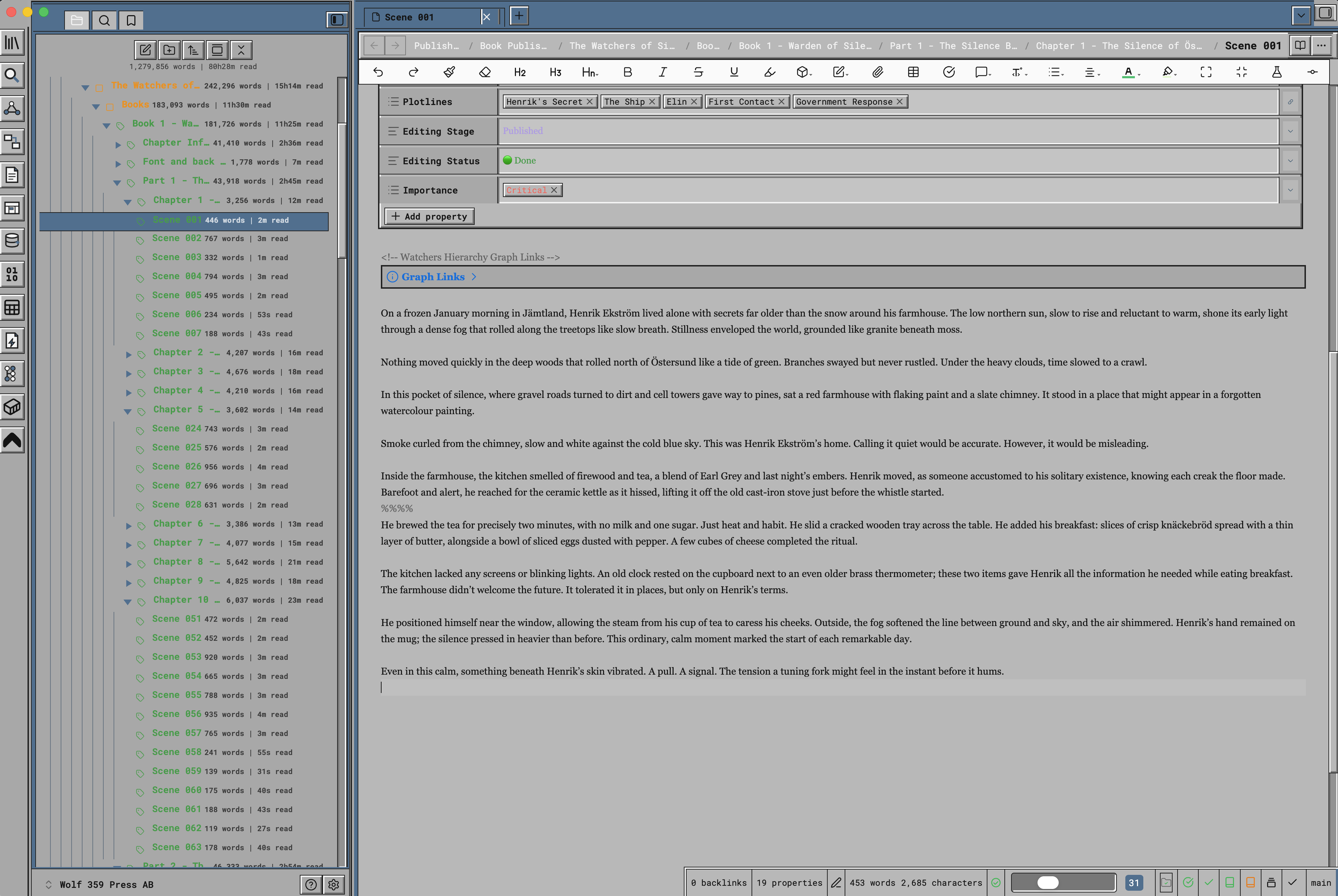
Workbench 2.0 was the redesign. Where 1.3 was flat, bold and blue, 2.0 was grey, restrained and — for the first time — dimensional. Buttons stood proud of the surface with light on their upper-left edges and shadow on their lower-right. Input fields sank into it. The whole interface suddenly behaved as though it were made of something, lit from a consistent direction, and it set the pattern every later AmigaOS release followed.
The palette went quiet to let that relief do the talking. A neutral grey desktop, lighter grey window surfaces, black text, white highlights, and a single restrained steel blue for title bars and selection. No orange, no drama. It is the most sober of the three and the most obviously designed — the work of people writing a style guide rather than fitting a desktop into four colours.
This theme carries that relief faithfully. Gadgets are raised, fields are recessed, controls have room to breathe, and the steel blue appears only where something is active or selected.
Why you might choose this one
Pick 2.04 when you want the Workbench look without the intensity of 1.3. It is the quietest of the three: no coloured screen, no warm accent, nothing shouting. If you find 1.3's blue-and-orange too assertive for a full working day, this is the one that gets out of the way. Against 3.1 it is the cooler and more neutral of the two greys.
The palette
Every colour below is stated plainly so you can see exactly what the theme does. Nothing is hidden behind a gradient or an image.
| Role | Value | Notes |
|---|---|---|
| Screen | #aaaaaa |
A neutral grey desktop, exactly balanced between warm and cool |
| Windows | #b8b8b8 |
Light grey working surfaces |
| Panels | #a8a8a8 |
Explorer and sidebars, a step down from the page |
| Title bars | #4d6f8f |
Restrained steel blue with light text |
| Selection | #4d6f8f |
The same blue. 2.0 used one accent, not two |
| Ink | #141414 |
Text and outlines, with #f4f4f4 as the highlight edge |
The geometry
| Property | Value | Notes |
|---|---|---|
| Relief | 2px, full | Raised gadgets, recessed fields, lit from the upper left |
| Border width | 2px bevels over 1px outlines | The 2.0 innovation |
| Corner radius | 0 | Square, as Workbench remained throughout |
| Spacing unit | 0.4rem | Roomier than 1.3 |
| Control height | 2rem | Larger, more comfortable gadgets |
What is covered
The theme styles the whole application, not just the editor:
- Workspace shell — ribbon, tab bar, view headers, status bar, pane dividers
- File explorer — indentation, disclosure triangles, connector rails, selection
- Editor and reading view — headings, lists, links, code, tables, callouts, quotes
- Properties — rebuilt as a Workbench-style requester with a keyed column
- Command palette and quick switcher — recessed entry field, square result rows, keyboard hints drawn as small raised gadgets
- Menus, modals, notices and tooltips — hard frames, title strips, solid selection
- Canvas, graph, Bases and backlinks — consistent surface and control treatment
- Settings — including when opened in its own window
Installation
From Obsidian's Community Themes browser
- Open Settings → Appearance.
- Under Themes, choose Manage.
- Search for Amiga Workbench 2.04.
- Select it and choose Use.
Manually
- Download
theme.cssandmanifest.jsonfrom this repository. - Place both in
YourVault/.obsidian/themes/Modern Amiga Workbench 2.04 inspired/— the folder name must match exactly. - In Obsidian, go to Settings → Appearance → Themes and select Amiga Workbench 2.04.
- If it does not appear, close and reopen Obsidian.
Light and dark
Both modes are designed, not generated. Switch with Settings → Appearance → Base theme. No plugin is involved.
Dark mode keeps the relief and the steel blue over a neutral charcoal screen. It stays deliberately colour-neutral, which is what separates it from 3.1's dark mode even in low light.
Fonts
The theme follows your typography settings. Set Settings → Appearance → Interface font, Text font, Monospace font and Font size, and the entire interface follows — including the tab bar, view headers, file explorer and status bar.
Leave them unset and the theme's own stack applies. It never overrides a font you have chosen.
Requirements
- Obsidian 1.6.0 or later
- No plugins. The theme is plain CSS and works on its own.
Accessibility
- Every text and background pair is contrast-checked in both light and dark modes
- Keyboard focus is always visible, with a dedicated focus colour
prefers-reduced-motionis respectedprefers-contrast: morestrengthens frames and removes muted text- Printing and PDF export drop the screen palette for black on white
Documentation
- User Guide — a fuller walkthrough, including customisation and troubleshooting
Building from source
This repository is self-contained. The CSS is authored as modules under src/ and
theme.css is generated from them:
npm run build    # regenerate theme.css from src/
npm test         # verify packaging, isolation, tokens and contrast
There are no dependencies to install — the build is plain Node. src/variants/ holds this
theme's light and dark palettes; src/components/workbench-chrome.css holds the shared
Workbench structure; src/icons/ holds the ribbon pictograms, which are coloured from the
palette at build time so they can never drift from it.
theme.css is generated. Edit the modules under src/ and rebuild rather than editing it
directly; the pre-commit hook enforces this if you enable it with
git config core.hooksPath .githooks.
Trademarks, affiliation and intellectual property
Please read this section in full. It matters.
No affiliation whatsoever
Amiga Workbench 2.04 for Obsidian is an independent, unofficial, community-created theme. The developer is a private individual with no relationship of any kind to:
- Amiga Corporation, Amiga Inc., or any entity trading under the Amiga name
- Cloanto Corporation, holders of Commodore/Amiga ROM and Workbench copyrights
- Hyperion Entertainment, developers and rights-holders of later AmigaOS releases
- The former Commodore International, Commodore Business Machines, or their successors
- Haage & Partner, or any other historical Amiga software publisher
- Any present, former or claimed owner of the Amiga, Commodore, Kickstart, AmigaOS or Workbench trademarks, in any territory
There is no endorsement, sponsorship, approval, licence, partnership, or association, express or implied. Nothing in this project should be read as suggesting otherwise. If you have arrived here believing this is an official product, it is not.
Why the name refers to Workbench at all
The name is descriptive, not proprietary. It tells you which remembered look the palette and proportions are drawn from — the Workbench redesign of 1990–91 — in the same way a paint colour might be called "racing green" without any claim on a car manufacturer. This is nominative use: naming a thing in order to describe a resemblance to it. It is not a claim of origin, authorship or authority.
The project's own framing is "Amiga Inspired". Inspired by. Not a port, not a recreation, not a replica, not a continuation, and not a substitute for anything real.
No original assets are used or distributed
This theme is CSS only. It contains no copyrighted material from any Amiga or Commodore product. Specifically, it does not contain, embed, adapt, trace, or redistribute:
- Workbench, AmigaOS or Kickstart ROM code, or any part of any operating system
- Original Workbench icons, or any icon set derived from them
- MagicWB, NewIcons, GlowIcons, or any other third-party Amiga icon set
- Topaz or any other Amiga bitmap font, or any digitisation of one
- Original wallpapers, backdrops, pointers, brand marks or logos
- Screenshots of any Amiga system, used as an asset or otherwise
Every graphic in this theme is an original drawing, authored for this project as inline SVG, using ordinary geometry. Colour values are stated as plain numbers. Colours themselves are not copyrightable, and no artwork has been copied.
Trademark acknowledgement
Amiga, AmigaOS, Kickstart and Workbench are trademarks or registered trademarks of their respective owners. Commodore is a trademark of its respective owner. All such marks are acknowledged as the property of those owners, and are used here only descriptively, to identify the historical visual style that inspired this work.
Obsidian is a trademark of Dynalist Inc. This theme is a community theme for Obsidian and is not produced by, endorsed by, or affiliated with Dynalist Inc.
If you are a rights-holder
If you represent any rights-holder and consider anything in this project to overstep, please open an issue on the repository. The developer's intention is respectful homage within the bounds of independent creative work, and any specific, good-faith concern will be addressed promptly and without argument.
Licence
This theme is released under the MIT Licence. See LICENSE for the full text. The MIT Licence covers only the original CSS and documentation in this repository. It does not, and cannot, grant any rights in any third party's trademarks or copyrighted works, and confers no rights in anything owned by the parties named above.