
README file from
GithubZacess High Contrast for Obsidian
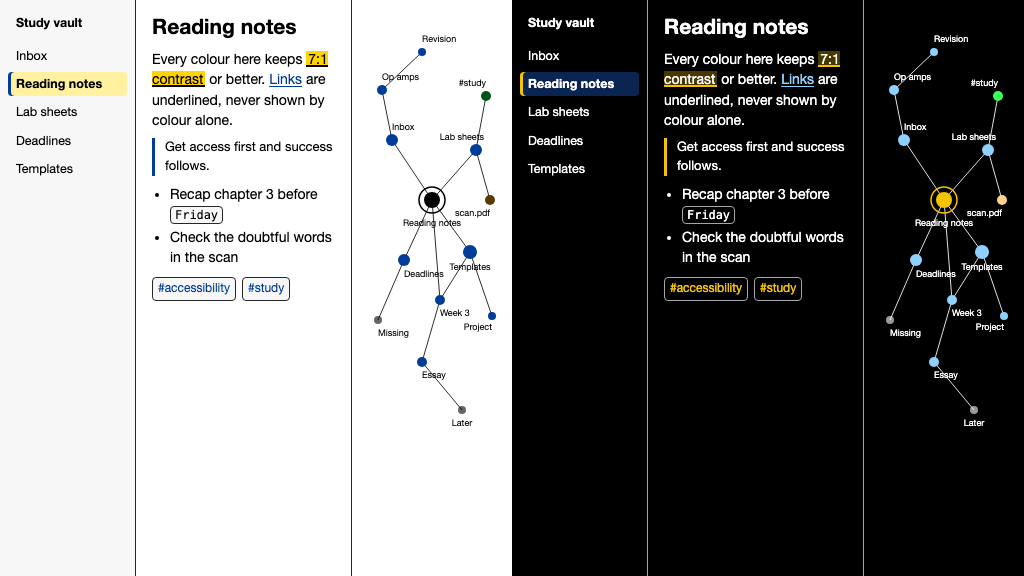
An Obsidian theme with Zacess High Contrast Light for light mode and Zacess High Contrast Dark for dark mode, the highest contrast a screen can give. Black on white by day and white on black at night, with a yellow accent in the dark. Obsidian's own Base color scheme setting switches between the two, so no plugin is needed.
The colours match the Zacess reader's contrast themes, so a page looks the same in the reader and in your vault. The other three pairs are their own themes: Zacess, Zacess Cream and Zacess Deep Contrast.
Install
Download zacess-high-contrast-obsidian-<version>.zip from the
latest release, put manifest.json and
theme.css in a folder named Zacess High Contrast inside your vault's .obsidian/themes/ folder and choose
Zacess High Contrast under Settings, Appearance, Themes. Once the theme is in Obsidian's
community directory it can also be installed from Settings, Appearance, Manage by
searching for Zacess High Contrast.
What the theme covers
Every surface Obsidian draws takes its colours from the Zacess palette: the editor in reading and editing view, headings, links, lists, quotes, rules, inline code and code blocks, tables, embeds, properties, footnotes, every callout type, the file explorer and every other tree, tabs, the ribbon, dividers, the status bar, the title bar, menus, the command palette and every other prompt, suggestions, modals, settings, notices, tooltips, inputs, toggles, sliders, the graph view, canvas, Bases table, card and kanban views, the PDF viewer, Sync avatars and Mermaid diagrams.
Every text colour keeps 7:1 on every fill it can sit on, secondary text keeps 4.5:1 over a selection or a hovered row and every border, outline, icon and mark keeps 3:1. Colour is never the only signal: links are underlined, the active tab, the open file, a selected row and a selected suggestion carry a bar, a highlight is underlined, a matched bracket is outlined and bold, a finished task is struck through, callouts keep their icon and every control shows a focus ring.
Releases
Each release matches a release of zacesshq/themes with the
same version and carries manifest.json and theme.css. The full notes for every version are in
its changelog.
Where the theme is made
[!NOTE] The theme is generated from one palette in zacesshq/themes, which also has the same themes for VS Code, JetBrains IDEs, Neovim, Zed and terminals. The read-only copy
zacesshq/obsidian-theme-high-contrast, which Obsidian's theme directory installs from, is updated by each release. Issues, ideas and pull requests go to zacesshq/themes.